
BE900 2.4G Cannot be searched
 This thread has been locked for further replies. You can start a new thread to share your ideas or ask questions.
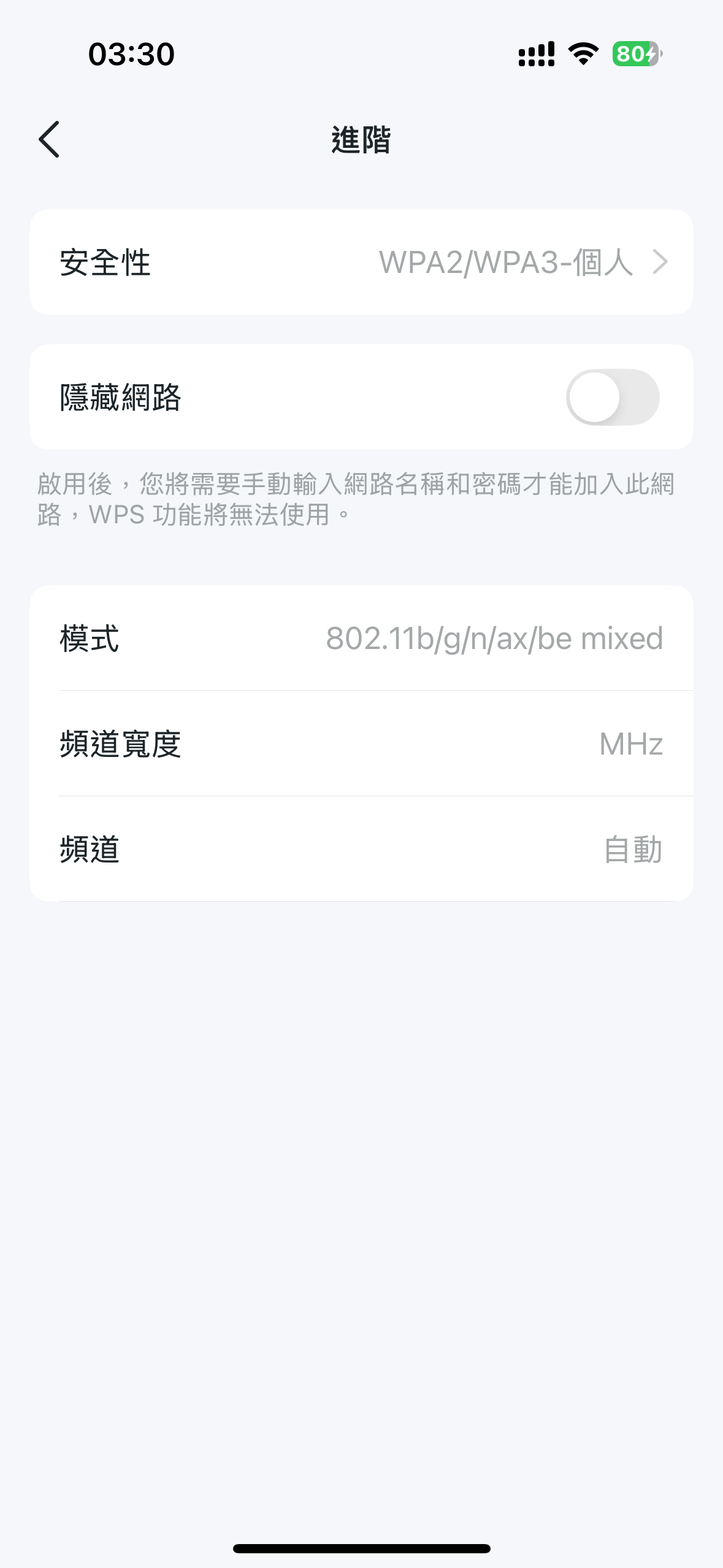 2.4G cannot be found. Restoring factory Settings still doesn't solve the problem. The 2.4G channel cannot be changed in the app. Currently, 2.4G cannot be used
- Copy Link
- Subscribe
- Bookmark
- Report Inappropriate Content


Hello @xinxinxin ,
Welcome to our community.
If it recommended that you can log in to the Web UI of the router to check and modify settings:
How do I log into the web-based Utility (Management Page) of TP-Link wireless router?
Here are some suggestions may help you:
- Please check whether all your devices can't see the TP-LINK WI-FI, if only certain devices, update the driver or system on your wireless client.
- Please confirm the 2.4Ghz is not hidden.
- Please confirm that you have disabled the "Smart Connect" feature.
- Plese change channel and wireless name of the 2.4Ghz.
- Copy Link
- Report Inappropriate Content
Hello @xinxinxin ,
Welcome to our community.
If it recommended that you can log in to the Web UI of the router to check and modify settings:
How do I log into the web-based Utility (Management Page) of TP-Link wireless router?
Here are some suggestions may help you:
- Please check whether all your devices can't see the TP-LINK WI-FI, if only certain devices, update the driver or system on your wireless client.
- Please confirm the 2.4Ghz is not hidden.
- Please confirm that you have disabled the "Smart Connect" feature.
- Plese change channel and wireless name of the 2.4Ghz.
- Copy Link
- Report Inappropriate Content
@Joseph-TP No, I can't modify the 2.4G channel when I log in to the WEB management interface. It's grayed out and I can't control it.
I have tried restoring the factory settings, but there is still no 2.4G signal. 5G1 5G2 signal is normal
- Copy Link
- Report Inappropriate Content
Hello @xinxinxin ,
Thank you for getting back to me.
May I know when did you buy the router? Does the issue occur recently?
If the problem occurred recently, we recommend that you contact local support for further help.
- Copy Link
- Report Inappropriate Content
Information
Helpful: 0
Views: 397
Replies: 3
Voters 0
No one has voted for it yet.