
RE220 slow on AP mode

RE220 slow on AP mode

RE220 slow on AP mode
2025-07-26 15:51:55 - last edited 2025-08-07 15:22:34
Model: RE220  
Hardware Version: V2
Firmware Version:

Hello!


I've been trying to troubleshoot my RE220 WiFi speeds, so I set it up as AP to diagnose.


I've switched the RE22' over to AP mode and attached it directly to the router with an Ethernet cable. I have fiber internet at 900 Mbps, so I was expecting to max out the 802.11ac speed of the RE220, but I'm getting really slow speeds at approx 90Mbps.


I've disabled the 2.4GHz network to make sure I'm using 5GHz, this is my network info:
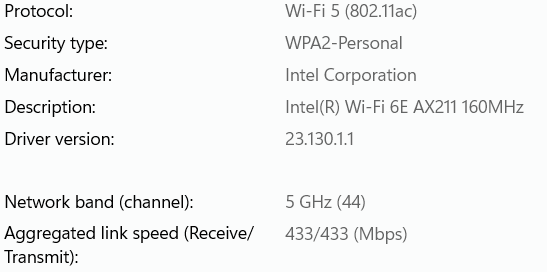


(just for comparison, if I connect my laptop to the WiFi router, I get about 400Mbps)


Why am I only getting 90Mmps?

Thanks!

  0      
  0      
#1
Options
1 Accepted Solution
Re:RE220 slow on AP mode-Solution
2025-07-28 10:53:02 - last edited 2025-08-07 15:22:34

Hello @TNO81 ,

Welcome to our community.


Please refer to specification of RE220, it has 1 x 10/100Mbps Ethernet Port (RJ45).

So this speed is normal, it can only get a speed close to 100M from the router.


Thank you.


Nice to Meet You in Our TP-Link Community. Check Out the Latest Posts: △Pre-release Firmware for Archer AX50 Introduces New Parental Control Features and Enhancements △Introducing AI QoS: Elevate Your Gaming Experience on the Archer GE800 Gaming Router △Connect TP-Link Archer BE550 to Germany's DS-Lite (Dual Stack Lite) Internet via WAN △Tether KidShield Test Recruitment - Safeguarding Children's Online Experience If you found the post or response helpful, please click Helpful. If an answer solves your problem, click "Recommended Solution" so that others can benefit from it.
Recommended Solution
  0  
  0  
#2
Options
3 Reply
Re:RE220 slow on AP mode-Solution
2025-07-28 10:53:02 - last edited 2025-08-07 15:22:34

Hello @TNO81 ,

Welcome to our community.


Please refer to specification of RE220, it has 1 x 10/100Mbps Ethernet Port (RJ45).

So this speed is normal, it can only get a speed close to 100M from the router.


Thank you.


Nice to Meet You in Our TP-Link Community. Check Out the Latest Posts: △Pre-release Firmware for Archer AX50 Introduces New Parental Control Features and Enhancements △Introducing AI QoS: Elevate Your Gaming Experience on the Archer GE800 Gaming Router △Connect TP-Link Archer BE550 to Germany's DS-Lite (Dual Stack Lite) Internet via WAN △Tether KidShield Test Recruitment - Safeguarding Children's Online Experience If you found the post or response helpful, please click Helpful. If an answer solves your problem, click "Recommended Solution" so that others can benefit from it.
Recommended Solution
  0  
  0  
#2
Options
Re:RE220 slow on AP mode
2025-08-07 15:22:29
Whoops! Can't believe I missed the 10/100 spec for the ethernet port. Oh well. Thanks!
  0  
  0  
#3
Options
Re:RE220 slow on AP mode
2025-08-08 02:29:37

  @TNO81 ,

You are welcome.

If you need a Gigabit range extender, click here.

Have a good weekend~

Nice to Meet You in Our TP-Link Community. Check Out the Latest Posts: △Pre-release Firmware for Archer AX50 Introduces New Parental Control Features and Enhancements △Introducing AI QoS: Elevate Your Gaming Experience on the Archer GE800 Gaming Router △Connect TP-Link Archer BE550 to Germany's DS-Lite (Dual Stack Lite) Internet via WAN △Tether KidShield Test Recruitment - Safeguarding Children's Online Experience If you found the post or response helpful, please click Helpful. If an answer solves your problem, click "Recommended Solution" so that others can benefit from it.
  0  
  0  
#4
Options

