
Failed to login
 This thread has been locked for further replies. You can start a new thread to share your ideas or ask questions.
I'm unable to login to apps anymore after i reinstall the apps. Previously the apps works on my phone. I been using the iPhone 7 for the Deco app for year, now recently its not able to login. I have been reset the apps multiple times already. What should i do?
- Copy Link
- Subscribe
- Bookmark
- Report Inappropriate Content


Hello @Zed0 ,
Welcome to our community!
Is there any error message when you try to log in to the Deco App? Please try the troubleshooting steps below:
"No Internet Connection"
1) This error message means that your phone currently has no Internet. To log in to the Deco App, make sure your phone has an Internet Connection.
"Incorrect email or password"
1) Double-check your email and password.
2) Click the "Forgot Password?" button to reset your password.
3) Use the new password to log in to the Deco App.
"Login failed"
1) Disconnect your phone from the Deco Wi-Fi network and try again.
Best Regards.
- Copy Link
- Report Inappropriate Content
@Joseph-TP I had try all of it. Still doesnt work. It keep showing this:
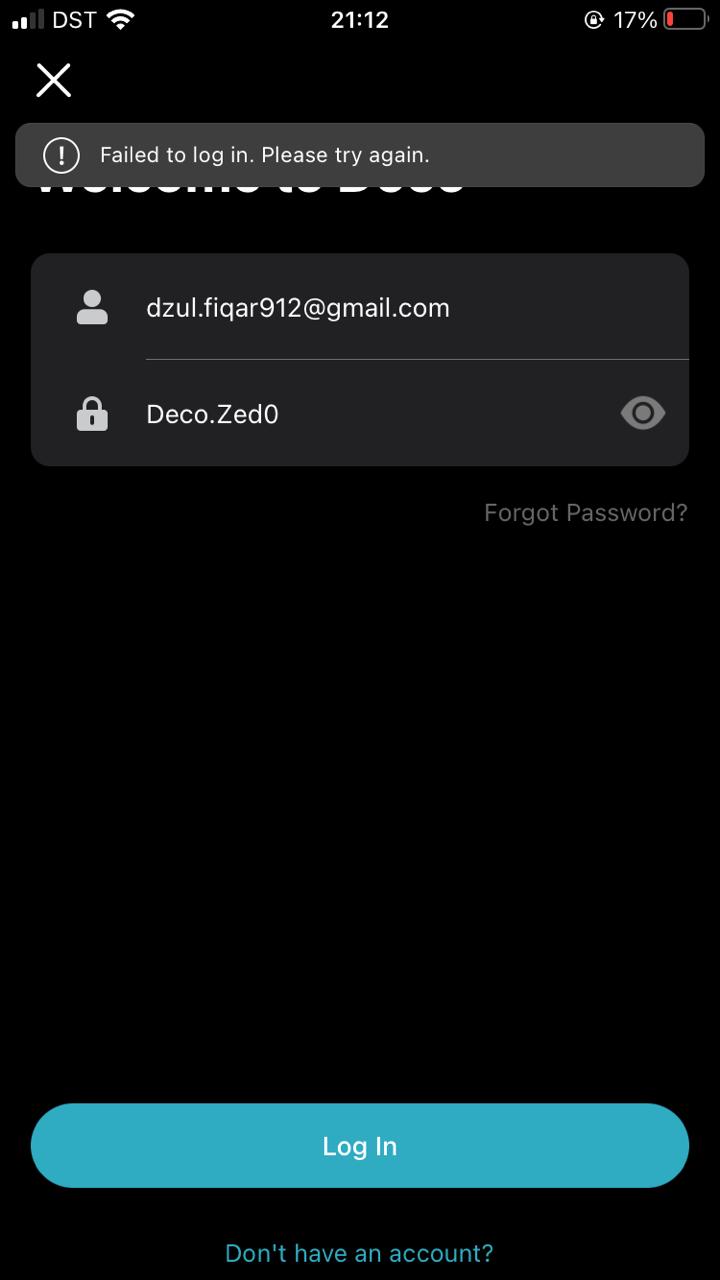
Is there any other way I can login to my account? I don't want to make a new account using a diffrent email. I prefer to have all my device link to one email account.
- Copy Link
- Report Inappropriate Content
Hello@Zed0 ,
Thanks for getting back to me.
Please do not easily post your account number, password, or other private information on public media. We recommend that you edit the original post to remove the screenshot.
If the Deco units are offline, please disconnect your phone from the Deco Wi-Fi network and try again.
If the main deco is solid red light,and the error message in Deco app "unable to connect to the Internet" indicates that the Internet is not available, please refer to the steps below to restore Internet:
1. Check the Internet status of your ISP by connecting a PC directly into your ISP Modem/Router.
2. Reboot the ISP modem and the main Deco.
3. Try a different Ethernet cable between the ISP Modem and the main Deco, or use another Ethernet port on the main Deco.
4. Make sure your phone is connected to the Deco Wi-Fi network, open the Deco App, go to MORE > Internet Connection > tap 'IPv4 Connection' > DNS Address. Select 'Manual' and input '8.8.8.8' and '1.1.1.1' as the primary and secondary DNS servers.
5. If your PC has Internet when connected to the Modem, while the main Deco doesn't, a Mac Clone of your PC might help. Please refer to this article for configuring Mac Clone on Deco: How to configure MAC Clone on Deco if Deco fails to connect to the internet
Additional settings that may affect your Internet connection:
1. On the Deco app, go to MORE > Advanced > IPTV/VLAN. If the IPTV port is enabled, do not use it to connect to your ISP modem.
2. Go to MORE > Advanced > WAN Port. If this feature is enabled, ensure you use the correct Ethernet port on the Deco to connect to your ISP modem.
- Copy Link
- Report Inappropriate Content
@Joseph-TP My deco lights green, i believe its connected to the internet. My issues is the Deco apps, I'm unable to login. I had reset it multiple times, still its say failed to login.
- Copy Link
- Report Inappropriate Content
Hi@Zed0 ,
Please check if the phone has internet access, you could try to open some web pages to see if the internet really works.
Also, please checked the Deco network via other clients.
If it is working fine, please try different phones to login the App.
For more details, please refer to What should I do if I failed to log in to the Deco App?
- Copy Link
- Report Inappropriate Content
Information
Helpful: 0
Views: 2908
Replies: 5
Voters 0
No one has voted for it yet.