Archer AX10 limited to 50 Mbps

This thread has been locked for further replies. You can start a new thread to share your ideas or ask questions.

Archer AX10 limited to 50 Mbps

This thread has been locked for further replies. You can start a new thread to share your ideas or ask questions.

Archer AX10 limited to 50 Mbps
2025-08-26 05:27:07 - last edited 2025-08-27 06:45:26
Model: Archer AX10  
Hardware Version: V3
Firmware Version: 1.0.8 Build 20240910 rel.37547(5553)

I recently paid for a speed increase from 50 to 500 Mbps on my cable-based (HFC) internet. I have checked that this is available by plugging my laptop directly into the HFC box and all is fine. However when using my AX10/1500 modem I am only getting 50 Mbps - irrespective whether I connect via WiFi or via a LAN cable plugged into the back of the modem.

Any ideas?

  0      
  0      
#1
Options
1 Accepted Solution
Re:Archer AX10 limited to 50 Mbps-Solution
2025-08-26 15:31:57 - last edited 2025-08-27 01:09:17

  @HughCF 


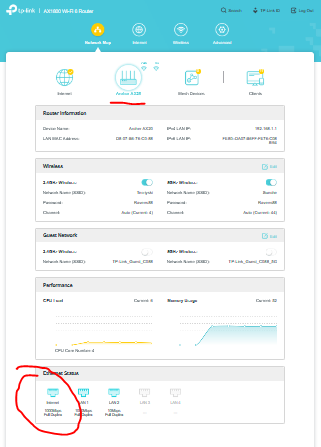
Check your WAN port speed - it should be 1000mbps:


Disable any QoS services if enabled on the router - restart the router and test again. 

If this was helpful click on the arrow pointing upward to make it blue. If this solves your issue, click the star to make it blue as a "Recommended Solution". Tips:149wubkkfoLmNDjDbiTxx4ZU8mpcMA5CJt
Recommended Solution
  3  
  3  
#2
Options
2 Reply
Re:Archer AX10 limited to 50 Mbps-Solution
2025-08-26 15:31:57 - last edited 2025-08-27 01:09:17

  @HughCF 


Check your WAN port speed - it should be 1000mbps:


Disable any QoS services if enabled on the router - restart the router and test again. 

If this was helpful click on the arrow pointing upward to make it blue. If this solves your issue, click the star to make it blue as a "Recommended Solution". Tips:149wubkkfoLmNDjDbiTxx4ZU8mpcMA5CJt
Recommended Solution
  3  
  3  
#2
Options
Re:Archer AX10 limited to 50 Mbps
2025-08-27 01:09:05 - last edited 2025-08-27 01:09:19

  @HughCF Thanks, solved my problem. Forgot all about the QoS issue - obviously still set to divide the bandwidth up to a maximum of 50 Mbps!!!!

  1  
  1  
#3
Options