
[SOLVED]Can not update the firmware of the RE655BE
[SOLVED]Can not update the firmware of the RE655BE

Hello Forum,
Everytime i press the "check on updates" button from the webinterface of the RE655BE, i get an error message, stating that, i quote:
"It is not possible to connect with the cloudserver. Please try again later".
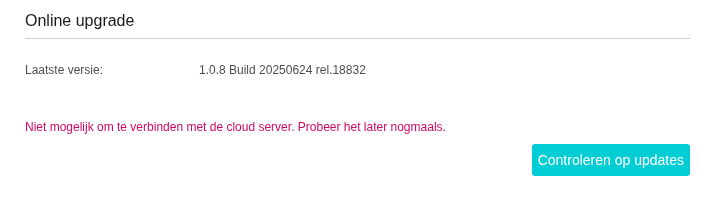
The red line is in Dutch, however, i translated it (see above)
As a side note... ever since i am using this repeater, i have not changed a single setting after the setup.
My Re705X was succesfully updated a few minutes ago.
See this video i made: re655be
Thanks
- Copy Link
- Subscribe
- Bookmark
- Report Inappropriate Content
Appologies for bothering you.
Last night i loged in on both RE655BE repeaters, and to my surprise the error, reported on 21st of september last year, was back.
Now on both repeaters.
for the first impression i asked gemini to help me out.
It adviced me to change the DNS server on the repeaters from 192.168.0.1 to 1.1.1.1.
That solved the issue.
May i conclude that there is a bug in firmware 1.1.3 Build 20251110 rel.18833?
My setup:
BE800 with 2 RE655BE repeaters as a mesh hetwork.
On the router is a VPN provider enabled, and a pihole is running.
Repeaters ar not behind the VPN and the traffic is not going through the pihole.
- Copy Link
- Report Inappropriate Content

- Copy Link
- Report Inappropriate Content
My laptop is connected with it, usb-c to ethernet 2.5Gbps
Thanks anyway.
I belief it is a FW issue, cause i was able to upgrade to 1.0.8 a while ago.
Again, thanks. I will wait until tp-link releases a new fw. Maybe that solves the issue.
- Copy Link
- Report Inappropriate Content
I have re-applied the FW. Still no show.
- Copy Link
- Report Inappropriate Content

Have you tried to install it manually? Please download the firmware: RE655BE(EU)_V1_1.0.8 Build 20250624
Then refer to Mention 2 to update firmware: How to upgrade the firmware of my range extender (new logo).
- Copy Link
- Report Inappropriate Content
As stated, i have re-aplyd the SAME fw manualy.
Still no show
The FW for the 705x was succesfully updated from FW's webinterface.
Could it be possible that the update server for the re655be is down?
- Copy Link
- Report Inappropriate Content
Do you mean that even if you manually download the firmware I provided, the update still won't be successful?
Would you like to try reset RE655BE again?
- Copy Link
- Report Inappropriate Content
When i press the "check for updates" button in the FW's webinterface i see that error message.
When i apply FW manualy, it installs succesfully.
When i press then again the button, error appears again.
- Copy Link
- Report Inappropriate Content

This error message appears to indicate your device isn't connecting to the cloud service.
If possible, I recommend hard resetting the RE655BE: please use a pin to press the reset button(hole) for 1 second to reset the extender.
Then configure the extender again, and ensure the Tether app can remotely manage the RE655BE. This usually means it's successfully connected to the cloud server.
- Copy Link
- Report Inappropriate Content
- Copy Link
- Report Inappropriate Content
Appologies for bothering you.
Last night i loged in on both RE655BE repeaters, and to my surprise the error, reported on 21st of september last year, was back.
Now on both repeaters.
for the first impression i asked gemini to help me out.
It adviced me to change the DNS server on the repeaters from 192.168.0.1 to 1.1.1.1.
That solved the issue.
May i conclude that there is a bug in firmware 1.1.3 Build 20251110 rel.18833?
My setup:
BE800 with 2 RE655BE repeaters as a mesh hetwork.
On the router is a VPN provider enabled, and a pihole is running.
Repeaters ar not behind the VPN and the traffic is not going through the pihole.
- Copy Link
- Report Inappropriate Content
Information
Helpful: 0
Views: 1791
Replies: 15
Voters 0
No one has voted for it yet.