
[SOLVED]Can not update the firmware of the RE655BE
[SOLVED]Can not update the firmware of the RE655BE

Hello Forum,
Everytime i press the "check on updates" button from the webinterface of the RE655BE, i get an error message, stating that, i quote:
"It is not possible to connect with the cloudserver. Please try again later".
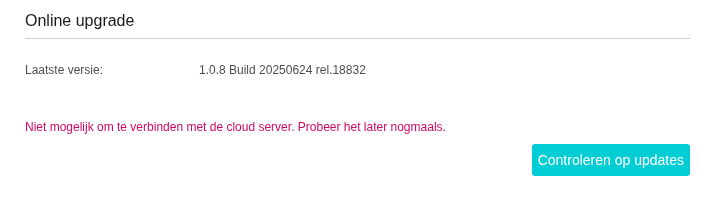
The red line is in Dutch, however, i translated it (see above)
As a side note... ever since i am using this repeater, i have not changed a single setting after the setup.
My Re705X was succesfully updated a few minutes ago.
See this video i made: re655be
Thanks
- Copy Link
- Subscribe
- Bookmark
- Report Inappropriate Content

Hello @BE800user ,
Thanks for your feedback.
It's not possible to definitively say whether a bug exists at this time. We haven't received any other similar feedback yet.
After changing the DNS to 1.1.1.1, everything returned to stability, right?
I suggest you continue to observe for a while, and you are welcome to provide feedback at any time if you have any other questions.
- Copy Link
- Report Inappropriate Content
Thanks for your reply on this.
On this very moment one of the RE655BE repeaters states, after pressing the "check on updates" button, that my FW is up to date.
Regards
- Copy Link
- Report Inappropriate Content
Hi @BE800user ,
I'd like to confirm that you changed the DNS on your router, right?
It's possible that different DNS servers have different performance characteristics, and it might not be closely related to the RE665BE firmware.
BE800user wrote
Appologies for bothering you.
Last night i loged in on both RE655BE repeaters, and to my surprise the error, reported on 21st of september last year, was back.
Now on both repeaters.
for the first impression i asked gemini to help me out.
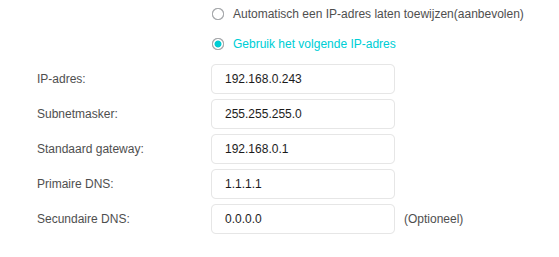
It adviced me to change the DNS server on the repeaters from 192.168.0.1 to 1.1.1.1.
That solved the issue.
May i conclude that there is a bug in firmware 1.1.3 Build 20251110 rel.18833?
My setup:
BE800 with 2 RE655BE repeaters as a mesh hetwork.
On the router is a VPN provider enabled, and a pihole is running.
Repeaters ar not behind the VPN and the traffic is not going through the pihole.
- Copy Link
- Report Inappropriate Content
No, not on my router, on the repeater.
At this moment of writing the repeater shows no errors when i press the update button.
- Copy Link
- Report Inappropriate Content

Hello @BE800user ,
Thank you for your feedback.
Before updating to version 1.1.3, specifically version 1.1.0, it was not necessary to modify the DNS for RE655BE, right?
I think this is likely due to a difference in DNS resolution between the router and the extender.
Further analysis may be needed; I will consult with technical staff. I will reply here with any updates.
- Copy Link
- Report Inappropriate Content
Information
Helpful: 0
Views: 2461
Replies: 15
Voters 0
No one has voted for it yet.