
Deco X50 setup

Deco X50 setup

Deco X50 setup
Deco X50 setup
3 weeks ago - last edited 2 weeks ago
Model: Deco X50  
Hardware Version:
Firmware Version:

Hello,

I would need some help on how to arrange this so that everything works.

The situation is as follows:

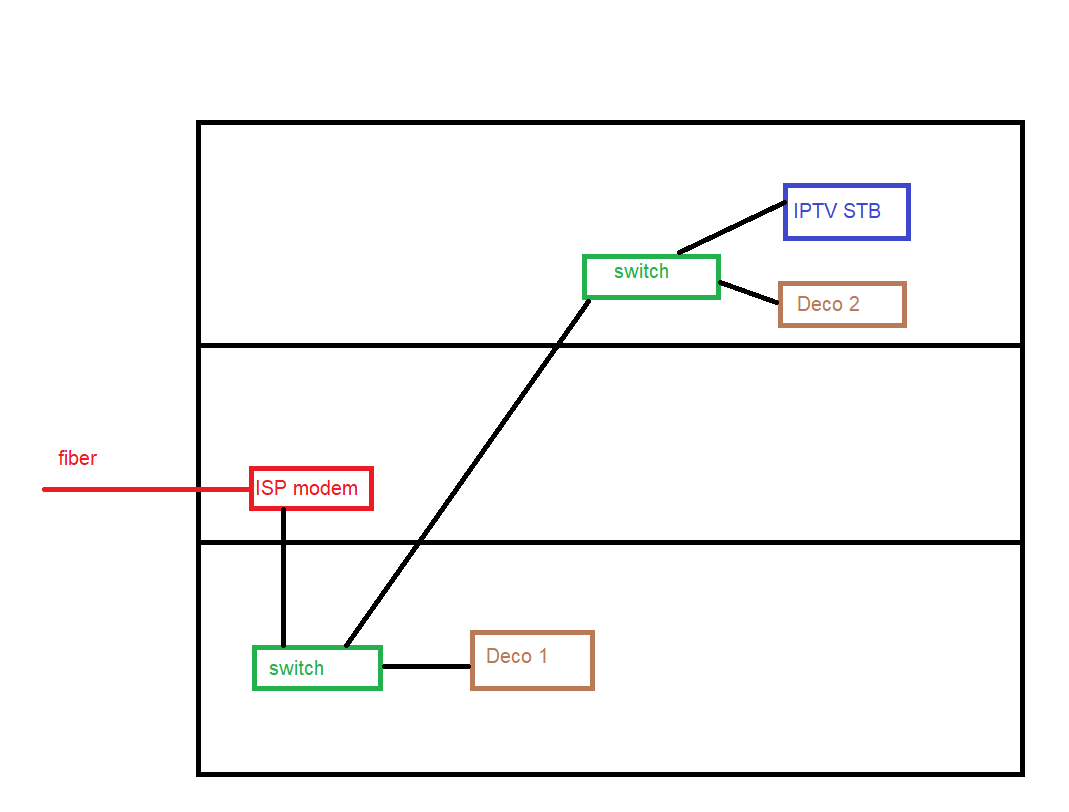
  • I have an fiber from ISP on the 1st floor, enabled on the modem. I have Wi-Fi enabled on the modem to cover the 1st floor

  • The 1st floor and the basement are connected with a UTP cable

  • The UTP cables then go from the basement to the 2nd floor

  • In the basement and the 2nd floor I have 2 switch TP-link SG108E

  • All devices connected to the switches (PCs, IPTV STB) works normally

  • Since I do not have a good Wi-Fi signal in the basement and on 2nd floor, I purchased 2 Deco Mesh X50 units

I connected the Deco units to the existing setup, each on a separate switch (picture 1). In this case, Deco1 works normally, while Deco2 works in the Mesh only via Wi-Fi connection and not via ETH. Since there is one floor in between, of course Deco2 is almost useless.

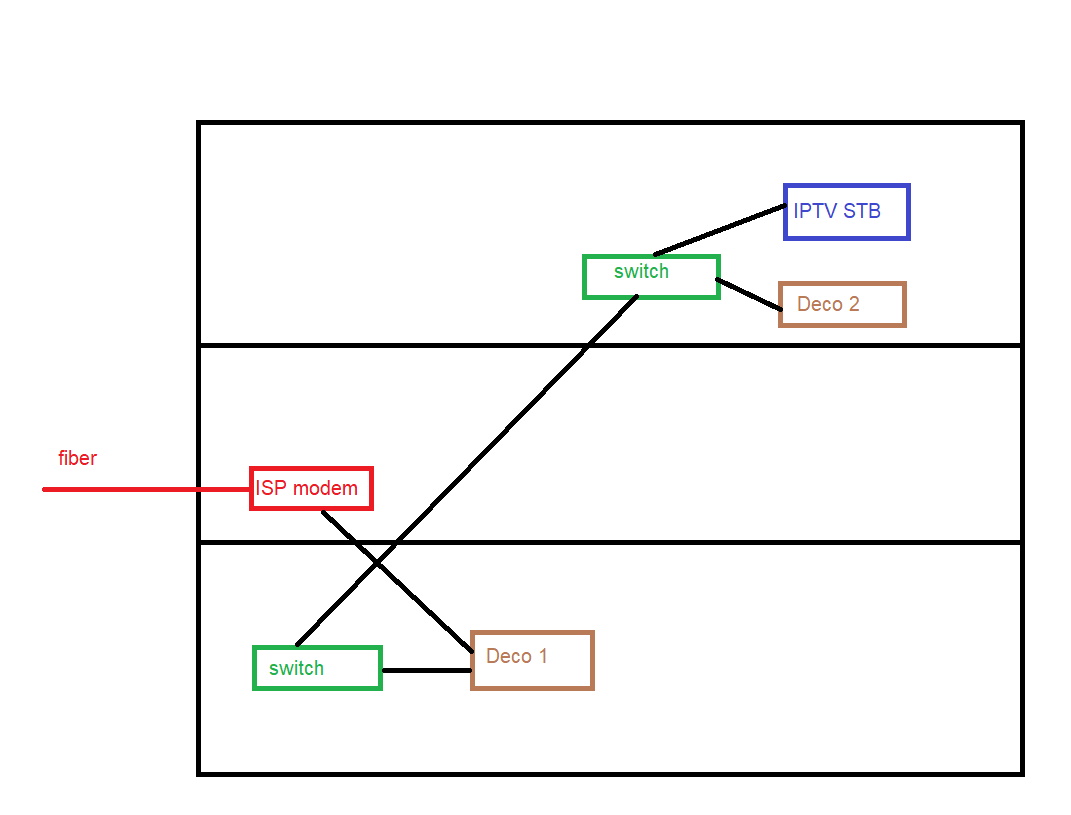
But if I make a small change (picture 2), the connection from the modem goes first to Deco1 and then to the switch. In this case, Deco2 also works via ETH connection and WiFi works great. The problem is, with such a setup, the IPTV STB in the 2nd floor does not work.

I assume that it will be necessary to somehow configure the ports on the switches. Does anyone know how?
 

  0      
  0      
#1
Options
1 Accepted Solution
Re:Deco X50 setup-Solution
3 weeks ago - last edited 2 weeks ago

  @rs1975 


You need to configure Deco mesh to run in Access Point mode, this will fix the issue you describe. See https://community.tp-link.com/en/home/kb/detail/334

Recommended Solution
  2  
  2  
#2
Options
6 Reply
Re:Deco X50 setup-Solution
3 weeks ago - last edited 2 weeks ago

  @rs1975 


You need to configure Deco mesh to run in Access Point mode, this will fix the issue you describe. See https://community.tp-link.com/en/home/kb/detail/334

Recommended Solution
  2  
  2  
#2
Options
Re:Deco X50 setup
a week ago

  @Alexandre. Thanks. Now is working through Ethernet connection. 

Now I have another question. On my router I have one SSID, on Deco is another SSID. 

How to change that I would have only one, this one from my router. 

  0  
  0  
#3
Options
Re:Deco X50 setup
a week ago

  @rs1975 Open Deco App go to Wi-Fi Settings and change the SSID and use same as your router and turn OFF Wi-Fi on your router.

Please & Thank You !! ❤️
  0  
  0  
#4
Options
Re:Deco X50 setup
a week ago

  @ARGamingPK1 why should l Turn off Wi-Fi in my router? 

The purpose of the router is to cover Wi-Fi in the middle floor

  0  
  0  
#5
Options
Re:Deco X50 setup
a week ago

  @rs1975 Using same Wi-Fi name will not do seamless roaming between Deco and Router.

Please & Thank You !! ❤️
  0  
  0  
#6
Options
Re:Deco X50 setup
a week ago

  @ARGamingPK1 So, it is better that I buy another Deco unit and disable Wi-Fi on my router? 

  0  
  0  
#7
Options
