mesh network via EC220-G5 and RE315

mesh network via EC220-G5 and RE315

mesh network via EC220-G5 and RE315
3 weeks ago - last edited 2 weeks ago
Model: EC220-G5   RE315  
Hardware Version:
Firmware Version:

I try to extend my wifi-network using MESH technology.

 My router is EC220-G5, v6055.0 Build 230913 Rel.36322n 

Option WPS in enabled


My Extender is RE 315.


I use mopile app Tether on mi iPhone in this way:

1. Go on RE315 page

2. More - easyMesh

3. press button "Join Mesh Network"

4.  press WPS Button on router

5. press WPS Button on extender

6. press "I have pressed WPS" in my app

7. after few second next screen is appear: "1. Connect to your router's network. 2. Come back to continue with setup'


what I have to do next? My app is allready connected to router's wifi. If I reconnect to wifi, nothing happend.


What is the problem?

  0      
  0      
#1
Options
1 Accepted Solution
Re:mesh network via EC220-G5 and RE315 -Solution
3 weeks ago - last edited 2 weeks ago

  @VasBur 


Hi,


Normally, steps 4 and 5 should be sufficient to establish the EasyMesh network. (provided the "EasyMesh" feature is already enabled on both, the router and the extender)


On TP-Link's product webpage for the EC220-G5 I noticed there exist three versions of it. V1, V2 and V3. Apparently only V3 supports EasyMesh.


Can you please look at the white serial number stricker on the underside of your EC220-G5 and check what version you have? It should read something like "Model: EC220-G5(**)   Ver:*.*" and we need to know what is written after "Ver:".


Recommended Solution
  2  
  2  
#3
Options
5 Reply
Re:mesh network via EC220-G5 and RE315 -Solution
3 weeks ago - last edited 2 weeks ago

  @VasBur 


Hi,


Normally, steps 4 and 5 should be sufficient to establish the EasyMesh network. (provided the "EasyMesh" feature is already enabled on both, the router and the extender)


On TP-Link's product webpage for the EC220-G5 I noticed there exist three versions of it. V1, V2 and V3. Apparently only V3 supports EasyMesh.


Can you please look at the white serial number stricker on the underside of your EC220-G5 and check what version you have? It should read something like "Model: EC220-G5(**)   Ver:*.*" and we need to know what is written after "Ver:".


Recommended Solution
  2  
  2  
#3
Options
Re:mesh network via EC220-G5 and RE315
3 weeks ago

  @woozle 

model: EC220-G5(RUER) Ver:3.0

S/N:2241442003055

  0  
  0  
#4
Options
Re:mesh network via EC220-G5 and RE315
3 weeks ago

  @VasBur 


The code "RUER" might indicate a customized version of the EC220-G5.


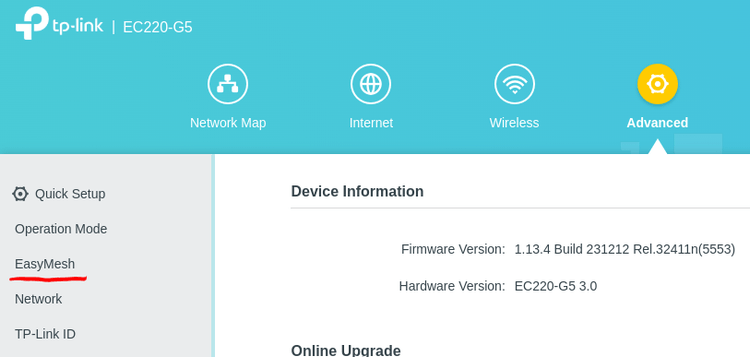
Anyway, if you log into the EC220-G5, can you see any mention of "EasyMesh" or "Mesh" somewhere, like in the picture below?


  0  
  0  
#5
Options
Re:mesh network via EC220-G5 and RE315
3 weeks ago

Dear sir 


I am facing problem on the extender some times it is getting disconnected. Now it's not getting connected with my existing wifi. Can you please advise how to connect permanently

Thanks,

VIJAY 

9444281124

  0  
  0  
#6
Options
Re:mesh network via EC220-G5 and RE315
3 weeks ago

  @VIJAY75 


My extender model no is RE305, recently purchased 

  0  
  0  
#7
Options