
Tether app shows clients list wrongly if there is no active clients
Tether app shows clients list wrongly if there is no active clients

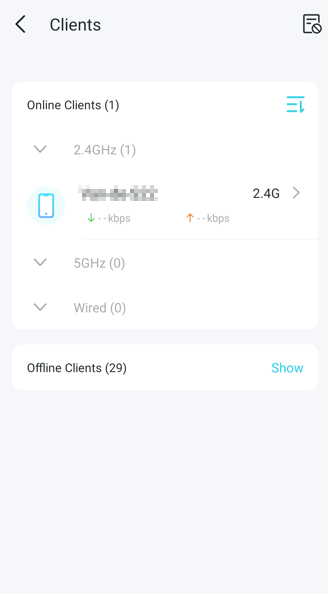
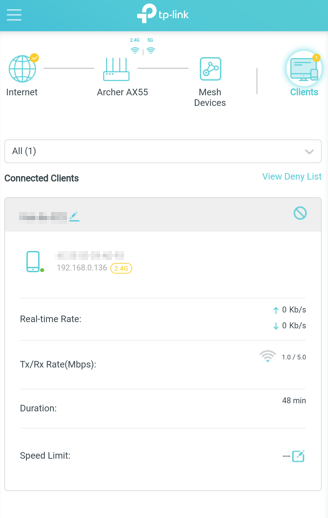
I'm using Tether app to check the active device connections of my home router (Archer AX55). While it works well most of the time, I found that when there are NO devices connected, it would still show one device (probably the last one connected) but this is wrong. It appears to be a software bug that it cannot handle no devices. I'm not sure if it is the problem of the Tether app or the router itself though.
- Copy Link
- Subscribe
- Bookmark
- Report Inappropriate Content


Hello @Loxley ,
Welcome to our community.
Have you tested it on a different phone? If you connect a new client to the router, will the client list only show the new client's info?
Please refresh the list for a try; you can log out and log in to the App again.
Please log in to your router's web interface to check if the last connected client is also displayed.
Best Regards.
- Copy Link
- Report Inappropriate Content

@Joseph-TP This also happens with me on the AXE95, where when there is no device connected, it still lists the last connected and shows the "Active DHCP Lease" ones and not the "Real-time" data. Would be helpful if this can be fixed.
FYI, I already resetted, restarted, updated both the device and the app already a number of times.
- Copy Link
- Report Inappropriate Content
Have you tested it on a different phone? If you connect a new client to the router, will the client list only show the new client's info?
Yes, and Yes
Please refresh the list for a try; you can log out and log in to the App again.
Same results
Please log in to your router's web interface to check if the last connected client is also displayed.
Yes, same problem if I log on remotely using router's web interface instead of the Tether App.
- Copy Link
- Report Inappropriate Content
- Copy Link
- Report Inappropriate Content
@Joseph-TP Hello,
Connected Client under Network Map sometimes report the accurate online devices, sometimes offline aswell.
The main problem is with the tether app, which shows the DHCP Client list and shows offline client list aswell, which is annyoing and fruatating. I hope this is fixed.
Router is AXE95 v1.0(US)
- Copy Link
- Report Inappropriate Content
Hello@IfranAli ,
So, the client list under the Network Map usually correctly displays online devices.
If the DHCP client list shows some offline devices as online, it could be because the DHCP lease hasn't expired and the records are still being retained.
- Copy Link
- Report Inappropriate Content
@Joseph-TP In the Web UI, it's accurate.
In TP-Link Tether App, it retains the offline clients and doesn't accurately show the device list properly.
I hope it's fixed on the app side, it creates a problem to check active devices via mobile and either block them or apply parental controls.
I thereby also ask TP-Link to provide us an update for the AXE95 like the AX80: such as DoT/DoH, Easymesh complete features with Ethernet Backhaul and Easymesh in AP mode, VPN Client, VPN kill switch and integration of Wireguard, IPv6 firewall, IoT Wifi etc. in the form of pre-release or beta firmware to test first, before release
- Copy Link
- Report Inappropriate Content
I think my situation may be different IfranAli's.
In both Tether app and browser remote login, even if no device is online, it still shows one device (last online). See screenshots below. However, if there is one or move devices, it shows correctly. As I mentioned in my first post, it appears to be a program bug that it can't handle nil device situation properly.
- Copy Link
- Report Inappropriate Content
- Copy Link
- Report Inappropriate Content
@Loxley As per my conduct, seems like it's the same.
It can't handle "null" devices.
And I checked the web ui via browser, it has lesser devices (accurate) than what the tether app shows.
Could be a bug on the app, or the device.
I own 12 tp-link devices, so I know it's a bug on the router itself.
- Copy Link
- Report Inappropriate Content
Information
Helpful: 0
Views: 1529
Replies: 11
Voters 0
No one has voted for it yet.