
Low speed in wired local net for Steam Link and Moonlight

I have a PC (connected to the router with a 1 Gigabit cable) and an android tablet connected to the router via a Type-C hub and a 100 Megabit cable. When I check the speed of the local network between them using iperf3, it shows me a speed of about 100 megabits. But when checking on Steam Link, the speed shows around 25-30 megabits. Moonlight+Sunshine has the same problem. If you connect the tablet not with a cable, but via wi-fi, then the speed is around 70 megabits, which is already normal.
I've tried 4 different USB hubs and the problem repeats. I also tried changing the 100 megabit cable to 1 gigabit, it doesn't help.
But then I tried to connect it via another router and everything works fine there!
- Copy Link
- Subscribe
- Bookmark
- Report Inappropriate Content


Hello @GT21 ,
Thanks for getting back to me.
It appears the wired speed from your client device to the AX50 router is limited, particularly compared with other routers and client devices.
We recommend contacting local technical support for further assistance.
- Copy Link
- Report Inappropriate Content
Hello @GT21 ,
Welcome to our community.
Could you tell me the model numbers of your tablet and USB hub?
- For the USB hub, please confirm it supports Gigabit Ethernet. Please try a different Ethernet cable for comparison.
- Please verify that the negotiated speed on the router's LAN port for the tablet is 1000 Mbps.
- Please ensure the tablet's wired link speed is 1000 Mbps. How to check the associated/link speed on a wired client.
- Please ensure the tablet supports USB 3.0 or higher.
- If possible, test the USB hub on a different wireless device.
- Copy Link
- Report Inappropriate Content
@Joseph-TP The problem is not that I don't have 1 Gigabit. The problem is that I don't even have 100 mbps. When I check the broadcast through the Steam Link, it shows only 20-25 megabits. (there is a similar problem with speed in sunshine + moonlight. But the specific speed is not displayed there, it just says reduce the bitrate, although I have it set to 15 megabits). But when checking the speed through iperf3, the speed is about 80-90. Moreover, I tried to connect via the xiaomi router, and there is no such problem.
- Copy Link
- Report Inappropriate Content
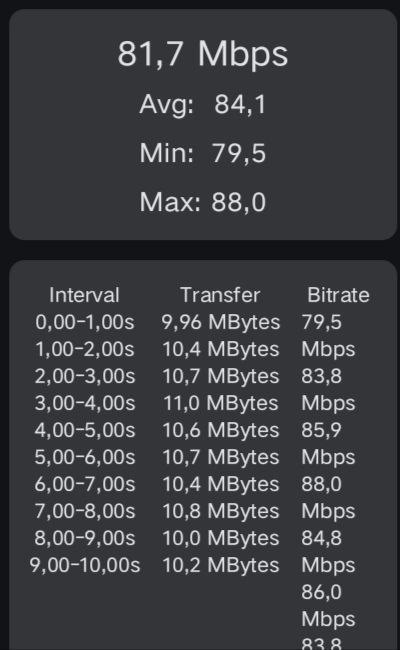 @Joseph-TP it's iperf3
- Copy Link
- Report Inappropriate Content
@Joseph-TP Yesterday I tried to flash the router to a previous firmware version, disable upnp, and disable everything in the ALG section. None of this helped.
- Copy Link
- Report Inappropriate Content
@Joseph-TP tablet lenovo xiaoxin pad 2024. I also checked on the poco m4 pro 5g phone, everything is the same there.
- Copy Link
- Report Inappropriate Content
@Joseph-TP And one more thing: I tried 3 other usb hubs before that, this is the fourth one. It's the same problem everywhere.
- Copy Link
- Report Inappropriate Content
Now I've checked it again in Steam Link: I connected it via a TPLINK router - speed of 20 megabits. I switched to a Xiaomi router - speed of 100 megabits. For some reason, I can't attach screenshots here, it gives me an error.
- Copy Link
- Report Inappropriate Content
Can I get some advice? Or should I take the router under warranty?
- Copy Link
- Report Inappropriate Content
I can't upload screenshots, it gives me an error. That's why I posted it on Dropbox
TPLINK: https://www.dropbox.com/scl/fi/go92x1q329e12t10z97ph/router_tplink.jpg?rlkey=kukwvgvejpl7hh1m4g1t959qr&st=v3ll08j4&dl=0
XIAOMI: https://www.dropbox.com/scl/fi/6ru10mejw32m3js7zpke1/router_xiaomi.jpg?rlkey=h56f1yg0zwnktbdwspo0tq3u9&st=x8pq6cxw&dl=0
- Copy Link
- Report Inappropriate Content
Hello @GT21 ,
Thanks for getting back to me.
It appears the wired speed from your client device to the AX50 router is limited, particularly compared with other routers and client devices.
We recommend contacting local technical support for further assistance.
- Copy Link
- Report Inappropriate Content
Information
Helpful: 0
Views: 1560
Replies: 10
Voters 0
No one has voted for it yet.