
TP-Link BE230 EasyMesh - Internet LED randomly turns red, but internet still works
TP-Link BE230 EasyMesh - Internet LED randomly turns red, but internet still works

Hi everyone, I need help understanding an issue with my mesh setup.
My setup:
ISP router: ZTE F609
Main router: TP-Link BE230 (connected via LAN from ISP → WAN on BE230)
Second BE230 added as a wireless EasyMesh node (let’s call it “node”)
Internet works fine on both routers
The problem:
On the node, the globe/internet LED randomly turns red for a few seconds, then goes back to white.
Internet does NOT drop when this happens.
I even tried Ethernet backhaul (LAN from main → LAN on node). The LED still turns red sometimes, so I switched back to wireless.
When the LED turns red, I connected a laptop directly to the node’s LAN port, and kept pinging 8.8.8.8 → 0 packet loss. Internet continues working normally.
So why does the LED keep turning red if the WAN/internet connection is actually fine?
Additional info:
The node’s system log shows constant LED controller entries, sometimes multiple per second:
2025-12-11 13:17:20 Led Controller INFO [2090] Start to run WAN1_ON
2025-12-11 13:17:20 Led Controller INFO [2090] Start to run WAN0_OFF
2025-12-11 13:17:14 Led Controller INFO [2090] Start to run WAN1_OFF
2025-12-11 13:17:14 Led Controller INFO [2090] Start to run WAN0_ON
2025-12-11 13:12:43 Led Controller INFO [2090] Start to run WAN1_ON
2025-12-11 13:12:43 Led Controller INFO [2090] Start to run WAN0_OFF
2025-12-11 13:12:28 Led Controller INFO [2090] Start to run WAN1_OFF
2025-12-11 13:12:28 Led Controller INFO [2090] Start to run WAN0_ON
...
Has anyone seen this before?
- Copy Link
- Subscribe
- Bookmark
- Report Inappropriate Content

You may try the following on your main BE230 and test if there's any improvement:
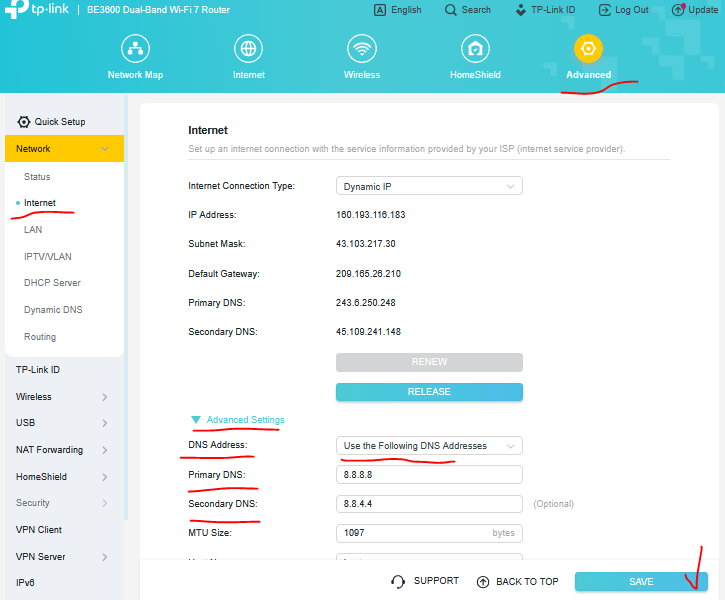
After this change reboot your main BE230 first, then your satellite BE230 and test.
- Copy Link
- Report Inappropriate Content
Try updating the router FW to Archer BE230(EU)_V2_1.1.0 Build 20250718 from here and test if there's any improvement.
- Copy Link
- Report Inappropriate Content
Thank you for the reply, Just want to make sure.
1. is it okay to update the firmware from that link? (en) Because i'm from Indonesia, and when i change the URL from "en" to "id", the firmware only has BE230 V1 here's the "id" url
https://www.tp-link.com/id/support/download/archer-be230/#Firmware
2. I should update this on both of the router, correct?
- Copy Link
- Report Inappropriate Content
Look at the router bottom sticker to check its HW version and FW region first - details.
If it's with an (EU) region FW then proceed with the upgrade on both devices from the link I posted (don't change the URL).
If it's with a (US) region FW you're most probably with the latest FW version 1.0.4.
- Copy Link
- Report Inappropriate Content
@terziyski
I checked both of my BE230 routers, and it says US/2.0.
So i'm already on the latest firmware version, correct?
Is there anything that i can do?
- Copy Link
- Report Inappropriate Content
You may try the following on your main BE230 and test if there's any improvement:
After this change reboot your main BE230 first, then your satellite BE230 and test.
- Copy Link
- Report Inappropriate Content
Before i posted the original post, i already set my
- ISP router's DNS to 1.1.1.1 and 8.8.8.8
- Main router's DNS on Advanced → Network → Internet → Advanced Settings Dropdown → DNS to 1.1.1.1 and 8.8.8.8
- Main router's DNS on Advanced → Network → DHCP Server → DNS to 1.1.1.1 and 8.8.8.8
- Turn off all routers → wait 1-2 minutes → turn on ISP router → wait 5 minutes → turn on main router → wait 5 minutes → turn on satelite router
Do i need to change it to 8.8.8.8 and 8.8.4.4?
Note :
- Right now im using wired backhaul
- ISP LAN → Main router's WAN
- Main router's LAN → to satelite router's WAN
- Connected my PC, TV, etc to satelite router's LAN (for wired speed)
- Phone connected via 5ghz wifi to satelite router
- Log still appears even with wired backhaul every 1 minute (sometimes 5 minute) - only on the wired satelite router (the main router doesn't log every minute)
-
2025-12-13 08:41:09 Led Controller INFO [2090] Start to run LAN_ON
2025-12-13 08:41:05 Led Controller INFO [2090] Start to run WAN1_ON
2025-12-13 08:41:05 Led Controller INFO [2090] Start to run WAN0_OFF
2025-12-13 08:40:38 Led Controller INFO [2090] Start to run LAN_ON
2025-12-13 08:40:35 Led Controller INFO [2090] Start to run WAN1_OFF
2025-12-13 08:40:35 Led Controller INFO [2090] Start to run WAN0_ON
2025-12-13 08:40:23 Led Controller INFO [2090] Start to run LAN_ON
-
-
When the internet LED became red (only on satelite router) → pinging to 8.8.8.8 doesn't causes RTO on my PC (wired to satelite) & i can still browse and send discord messages
-
But on my phone (WIFI to satelite) →
-
youtube buffers
-
other app also throw an error like (there's a problem with the internet, please reload)
-
if i do something (let's say search something on amazon, it has delay -- like there's no internet connection for a few second)
-
all of these are not always happening, but it's frequent enough to be annoying
-
my speed on speedtest and fast.com are above 100Mbps and no packet loss
-
- Copy Link
- Report Inappropriate Content
In this case you don't have to change the DNS settings.
Try something different - Main router's LAN → satellite router's LAN port and test again.
If these logs are still there, reset the satellite router to its factory defaults and add back to the mesh.
- Copy Link
- Report Inappropriate Content
Hi, i have tested these and the results are the same (still a lot of logs about LED_Controller & the red LED still appears.
1. From main router LAN to satelite router LAN
2. Resetting the satelite router multiple times (setting up wired & tried WPS as well)
I also tried resetting and set-up the satelite router as another new router
1. I plug the satelite router to the ISP router's LAN (just like my main router)
2. Setup and create a different SSID
3. And noticed that there's no logs about LED_Controller & the red LED disappears. (so the behaviour is the same as main-router)
So i have a few questions
1. Does this mean it's a bug on the EasyMesh itself?
2. If i leave the satelite router as EasyMesh wired (log about LED_Controller every minute multiple times & the red LED still appears) → does this damages the router?
3. Is there anything else that i need to do? does disabling DHCP on the ISP router helps? or should i change from EasyMesh to AP? (don't really prefer the AP though)
- Copy Link
- Report Inappropriate Content
This won't damage your router - you can go back to your initial configuration.
I can't say what exactly causing these logs but if it's a FW, probably a next FW release will fix that.
If your ISP router allows to be set in bridge mode, you can avoid the double NAT in your local network - details.
- Copy Link
- Report Inappropriate Content
Ok, i think i will stick with EasyMesh wired connection.
I'm just worried with that many logs, it can damage the router's memory or something.
So if it's only just a visual / cosmetic bug (red LED), i think i can live with that (until the new firmware came out).
- Copy Link
- Report Inappropriate Content
Information
Helpful: 0
Views: 2073
Replies: 11
Voters 0
No one has voted for it yet.