
BE400 Rebooting on its own

Router is rebooting on its own continuously
- Copy Link
- Subscribe
- Bookmark
- Report Inappropriate Content


Hello @Fibertincho ,
I hope I haven't disturbed you. You previously mentioned that you reset the BE400 to its factory defaults and reconfigured it, performing the onboarding process again with the BE550.
Did the BE400 previously operate stably as a Satellite node within an EasyMesh network—working in tandem with the BE550—while running version 1.2.3? Did the "Auto Reboot" anomaly only begin to occur after a certain period of time?
Fibertincho wrote
Hello,
Thanks for your suggestions.
- I have reset the BE400 to factory defaults and reconfigured it, performing the onboarding process again with the BE550. My understanding is that once it is configured as a satellite, accessing the GUI should not revert it back to router mode—it would be quite unusual if that happens.
- The BE400 is placed in an open environment, outside of any locations that could interfere with the signal. The distance to the BE550 is around 8 meters with line of sight.
- The Backhaul has been tested using both methods (Ethernet and Wi-Fi), and it is currently using Wi-Fi. The environment is practically free of interference on UNI-1, UNI-2, UNI-2 extended, and channels in 6 GHz, so a transmission channel issue seems unlikely.
Best regards,
Martin
- Copy Link
- Report Inappropriate Content

@Joseph-TP I mentioned SMB function because I was reading this thread and it was there, nothing happens if it On or Off.
Didn't make BE400 as Primary router because AXE75 is running 5 years straight, so it got lots of devices connected/assigned.
So My Primary AXE75
- Optical Internet connection from ONU with Log IN Credential.
- Mercusys AV1000 (Mar - 2024) for Powerline Ethernet for the remote location of my Home
- Another Old TPLINK TL-WR841N (Oct - 2016) for IoT devices.
This BE400 is the newest addition to my network from last year.
- Copy Link
- Report Inappropriate Content
Hi,
So Beta Firmware 124 [20260520-rel52028] received via Email from TP Link Support Forum Escalation,
My question is this solve the reboot issue ? As some other user received it in this thread but he didn't replied back.
- Copy Link
- Report Inappropriate Content
Hello @JoyB ,
Thanks for your update.
This beta firmware is likely intended to gather information and diagnose the root cause of the issue. If you would like further details, you can consult with an engineer via email.
Additionally, please provide your complete network topology, including the devices you recently mentioned: the ONU, the Mercusys AV1000, and the TL-WR841N.
The topology can be represented as follows: ISP modem—router )))((( client devices
(Note: — stands for wired connection,)))((( stands for wireless connection )
Best Regards.
- Copy Link
- Report Inappropriate Content
Hello,
I would like to inform after flashing Beta Firmware 1.2.4 Build 20260520 rel.52028(5553) my BE400 rebooted on its own only one time in the first 36 hours in front of me (and that I know of) - It is not possible to deny that this beta F.W is much more stable than 1.2.3. After flashing Beta F.W I did lots of data transfer via SMB as well as lots of content streaming from the USB via SSD connection, as well as regular online streaming.
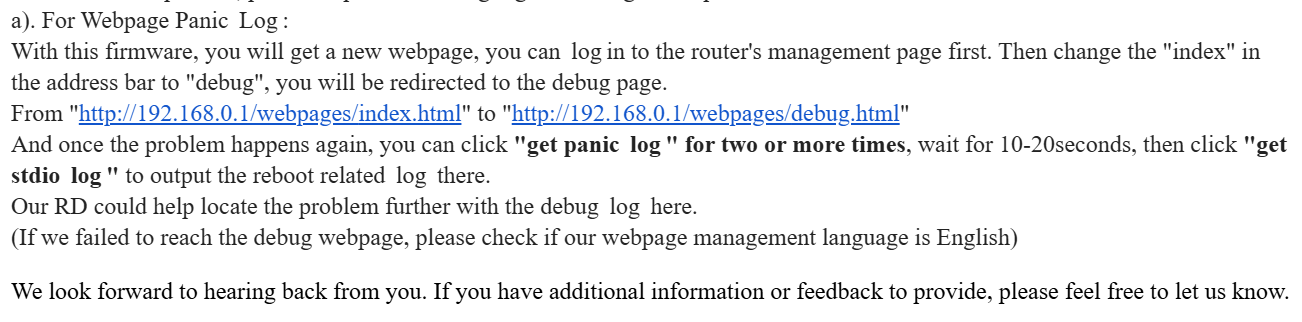
I tried to follow the email instructions to capture the debug log, Panic log, etc., but I can't get there. My BE400 IP address is 192.168.0.49, which throws into the browser address bar (192.168.0.49/webpages/index.html#/) <----there is # sign, can't get rid of that so when I replace 'index' with 'debug' it says 'no file or directory found'.
I'm attaching the screenshot of the Email
- Copy Link
- Report Inappropriate Content
Hello @JoyB ,
Thank you for sharing your latest test results. However, given that your case has already been escalated to the engineering team, we strongly recommend that you share these results directly with the engineers and consult with them on how best to gather the necessary information.
- Copy Link
- Report Inappropriate Content
Information
Helpful: 0
Views: 1331
Replies: 26
Voters 0
No one has voted for it yet.