Wifi extender that allows creating a separate password

Wifi extender that allows creating a separate password

Wifi extender that allows creating a separate password
Yesterday - last edited 4 hours ago

Hi all,

I’m looking for a Wifi extender that allows me to create a separate password (to serve the room I’m renting out) when on Wifi mode. This would be better for me than being forced to copy the password from the main router and my router does not allow creating a ‘guest’ network. I read elsewhere the TP-Link AX5400 WiFi 6 Range Extender might allow setting up a separate password, however, it seems to have been discontinued. Additionally, it used to cost around £90 and I’m looking for something cheaper. Another option might be the TP-Link AC1200 Dual Band Wi-Fi Range Extender & Booster.


Any advice would be welcome.

Blackredgold

  0      
  0      
#1
Options
1 Accepted Solution
Re: Wifi extender that allows creating a separate password-Solution
5 hours ago - last edited 4 hours ago

  @woozle 

Thank you very much for that excellent explanation. 

Best wishes

Blackredgold

Recommended Solution
  0  
  0  
#3
Options
2 Reply
Re: Wifi extender that allows creating a separate password
Yesterday

  @Blackredgold 


Hi,


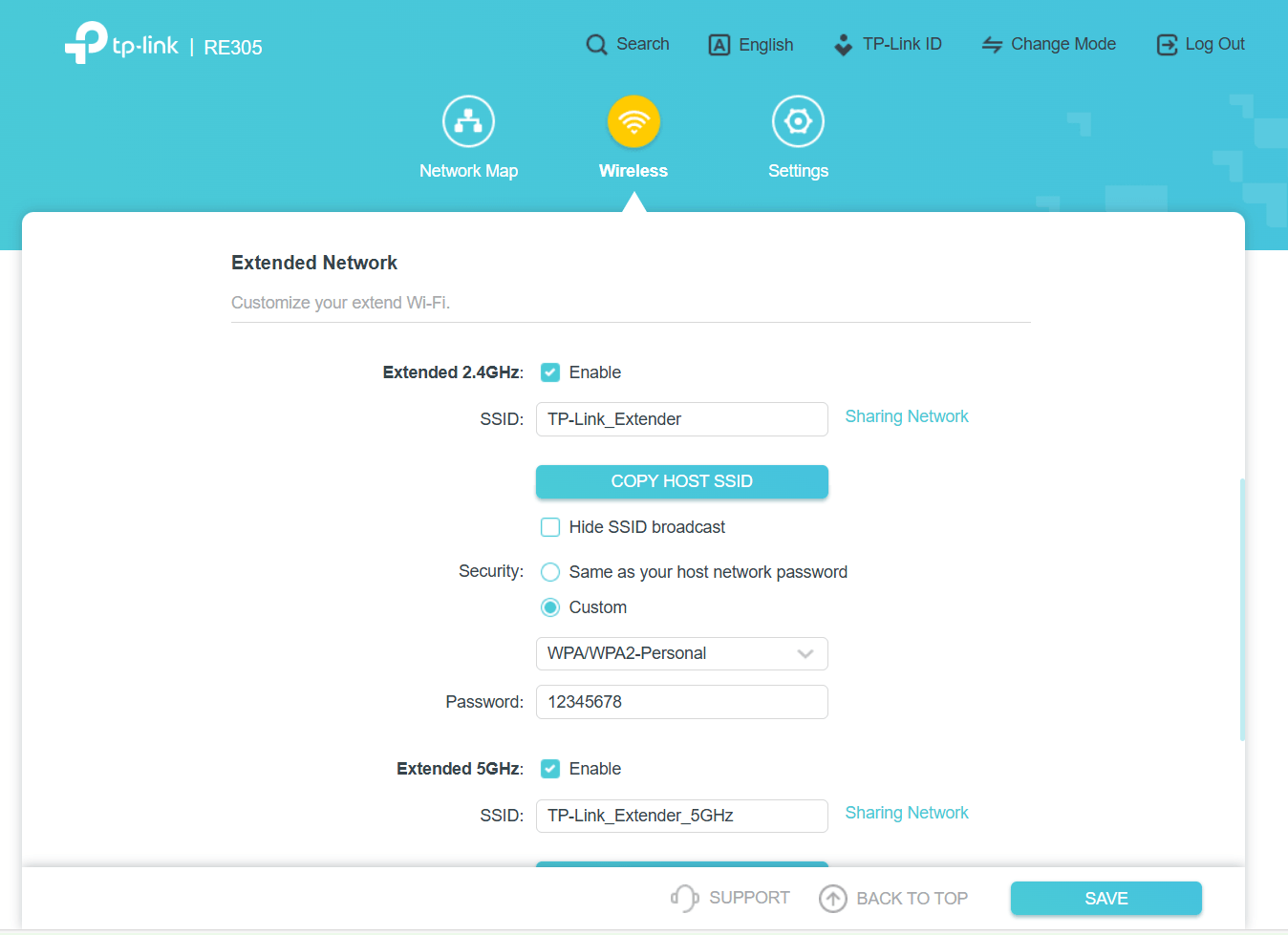
Recently, some of TP-Link's "AC1200" range extenders have received firmware version 1.0.50, which adds the feature you are asking for. (it goes under the description "Added the customizable encryption method option for the extended network")


https://www.tp-link.com/en/support/download/re305/v4/#Firmware  (note that older RE305 before hardware version V4 do not have this feature)

https://www.tp-link.com/en/support/download/re315/#Firmware

https://www.tp-link.com/en/support/download/re330/#Firmware


Below is a sample screenshot from a RE305 V4 with firmware 1.0.50 that shows what it looks like.

  0  
  0  
#2
Options
Re: Wifi extender that allows creating a separate password-Solution
5 hours ago - last edited 4 hours ago

  @woozle 

Thank you very much for that excellent explanation. 

Best wishes

Blackredgold

Recommended Solution
  0  
  0  
#3
Options