
TP-Link Archer BE550 - Wan L'an port

Bonjour
peux t on utiliser le port wan en lan sur le TP-Link Archer BE550.
ou bien utiliser le port wan pour utiliser le routeur comme point d accès et les autres ports en lan mais sans activer le dhcp.
je souhaite utiliser le dhcp de mon firewall.
merci
- Copy Link
- Subscribe
- Bookmark
- Report Inappropriate Content


Hello @Networkelec ,
Welcome to our community.
According to Google Translate, your question is that you want to set the router to Access Point mode and disable its DHCP server. If there is any discrepancy, please describe it in English.
Please refer to page 17 of Archer BE550_V1_User Guide; you can change the operation mode to Access Point mode.
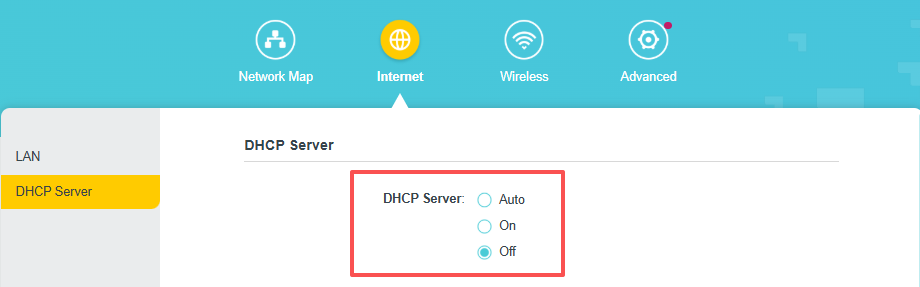
To disable the DHCP server, go to Internet -> DHCP server and set it to Off.
- Copy Link
- Report Inappropriate Content
Hello @Networkelec ,
Welcome to our community.
According to Google Translate, your question is that you want to set the router to Access Point mode and disable its DHCP server. If there is any discrepancy, please describe it in English.
Please refer to page 17 of Archer BE550_V1_User Guide; you can change the operation mode to Access Point mode.
To disable the DHCP server, go to Internet -> DHCP server and set it to Off.
- Copy Link
- Report Inappropriate Content
Information
Helpful: 0
Views: 291
Replies: 1
Voters 0
No one has voted for it yet.