
GE800 Random Reboot Issues

GE800 Random Reboot Issues

GE800 Random Reboot Issues
a week ago - last edited Thursday
Model: Archer GE800  
Hardware Version: V1
Firmware Version:

Hi, 

I had encounter this random reboot issues on my units. I had contact several time to the ISP and they had replace a few time modem. And now they asking me to checking on the router side. But I can't. Every reboot will cause the log missing. How its possible to let user to get the logs when TPLink reset the logs when reboot.

I hope TPLink can be fix this asap. And FYI, THIS is not a cheap router but working like low end router.


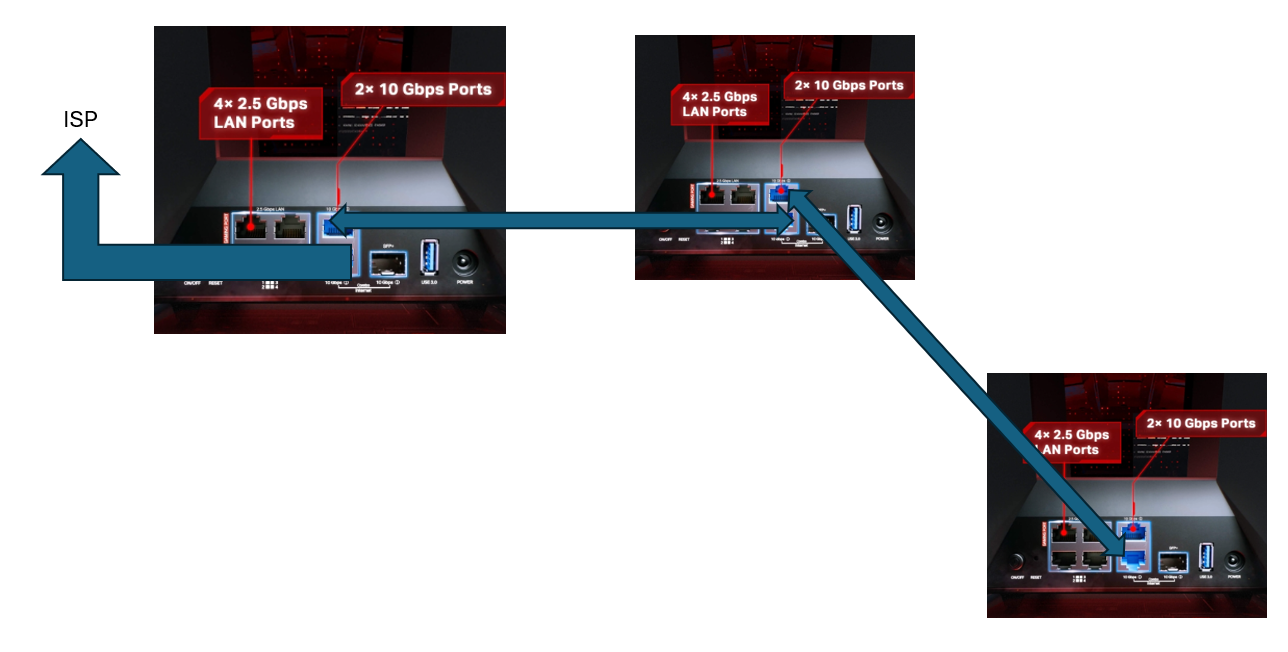
The network topology is as below. 
  0      
  0      
#1
Options
1 Reply
Re:GE800 Random Reboot Issues
a week ago

Hi@Jasson_Hong ,

Thank you for your inquiry.

To facilitate follow-up on your case, please reply to this thread: Regarding Easy Mesh Connection Issues and Device AP Binding. We may lock this case later.

THanks for your kind understanding~

Nice to Meet You in Our TP-Link Community. Check Out the Latest Posts: △New Firmware Update for Archer BE260/Archer BE400 to Support VPN Merge, New ECO Mode, and More △Connect TP-Link Archer BE550 to Germany's DS-Lite (Dual Stack Lite) Internet via WAN △Tether KidShield Test Recruitment - Safeguarding Children's Online Experience If you found the post or response helpful, please click Helpful. If an answer solves your problem, click "Recommended Solution" so that others can benefit from it.
  0  
  0  
#2
Options
