
WebUI error

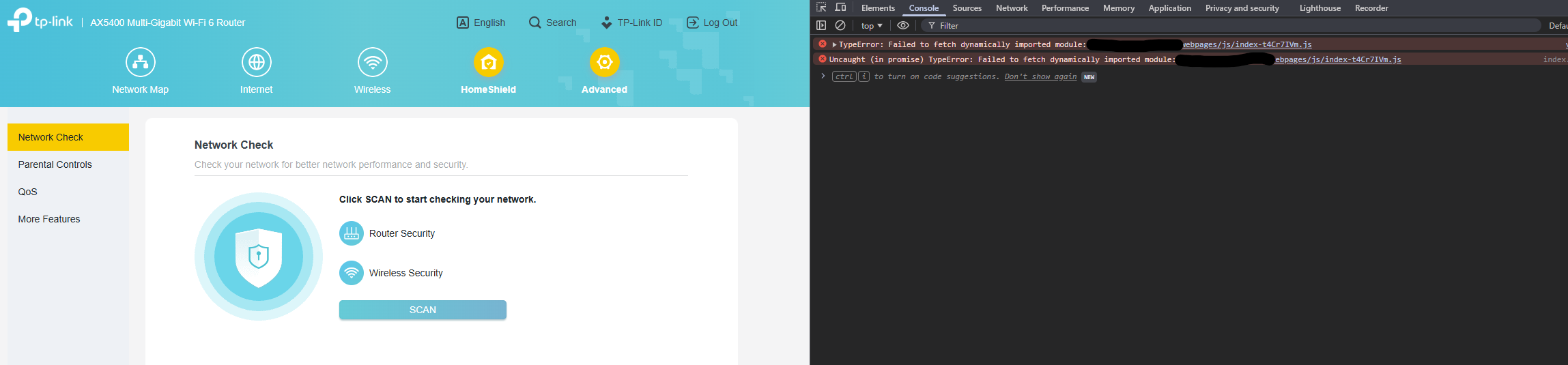
Facing a weird issue here. Whenever i am clicking on Advanced, it doesn't open at all. But if I inspect the Console, it shows it fails to fetch dynamically imported module. Adding a screenshot for reference
- Copy Link
- Subscribe
- Bookmark
- Report Inappropriate Content


Thank you for your feedback.
If your network usage is not significantly affected, I suggest you continue to monitor the router.
I will also report this to the relevant department to confirm whether any areas need improvement.
- Copy Link
- Report Inappropriate Content
Hello @gigakb ,
Welcome to our community.
Have you set the Archer AX72 Pro to Access Point?
May I know if your network topology diagram is as follows:
ISP modem—AX72 Pro AP mode)))((( client devices
(Note: — stands for wired connection,)))((( stands for wireless connection )
Is the Archer AX72 Pro working fine?
Please clear the browser cache, or try a different browser for comparison.
- Copy Link
- Report Inappropriate Content
@Joseph-TP
the Archer AX72 is working as the main router handling the internet and all the other stuff
ISP Fiber ONT --- AX72 Pro ---- Deco (AP) )))) (((( Rest of the Decos (AP) ))) ((( Devices
Router is working fine.
PS: This is accessed right after windows was reinstalled - so cache problem doesnt arise.
- Copy Link
- Report Inappropriate Content
Hello @gigakb ,
Thanks for getting back to me.
When did the problem start? Have there been any recent settings changes?
Please try to switch AX72 Pro to wireless router mode for comparison.
Also, please try using the Tether App to manage the Archer AX72 Pro.
- Copy Link
- Report Inappropriate Content
@Joseph-TP
The problem was sudden, because I barely open my router page - mostly handled by the app. but I keep things on the router checked via the WebUI only, as that has more control than the app.
- Copy Link
- Report Inappropriate Content
Hi@gigakb,
So the problem no longer exists, right?
- Copy Link
- Report Inappropriate Content
- Copy Link
- Report Inappropriate Content
Hello @gigakb ,
So you can manage the Archer AX72 Pro normally through the Tether App, right? If so, I recommend using the Tether App to manage the Archer AX72 Pro first. For web-based management, try logging in with different browsers and devices to rule out issues with specific browsers or devices.
- Copy Link
- Report Inappropriate Content
@Joseph-TP
No. I use the AX72 Pro as the main router; the Decos are in AP mode.
And it is getting affected on Edge too.
- Copy Link
- Report Inappropriate Content
Thank you for your feedback.
If your network usage is not significantly affected, I suggest you continue to monitor the router.
I will also report this to the relevant department to confirm whether any areas need improvement.
- Copy Link
- Report Inappropriate Content
Information
Helpful: 0
Views: 409
Replies: 9
Voters 0
No one has voted for it yet.