
BE800 support 8-10 Gbps PPPoE throughput?
BE800 support 8-10 Gbps PPPoE throughput?

Dear Team,
I have an Archer BE800 (BE19000 Wi-Fi 7) connected to a 10G ONT in bridge mode with an 8 Gbps internet package from my ISP. The PPPoE session does not exceed 3.5 Gbps download/upload, despite:
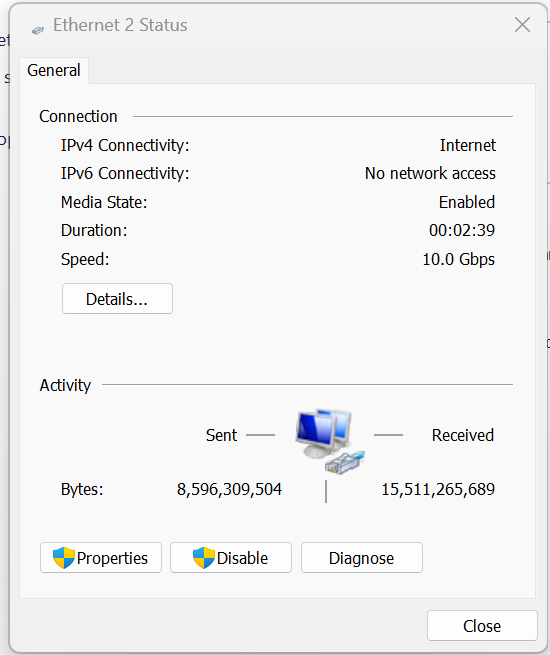
- Using Cat7 cables with 10Gbps full duplex link on WAN/LAN ports
- CPU load on Archer only 16% during Speedtest (idle 10%)
- PPPoE connection clearly limiting performance
Questions:
- Does the BE800 support 8-10 Gbps PPPoE throughput?
- Is there a known limitation in the PPPoE software stack?
- Is beta firmware available with improved PPPoE performance?
Best,
Perisa
- Copy Link
- Subscribe
- Bookmark
- Report Inappropriate Content


Hello @perisa ,
Welcome to our community.
May I know if your network topology diagram is as follows:
ONT in bridge mode — Archer BE800)))((( client devices
(Note: — stands for wired connection,)))((( stands for wireless connection )
Do you have a 10 Gbps PC or a different 10 Gbps router? Please connect them directly to the ONT and test whether it's running at 8Gbps.
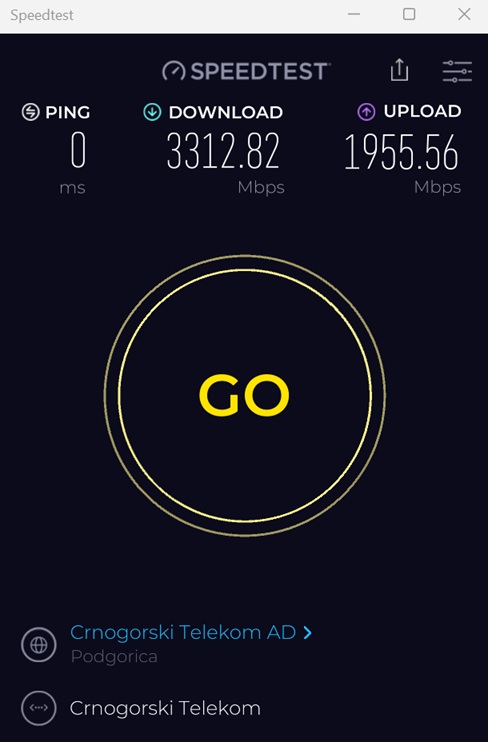
By the way, how did you test the speed? Would you mind providing screenshots of the test results?
If the 10 Gbps PC or router can run at 8 Gbps, please hard reset the Archer BE800 and test its speed again. Please do not configure advanced features, such as QoS and VPN, on the router for the time being.
Is there any switch between the ONT and BE800? If yes, please connect the BE800 to the ONT, bypassing the switch, and test the speed again.
- Copy Link
- Report Inappropriate Content
The BE800 router is connected using a Cat7 ethernet cable to a 10G ONT device that operates in bridge mode (Huawei OptiXstar HN8010Ts-20).
The ONT device has a 10G lan port.
On the BE800 router, I used the 10G port to connect with ONT device.
The BE800 router is connected through another 10G port to a desktop computer (which has an excellent configuration) with a 10G lan card.
The BE800 router initiates the PPPoE session.
In speed tests, I never get more than 3.5 Gbps — the download test result is always around 3.5 Gbps.
- Copy Link
- Report Inappropriate Content
Hi @perisa ,
Thanks for getting back to me.
Therefore, your complete network topology should be:
10G ONT(bridge mode)—Archer BE800—10G PC, CAT7 cables
Are the speed test results for when the PC is directly connected to the router?
Have you tested the speed when the PC is directly connected to the ONT? Especially the actual speed.
Since it is a PPPoE connection, you can refer to How to set up a PPPoE connection on Windows 8&10
- Copy Link
- Report Inappropriate Content
Hello @perisa ,
We are delighted to announce the pre-release firmware for the Archer BE800 V1! This update has introduced new advanced features.
It is recommended that you try this firmware and take advantage of the new features.
New Firmware for Archer BE800 V1 to Support VPN Merge,Guest/IoT Network Extend in EasyMesh, and More
Any feedback and suggestions are welcome~
- Copy Link
- Report Inappropriate Content
@Joseph-TP Hi, thanks for sharing the new pre-release firmware and the feature list. 🙂 I really hope this update will also fix the PPPoE throughput issue, so that with the BE800 router I can finally get more than 3.5 Gbit/s over LAN using my 10 Gbit/s NIC.
- Copy Link
- Report Inappropriate Content
@Joseph-TP Hi, I’ve installed the pre-release firmware on my Archer BE800 (1.4.1 Build 20260119 rel.30658(4555)), but I’m still seeing the same issue.
Speed test over LAN never goes above 3.5 Gbps download.
I can confirm that the BE800 (BE19000) is initiating the PPPoE session towards a Huawei 10G ONT (bridge mode), and my desktop PC with a 10G LAN card is connected directly to the BE800 via Cat7 cable.
Could you please confirm whether this firmware includes any improvements to PPPoE throughput on 10G WAN, or if there is a known limitation around 3.5 Gbps?
- Copy Link
- Report Inappropriate Content
Hi @perisa Have you tried the suggestions below?
We need to confirm the actual speed between the computer and the modem to rule out a problem with the 10 Gbit/s network card.
Joseph-TP wrote
Hi @perisa ,
Thanks for getting back to me.
Therefore, your complete network topology should be:
10G ONT(bridge mode)—Archer BE800—10G PC, CAT7 cables
Are the speed test results for when the PC is directly connected to the router?
Have you tested the speed when the PC is directly connected to the ONT? Especially the actual speed.
Since it is a PPPoE connection, you can refer to How to set up a PPPoE connection on Windows 8&10
- Copy Link
- Report Inappropriate Content
Q. Are the speed test results for when the PC is directly connected to the router?
A. My desktop PC with a 10G LAN card is connected directly to the BE800 via Cat7 cable.
Q. Have you tested the speed when the PC is directly connected to the ONT? Especially the actual speed.
A. My Huawei 10G ONT is in bridge mode. When using the scenario ONT (bridge mode) → 10G PC with CAT7 cables and initiating the PPPoE session from the PC (Windows11), speed test result is 1.4 Gbits (no more).
- Copy Link
- Report Inappropriate Content
Hi @perisa ,
So, the speed obtained by the PC (with a network card) directly connecting to the ONT is even lower than the speed obtained by the PC connecting to the Archer BE800?
Do you remember the speed before the firmware update? Or was the actual speed from your PC to the BE800 never exceeding 3.5Gbps?
- Copy Link
- Report Inappropriate Content
So, the speed obtained by the PC (with a network card) directly connecting to the ONT is even lower than the speed obtained by the PC connecting to the Archer BE800?
Yes. Max 1.4 Gbits initiating the PPPoE session from PC (ONT Huawei OptiXstar HN8010Ts-20 → 10G PC).
Do you remember the speed before the firmware update? Or was the actual speed from your PC to the BE800 never exceeding 3.5Gbps?
Every time 3.5-3.6 Gbits. All with new fw and with production fw (before fw upgrade). Same speed test results.
- Copy Link
- Report Inappropriate Content
Information
Helpful: 0
Views: 332
Replies: 12
Voters 0
No one has voted for it yet.