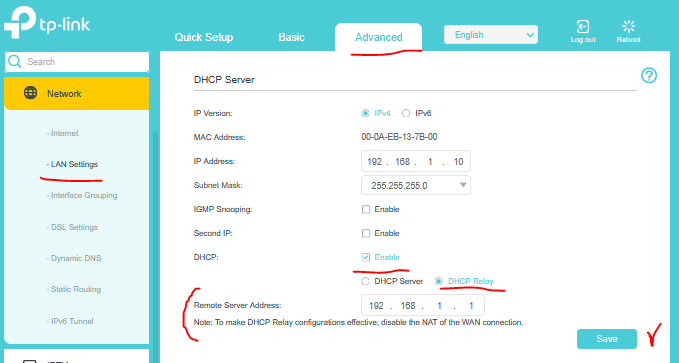
Archer VR1600v v2 as access point.

Hi,
I'm trying to connect VR1600V v2 as access point to my existing wireless network. So far without success.
Network:
1. Main modem/router - VX420-G2v v2, firmware 0.9.0 2.0.0 v603c.0 Build 250728 Rel.28804n.
Connected to nbn box. Serves as the main router, DHCP enabled.
2. Three routers (one ASUS, two D-Link) connected via Ethernet to main router, configured to act as access point (DHCP off).
They are assigned static internal IP addresses.
3. One wi-fi SSID on all the above
All working perfectly fine.
What I want to do:
1. I want to replace one of the D-Links (very old device) with Archer VR1600v v2 to work as access point.
I got this Archer device from ISP (iinet/TPG) a few years back but flashed it with firmware version 0.1.0 0.9.1 v5006.0 Build 200304 Rel.64006n so now all menu options are available.
What I did:
1. Assigned static IP address to Archer VR1600v outside the DHCP of the main router.
2. Turned DHCP for Archer VR1600v OFF.
3. Assigned same SSID as main router (and other two APs).
4. Connected Archer VR1600v to main router via Ethernet to LAN1 (I tried LAN4 as well)
Previously I did exactly the same with the other routers (ASUS, D-link) working as APs on my network and it was enough.
Problem:
1. I can reach Archer VR1600v via web interface under internal IP address assigned to it.
2. I can connect to Internet via Ethernet connected to one of the Archer VR1600v LAN ports.
3. I can NOT connect via wf-fi.
When I'm in the wi-fi range of the main router (or the other APs) I'm connected to the network and move the room where Archer VR1600v is connected, mobile device connects momentarily to Archer VR1600v but after 1-2 seconds the connection drops. And does not connect.
I can see on my mobile device in Net Analyzer App the mac address of the AP I'm connected to so I can confirm that it connects momentarily to Archer VR1600v.
But for whatever reason the connection is terminated.
When I move back to the area covered by main router or the other APs, connection is re-established to one of them without problem.
When I define different SSID for Archer VR1600v I can connect to it without any problems.
I've searched the forum and found a couple of threads describing exactly same issue (but no resolution):
https://community.tp-link.com/en/home/forum/topic/506336
https://community.tp-link.com/en/home/forum/topic/587130
Any help would be highly appreciated.
Szymon