Archer VR1600v v2 as access point.

Archer VR1600v v2 as access point.

Archer VR1600v v2 as access point.
Tuesday
Model: Archer VR1600v  
Hardware Version: V2
Firmware Version: 0.1.0 0.9.1 v5006.0 Build 200304 Rel.64006n

Hi,


I'm trying to connect VR1600V v2 as access point to my existing wireless network. So far without success.

Network:

1. Main modem/router - VX420-G2v v2, firmware 0.9.0 2.0.0 v603c.0 Build 250728 Rel.28804n.
Connected to nbn box. Serves as the main router, DHCP enabled.
2. Three routers (one ASUS, two D-Link) connected via Ethernet to main router, configured to act as access point (DHCP off).
They are assigned static internal IP addresses.

3. One wi-fi SSID on all the above


All working perfectly fine.


What I want to do:

1. I want to replace one of the D-Links (very old device)  with Archer VR1600v v2 to work as access point.
I got this Archer device from ISP (iinet/TPG) a few years back but flashed it with firmware version 0.1.0 0.9.1 v5006.0 Build 200304 Rel.64006n so now all menu options are available.


What I did:

1. Assigned static IP address to Archer VR1600v outside the DHCP of the main router.

2. Turned DHCP for Archer VR1600v OFF.

3. Assigned same SSID as main router (and other two APs).

4. Connected Archer VR1600v to main router via Ethernet to LAN1 (I tried LAN4 as well)


Previously I did exactly the same with the other routers (ASUS, D-link) working as APs on my network and it was enough.


Problem:

1. I can reach Archer VR1600v via web interface under internal IP address assigned to it.

2. I can connect to Internet via Ethernet connected to one of the Archer VR1600v LAN ports.

3. I can NOT connect via wf-fi. 


When I'm in the wi-fi range of the main router (or the other APs) I'm connected to the network and move the room where Archer VR1600v is connected, mobile device connects momentarily to Archer VR1600v but after 1-2 seconds the connection drops. And does not connect.


I can see on my mobile device in Net Analyzer App the mac address of the AP I'm connected to so I can confirm that it connects momentarily to Archer VR1600v.
But for whatever reason the connection is terminated.


When I move back to the area covered by main router or the other APs, connection is re-established to one of them without problem.

When I define different SSID for Archer VR1600v I can connect to it without any problems.


I've searched the forum and found a couple of threads describing exactly same issue (but no resolution):
https://community.tp-link.com/en/home/forum/topic/506336

https://community.tp-link.com/en/home/forum/topic/587130


Any help would be highly appreciated.


Szymon


  0      
  0      
#1
Options
9 Reply
Re:Archer VR1600v v2 as access point.
Tuesday

  @Szymosa 


This usually happens when the wireless settings parameters are different from the othe rdevices:


Make sure that you have configured the same settings for Security, Version and Encription on your VR1600v.

If this was helpful click on the arrow pointing upward to make it blue. If this solves your issue, click the star to make it blue and mark the post as a "Recommended Solution".
  0  
  0  
#2
Options
Re:Archer VR1600v v2 as access point.
Wednesday

  @terziyski 
Thanks for your reply and suggestion.
But all APs and main router have exactly same wifi security settings:
WPA2-PSK[AES] and of course same password.

They are also assigned not overlapping channels.


It must be some problem between this AP and main router.

On my mobile phone using Net Analyzer App I can see that my mobile phone connects via wifi to AP (I can see AP's MAC address as BSSIB)
but it's not getting assigned internal IP.


Any other ideas would be much appreciated?


Thanks,

Szymon

  0  
  0  
#3
Options
Re:Archer VR1600v v2 as access point.
Wednesday

  @terziyski 
***Update***

After 5 minutes or so my mobile phone finally connected to the network via AP.

Below log from main router.


192:168::0:12 is the inetrnal IP binded address of my mobile.

XX:XX:XX:XX:XX MAC address of the mobile
YY:YY:YY:YY:YY MAC address of the AP

ID Time Type Level Log Content
1 2026-01-28 15:13:21 MESH Notice Del Client : MAC : YY:YY:YY:YY:YY
2 2026-01-28 15:12:32 DHCPD Notice Send ACK to 192.168.0.12
3 2026-01-28 15:12:32 DHCPD Notice Recv REQUEST from XX:XX:XX:XX:X
4 2026-01-28 15:12:30 DHCPD Notice Recv REQUEST from XX:XX:XX:XX:XX
5 2026-01-28 15:12:29 DHCPD Notice Recv REQUEST from XX:XX:XX:XX:XX
6 2026-01-28 15:12:28 DHCPD Notice Send OFFER with ip 192.168.0.12
7 2026-01-28 15:12:28 DHCPD Notice Recv DISCOVER from XX:XX:XX:XX:XX:XX
8 2026-01-28 15:11:20 DHCPD Notice Send OFFER with ip 192.168.0.12
  0  
  0  
#4
Options
Re:Archer VR1600v v2 as access point.
Wednesday

  @terziyski 

Log from AP


ID Time Type Level Log Content
1 2016-01-01 12:08:16 DHCPC Notice Recv no OFFER, DHCP Service unavailable
2 2016-01-01 12:08:13 DHCPC Notice Send DISCOVER with request ip 0.0.0.0 and unicast flag 1
3 2016-01-01 12:08:10 DHCPC Notice Send DISCOVER with request ip 0.0.0.0 and unicast flag 1
4 2016-01-01 12:08:05 DHCPC Notice Send DISCOVER with request ip 0.0.0.0 and unicast flag 0
5 2016-01-01 12:08:02 DHCPC Notice Send DISCOVER with request ip 0.0.0.0 and unicast flag 0
6 2016-01-01 12:07:59 DHCPC Notice Send DISCOVER with request ip 0.0.0.0 and unicast flag 0
7 2016-01-01 12:00:18 DHCPC Notice Recv no OFFER, DHCP Service unavailable
8 2016-01-01 12:00:15 DHCPC Notice Send DISCOVER with request ip 0.0.0.0 and unicast flag 0
  0  
  0  
#5
Options
Re:Archer VR1600v v2 as access point.
Wednesday

  @Szymosa 


If everything's OK then do nothing.

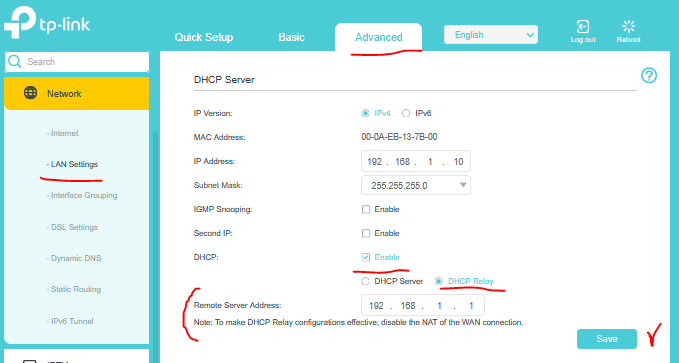
If the issue persists then you can try the following:


I haven't seen the VR1600v WegGUI (the screenshot is from VR2800) but most probably you should have a similar setting.

On the screenshot above the 192.168.1.1 is teh LAN IP address of your main router.

If this was helpful click on the arrow pointing upward to make it blue. If this solves your issue, click the star to make it blue and mark the post as a "Recommended Solution".
  0  
  0  
#6
Options
Re:Archer VR1600v v2 as access point.
Thursday

  @terziyski 
Thanks for your reply.


No it's not really solved.

It's very temperamental.


Some mobile devices will finally connect to the AP after 5-10min. But after moving to the area covered by other APs and coming back to the area covered by VR1600v v2 AP the problem starts again.
Some devices will not connect to this AP at all.


I'll try the DHCP Relay setting today.


Many thanks,

Szymon

  0  
  0  
#7
Options
Re:Archer VR1600v v2 as access point.
Thursday

This usually comes down to roaming/compatibility quirks on the VR1600v try matching all Wi-Fi settings exactly (security mode, encryption, channel width) and set a fixed channel instead of auto. Also disable any “Smart Connect” or legacy ISP features if present. I’ve seen similar setups stabilize after that, and it’s a reminder how clean configs (like you see in fairplay club community recommendations) really matter for seamless AP handoff.

  0  
  0  
#8
Options
Re:Archer VR1600v v2 as access point.
Friday

  @jamesjhone7 
Thanks for your reply.


I flashed the router with non-ISP firmware so legacy ISP settings that I'm aware of.

All the wifi security settings are exactly the same.
Channels and channel width set manually in order not to overlap.


Still not working.


What puzzles me is that other routers on my network configured as APs (ASUS, D-link) work perfectly fine.


Thanks,

Szymon

  0  
  0  
#9
Options
Re:Archer VR1600v v2 as access point.
Friday - last edited Friday

  @Szymosa 


Are your other APs (ASUS, D-link) actually wireless routers but not a DSL modem routers ?

With TP-Link there's a difference when comes to AP converting, especially if a customized FW is used.

Archer VR1600v should be in DSL modem router mode (not in Wirekess router mode.

Here's the official TP-Link guide for this. Besides, have you tested the DHCP Relay feature on VR1600v yet ?

If this was helpful click on the arrow pointing upward to make it blue. If this solves your issue, click the star to make it blue and mark the post as a "Recommended Solution".
  0  
  0  
#10
Options