
No remote access
No remote access

I think my isp is restricting my access. I can't use the remote access or the VPN. Connection times out. The tether app works remotely. I have enabled remote access and have dns to ip conversion. When I test the dns name it translates to my ip address, but won't connect either.
Is there a way around this? Ultimately, I don't care about the remote access but the vpn is important.
Thanks
- Copy Link
- Subscribe
- Bookmark
- Report Inappropriate Content

When I test the dns name it translates to my ip address, ...
Hi,
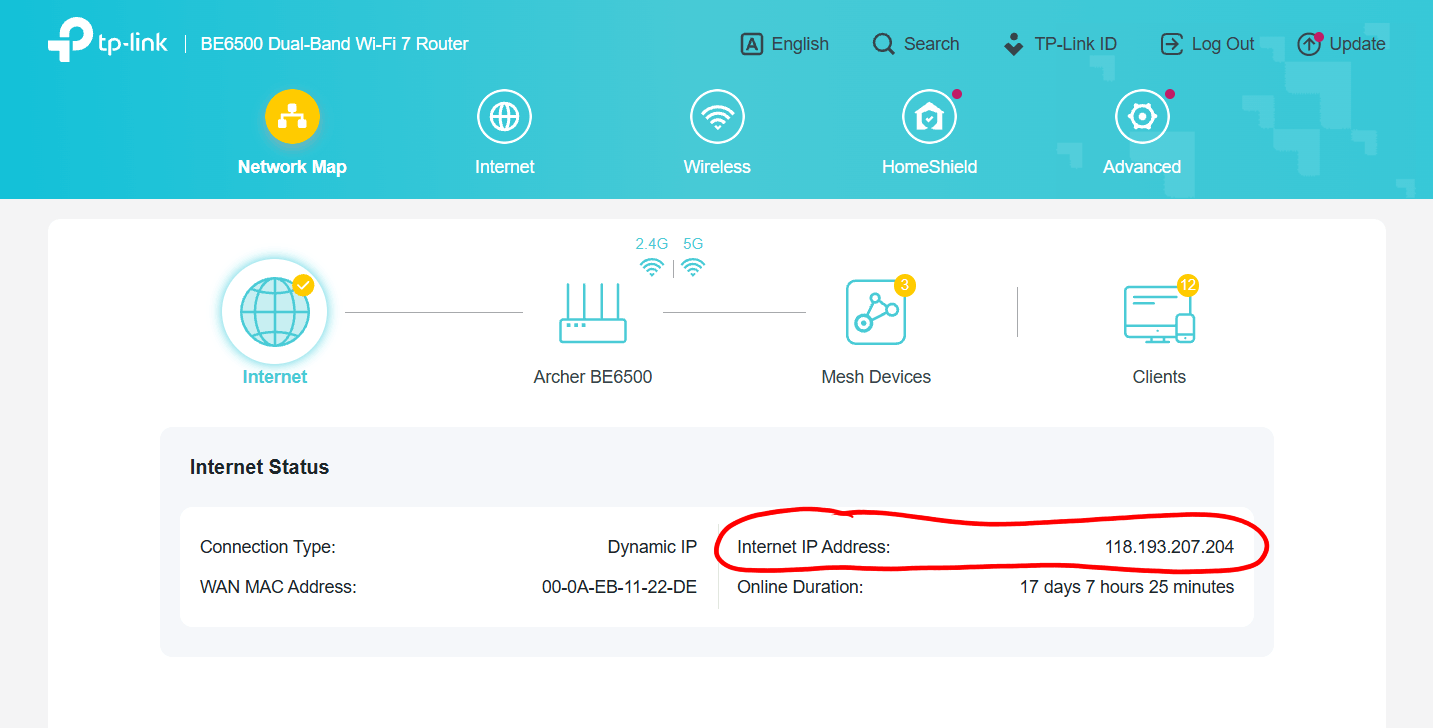
Can you please confirm that by "my ip address" you are referring to the one shown under "Network Map"?
- Copy Link
- Report Inappropriate Content
Yes. It shows my dynamic ip. The same address the dns translates to.
I had a vpn before getting this cheaper isp and it worked fine.
Once I switched isp's, the problem started.
Thanks again.
- Copy Link
- Report Inappropriate Content
Ok. Then please check whether the "Internet IP Address" of your router falls into one of the following segments of IP addresses.
These are private IP addresses that are not routed through the Internet.
100.64.0.0 - 100.127.255.255
10.0.0.0 - 10.255.255.255
172.16.0.0 - 172.31.255.255
192.168.0.0 - 192.168.255.255
In case your BE6500 is assigned such an address by your ISP, then you can't reach your BE6500 from the Internet. Nowadays it is very common for ISP's to do this, because of the limited availability of public IPv4 addresses.
- Copy Link
- Report Inappropriate Content
It's a proper ip address. When I do a dns lookup, it appears. It is similar to: 33.127.56.14 That's not it, but in the same format.
Thanks
- Copy Link
- Report Inappropriate Content
Just for the record. A DNS lookup is no guarantee for an IP address to be a public one. Private IP addresses can also be assigned to DNS records and will show up via a DNS lookup.
Anyway, as long your router's Internet IP Address is not within the IP ranges I posted earlier, then it must be a public IP address. (especially if it begins with 33...)
Do you happen to own another discarded router that you could use to cross-check whether it also fails remote access or not?
- Copy Link
- Report Inappropriate Content
Good idea...
I bought this router to solve my problem, but unfortunately it has the same issues as the old one.
The isp provided the first router.
This configuration has a modem in front of the router. The old isp just had a router doing everything.
Thanks
- Copy Link
- Report Inappropriate Content
If neither of two different routers can't be accessed remotely, then something else must be the culprit.
Does the modem have a sticker showing a brand name and/or model number on it?
- Copy Link
- Report Inappropriate Content
- Copy Link
- Report Inappropriate Content
If the information I found on the Internet is correct, then this Hitron cable modem has two LAN ports. Did your ISP specify which one you should use? I can't quite imagine they would allow two client devices to be accessible remotely.
- Copy Link
- Report Inappropriate Content
Looks like there was two lan ports, but one has been plugged. I guess the plug was jammed in there so it wouldn't be used.
- Copy Link
- Report Inappropriate Content
Information
Helpful: 0
Views: 85
Replies: 11
Voters 0
No one has voted for it yet.