
How to rename SSID of my Archer AX55?

I am sitting with my PC and video calling device in between my SP router and the connected (AP mode) TP Link AX55.
I am experiencing connectivity issues and the SP technician is telling me I should rename the network (SSID) of my TP Link to make sure I am connecting to the latter instead of to the SP modem. Now, connection is switching from SP model to TP Link and vice versa (hesitating), while the connection health is much better via the TP Link AX55. Both SSID's curently have the same name, so I am not getting the option to choose between both.
Can you tell me how I can rename the SSID of my TP Link?
And can you confirm that I will then be able to enforce connection via the latter?
- Copy Link
- Subscribe
- Bookmark
- Report Inappropriate Content

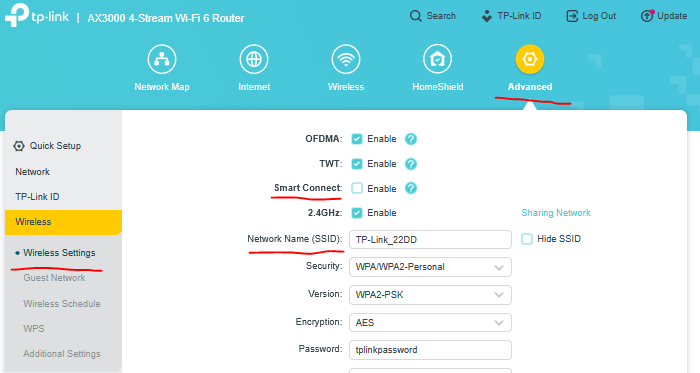
- Copy Link
- Report Inappropriate Content

Can you please post a screenshot of the screen where it doesn't allow you to edit the SSID name?
- Copy Link
- Report Inappropriate Content
- Copy Link
- Report Inappropriate Content
@terziyski
Thank you for your reply. I can find the SSID name following your instructions. However, I don't seem to be able to edit it. What do I do to change the name?
I've been told that this will allow me to enforce connection to my TP link instead of my modem, while now, my device is moving from one to another causing connection dips.
- Copy Link
- Report Inappropriate Content
Can you please post a screenshot of the screen where it doesn't allow you to edit the SSID name?
- Copy Link
- Report Inappropriate Content
@woozle
In the meatime I found it (one screen deeper I could edit the name). All sorted. Thanks anyhow.
- Copy Link
- Report Inappropriate Content
Information
Helpful: 0
Views: 260
Replies: 4
Voters 0
No one has voted for it yet.