Wired backhaul issue

Wired backhaul issue

Wired backhaul issue
2026-02-13 16:06:58 - last edited 2026-03-10 08:56:32
Model: Deco X50 - PoE  
Hardware Version:
Firmware Version:

Hi.


Looking for any input on this one.  Got a Deco system installed at my parents.  4 Deco units, all X50 POE and all connected into a wired network so on a wired backhaul.  Working perfectly for over 2 years now.  Yesterday I noticed in the Deco app that one of the X50s had lost its wired backhaul and was showing as using wireless.  Thought a reboot would fix it so rebooted the unit.  Came back on and picked up the wired backhaul fine.  However, I then noted another one of them was reporting as Wi-Fi.  I ended up rebooting all of them but now I can only ever get 3 of the 4 to report as being on the wired backhaul, there is always one that shows as wireless.  Decided to remove the units and set them back up but same issue.  Also swapped out the POE switch in the loft that’s powering them in case that was an issue.  Same thing.  No matter what I try only 3 will use the wired backhaul.  Out of ideas now as this was working fine but just started this issue yesterday.  All the units are on the latest firmware.  I think 3 of them are V2's and 1 of them is a V1 if that makes any difference.  Thanks.

1
1
#1
1 Accepted Solution
Re:Wired backhaul issue-Solution
2026-02-15 12:23:35 - last edited 2026-03-10 08:56:32

  @bemak187 


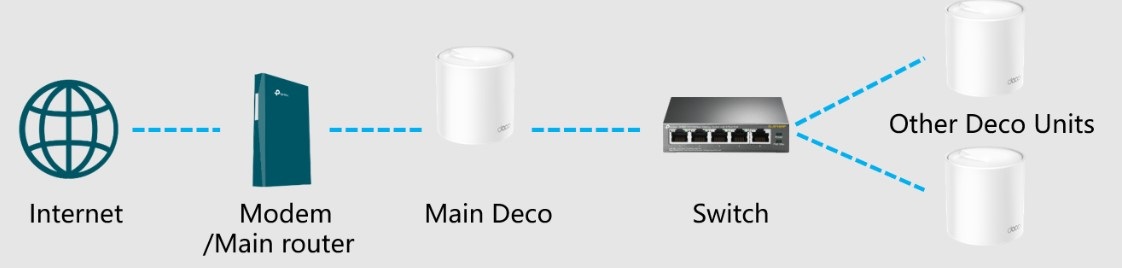
In Router mode, this is how Deco units should be connected:


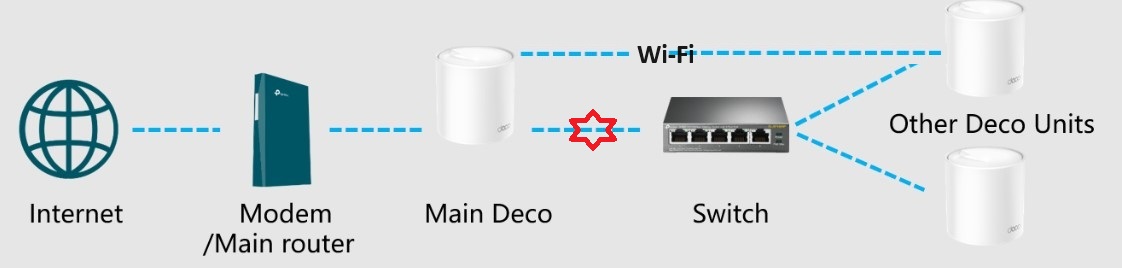
If this is what you have, you'll need to check connection between Main Deco and switch. What you describe matches the problem when this connection is broken: something is wrong with Ethernet cable or it is disconnected from one end.


When that happens, the following occurs:


One of Satellite Deco (random one) will establish WiFi backhaul to Main Deco and all traffic going through the switch will pass to that Satellite Deco and from it to Main Deco. If you power off Satellite Deco with WiFi backhaul, one of remaining Satellite Deco will restore link to Main Deco by switching to WiFi backhaul.


That situation is also discussed here: https://community.tp-link.com/en/home/forum/topic/626634

Recommended Solution
0
0
#4
4 Reply
Re:Wired backhaul issue
2026-02-14 00:55:50

  @bemak187 


Do you run Deco mesh in its default router mode, or in access point mode?

1
1
#2
Re:Wired backhaul issue
2026-02-15 11:25:35

  @Alexandre. Running them just in the default router mode. Thanks.

0
0
#3
Re:Wired backhaul issue-Solution
2026-02-15 12:23:35 - last edited 2026-03-10 08:56:32

  @bemak187 


In Router mode, this is how Deco units should be connected:


If this is what you have, you'll need to check connection between Main Deco and switch. What you describe matches the problem when this connection is broken: something is wrong with Ethernet cable or it is disconnected from one end.


When that happens, the following occurs:


One of Satellite Deco (random one) will establish WiFi backhaul to Main Deco and all traffic going through the switch will pass to that Satellite Deco and from it to Main Deco. If you power off Satellite Deco with WiFi backhaul, one of remaining Satellite Deco will restore link to Main Deco by switching to WiFi backhaul.


That situation is also discussed here: https://community.tp-link.com/en/home/forum/topic/626634

Recommended Solution
0
0
#4
Re:Wired backhaul issue
Yesterday

  @bemak187 


A brand new beta was just released for the Deco X50-PoE that you may be able to install/test. The beta is for the following Deco models/hardware versions.


Deco X50/X55/X3000 V3.0
Deco X55 Pro/X50 Pro V1.0
Deco X50-PoE/HB6300-PoE V2.0


This FAQ will go over how to find the hardware verson of your Deco X50-PoE please make sure your Deco is running hardware version 2.0 before trying this beta firmware 


You can find the link to the thread with the beta firmware below. 


Deco X50/X50Pro/X50-PoE Pre-Release Firmware 1.7.0 Introduces DoH/DoT, Channel Selection, and More!

Need help with the Deco app, setup, Ethernet backhaul, network switch or rolling back firmware? Router or AP mode? https://community.tp-link.com/us/home/forum/topic/699816?page=1
0
0
#5