
VR2100 Fireware Update - Issue after Install

After a undate to the firmware version shown above, the Internet status on the network map page has started to show a rotating circle all of the time and below that the internet status is showing "Detecting" Details below the Internet Status field are correct and yes there is an internet connection is working. A reboot did not fix the problem neither did a complete power cycle. Anybody else having the same issue? Thanks


- Copy Link
- Subscribe
- Bookmark
- Report Inappropriate Content

If your ISP provides Parental Controls through its DNSs, then you could set the Cloudflare's DNSs for "Adult Content + Malware (IPv4): 1.1.1.3 and 1.0.0.3" and check if that works for you.
- Copy Link
- Report Inappropriate Content
Try the following:
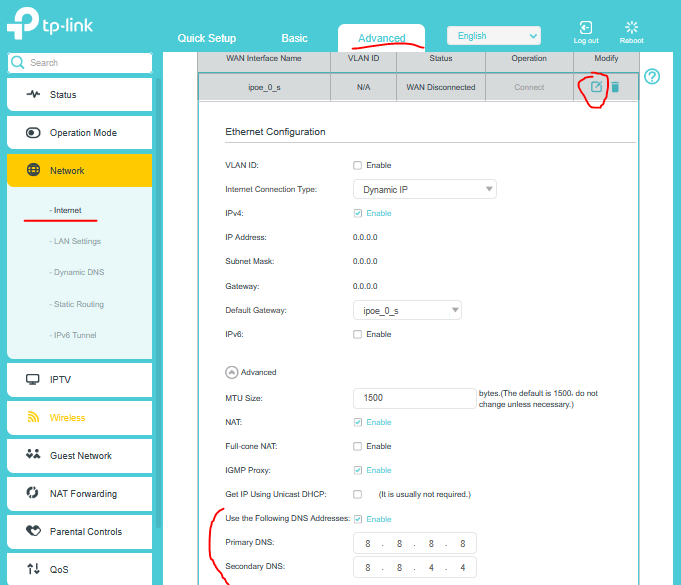
Edit your PPPoE connection and set a custom DNS servers like in the screenshot bellow and test how it goes.
- Copy Link
- Report Inappropriate Content
@terziyski Thanks I will give it a go, when I get a free moment, to see if the connection is registered as stable. I will have to revert to the DNS used,as my ISP provides Parental controls for me and I believe only works if I use their DNS.
Thanks
- Copy Link
- Report Inappropriate Content
If your ISP provides Parental Controls through its DNSs, then you could set the Cloudflare's DNSs for "Adult Content + Malware (IPv4): 1.1.1.3 and 1.0.0.3" and check if that works for you.
- Copy Link
- Report Inappropriate Content
Thanks I will give it a go
- Copy Link
- Report Inappropriate Content
@vfrgpz Well this seems to have resolved itself, all be it I am now having 'other' issues. (Link below)
https://community.tp-link.com/en/home/forum/topic/860182
Never the less I have been using Cloudflare DNS and do find it faster than my ISP DNS. (and it blocks the content that I want to see blocked) So thanks for pointing me in the direction of alternative DNS as I was not fully aware of thier existance.
- Copy Link
- Report Inappropriate Content
Yes, other users have reported this glitch. The recent firmware update caused a visual bug on your network map page. Even though your internet connection is working perfectly, Uhmegle, the router's user interface is stuck in a loop trying to verify the status. To fix this, try clearing your browser's cache or using an incognito window. If the "Detecting" circle persists, CooMeet, you may need to factory reset the router and reconfigure it.
- Copy Link
- Report Inappropriate Content
Information
Helpful: 0
Views: 360
Replies: 6
Voters 0
No one has voted for it yet.