
Wifi connected but no internet only with one device

Hello support, please your help with this issue.
I am having trouble connecting to the Wi-Fi network. It looks to be connected normally to the Wifi, but there is
no internet connection. The strange thing is that this only happens with one laptop. Another laptop and several
cell phones are able to connect to the TP-Link router´s internet signal without any problems.
I don't know if it's a compatibility issue between the laptop's Wi-Fi network adapter hardware and the router,
because the same laptop connects to the internet on other Wi-Fi networks.
The connection is:
ISP provider cable modem --> TP Link router (with Ethernet cable) --> Laptop
The laptop connects to the internet via the cable modem's Wi-Fi signal, but it does not connect to the internet via the TP Link router's Wi-Fi.
The same laptop connects to the internet via the mobile hotspot Wi-Fi of several mobile phones. The problem is only with the TP Link router.
I tried changing the wireless security type from WPA2-PSK with AES encryption to WPA-PSK with automatic encryption, but it didn't work.
I´ve tried to update firmware but it seems is the latest what is installed.
What else can I do to solve or identify the problem? Is there any kind of trace or what do you recommend?
Thank you in advance.
- Copy Link
- Subscribe
- Bookmark
- Report Inappropriate Content

The link for your region as you posted is https://www.tp-link.com/cac/support/download/tl-wr841n/#Firmware
If you follow this link you'll see the FW relase: TL-WR841N(US)_V14_180319
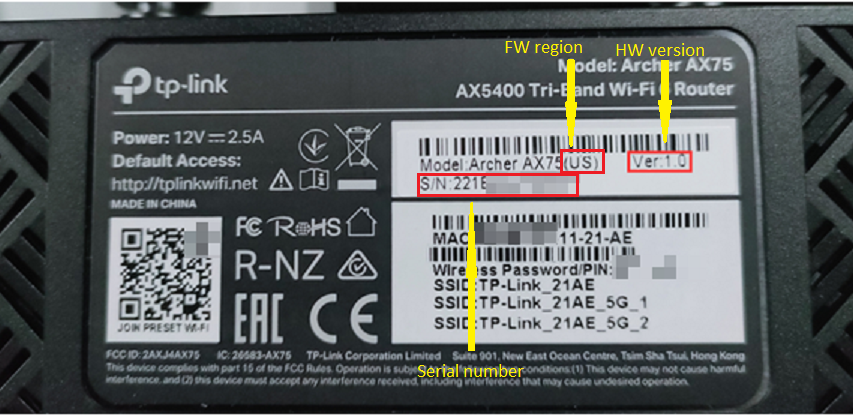
The US in parenthesis shows the FW region, which in your case is US.
You could check that by yorself looking at the botom sticket of your router - details (Case 1):
What's happening here is most probably that you're jumping several versions ahead in one try.
Try the following - update first to an intermediate version like TL-WR841N(US)_V14_210203 to see how it goes.
Upon successful attempt, you can continue upgrading the FW version further.
- Copy Link
- Report Inappropriate Content
Hi, thanks again for your support. Still receiving the same error during firmware upgrade with the last version you shared.
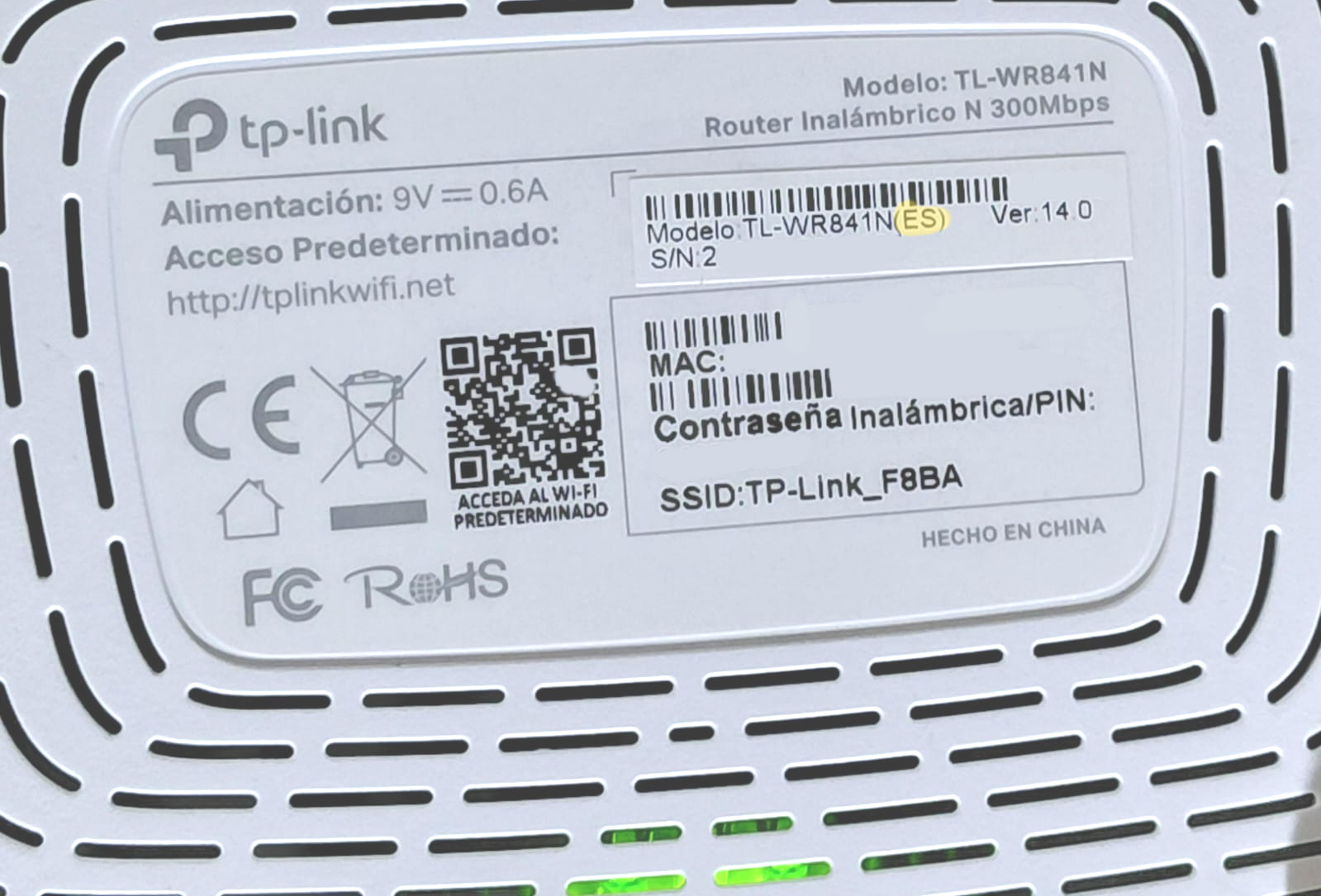
Seeing physically, my router´s region is ES. See image below.
Regards
- Copy Link
- Report Inappropriate Content
Well, if it's with a (ES) firmware after all, you can try this FW release here. If that doesn't work either, I would recommend contacting your local support for further assistance.
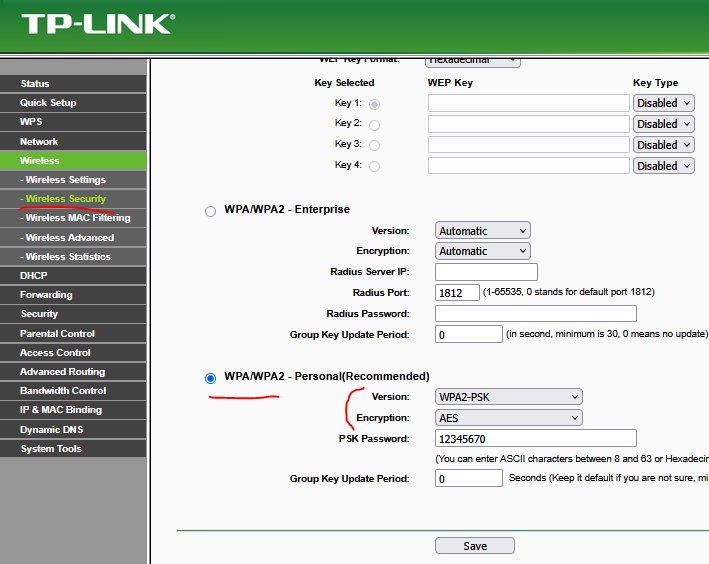
For maximum security of your local network, use the following wireless security settings:
Forget the SSID on your laptop and re-connect again with your password.
- Copy Link
- Report Inappropriate Content
This time it works the firmware upgrade. That was the correct version, sadly only the same laptop cannot connect to
internet, I did forget and re connect again and connects to WiFi but without access to Internet. Is weird.
Thanks so much for all your help and time.
- Copy Link
- Report Inappropriate Content
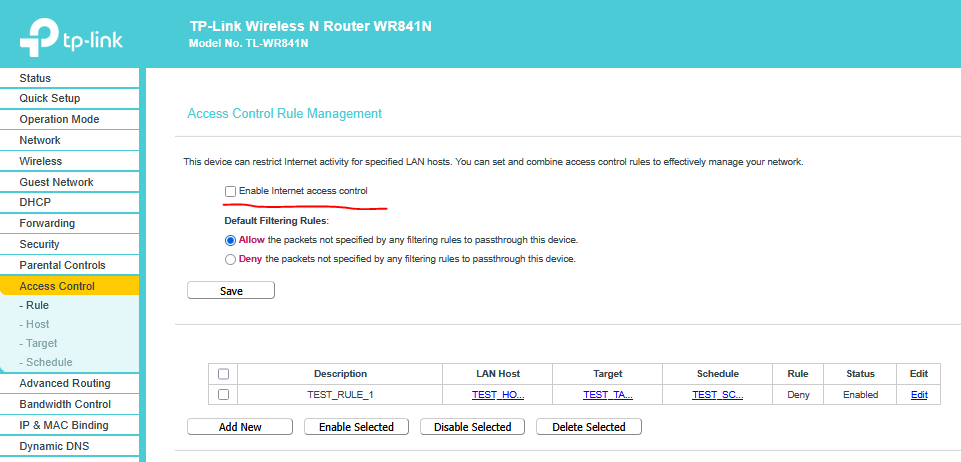
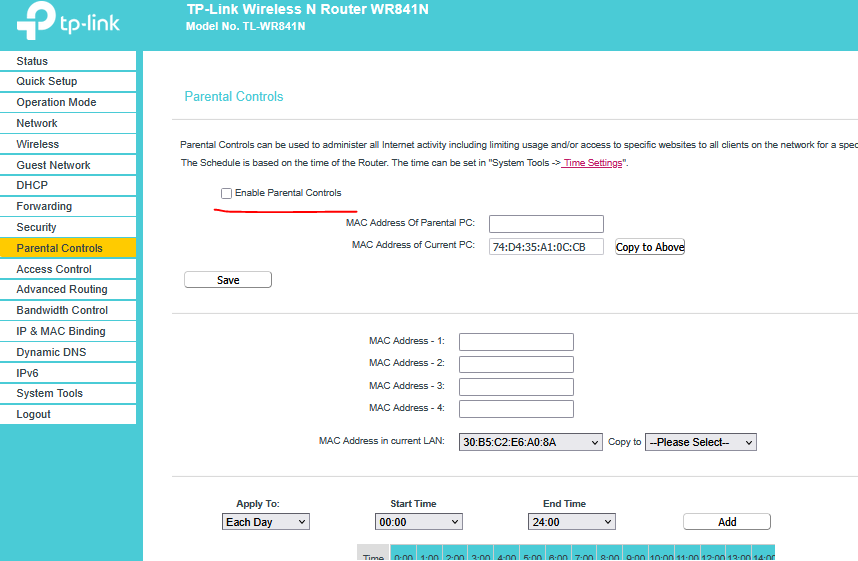
Lets be sure that you're not using any Access Control or Parental Controls feature:
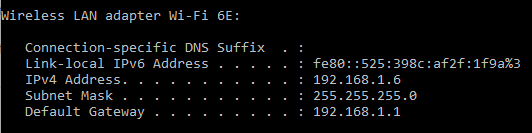
Open command prompt on yur laptop and issue the following command (cmd):
ipconfig
Then post the screenshot for this command outuit for the wireless adapter here. It should be something like this:
Which brand and model is your laptop wireless adapter ?
- Copy Link
- Report Inappropriate Content
Hi, I don't have any Access Control nor Parental Control enabled.
Wifi adapter details are:
Intel(R) Wi-Fi 6E AX211 160MHz
ipconfig when connected to TP-Link (internet signal fails)
Wireless LAN adapter Wi-Fi:
Connection-specific DNS Suffix . :
Link-local IPv6 Address . . . . . : fe80::1f29:3b0e:4f26:cd5%22
IPv4 Address. . . . . . . . . . . : 192.168.1.100
Subnet Mask . . . . . . . . . . . : 255.255.255.0
Default Gateway . . . . . . . . . : 192.168.1.1
ipconfig when connected to cable modem of internet provider (internet signal works)
Wireless LAN adapter Wi-Fi:
Connection-specific DNS Suffix . :
IPv6 Address. . . . . . . . . . . : 2803:f400:2:3b5:1e84:f911:bd4c:df93
Temporary IPv6 Address. . . . . . : 2803:f400:2:3b5:a5c9:9376:1aa7:6e77
Link-local IPv6 Address . . . . . : fe80::1f29:3b0e:4f26:cd5%22
IPv4 Address. . . . . . . . . . . : 192.168.0.13
Subnet Mask . . . . . . . . . . . : 255.255.255.0
Default Gateway . . . . . . . . . : fe80::dea6:33ff:fe01:3f0a%22
192.168.0.1
- Copy Link
- Report Inappropriate Content
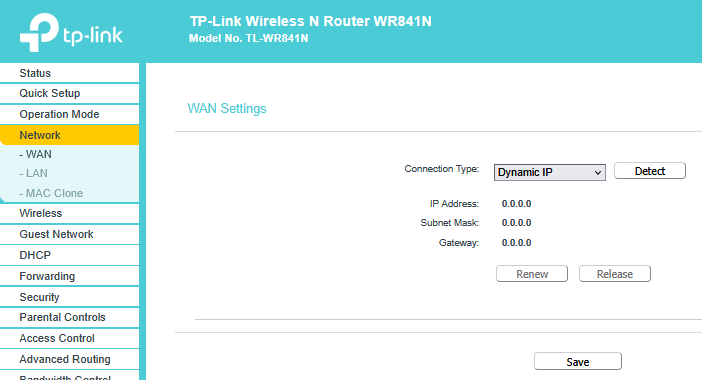
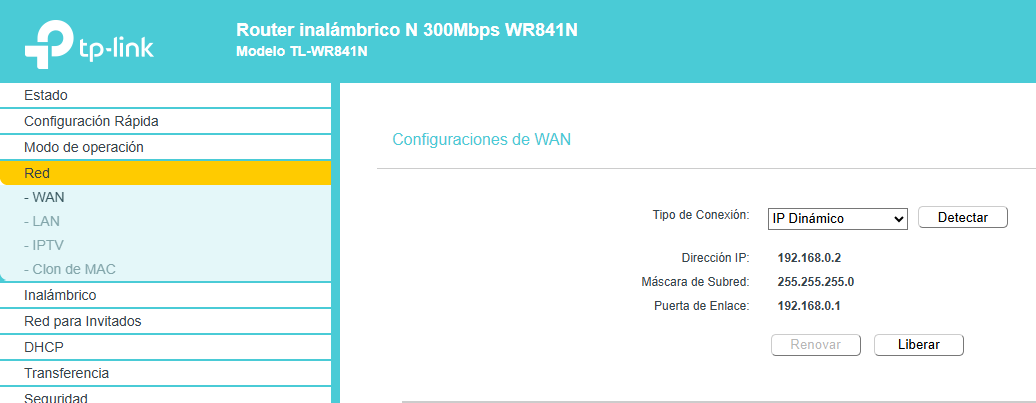
Take a screenshot of your WR841N WAN settings:
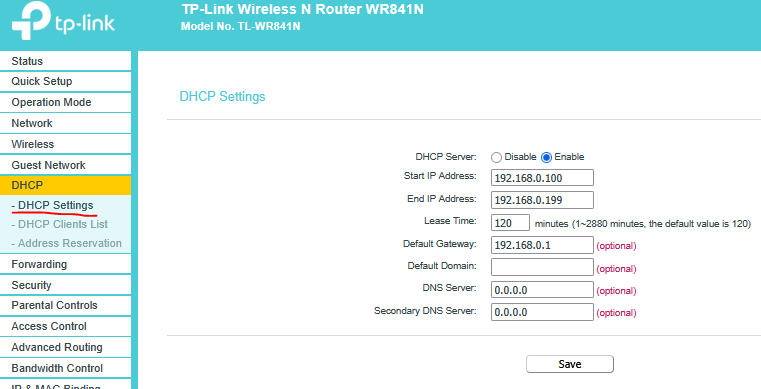
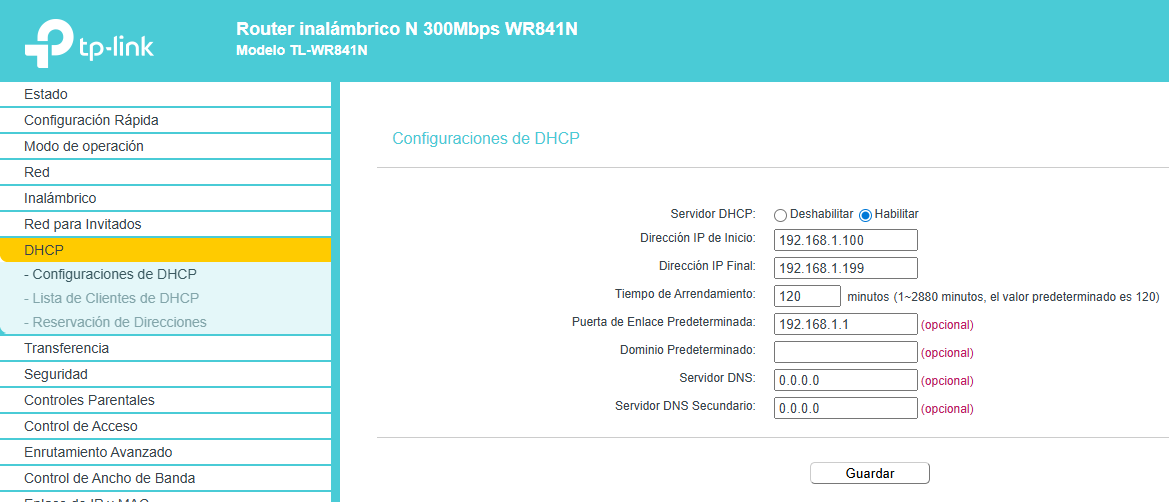
WR841N DHCP settings:
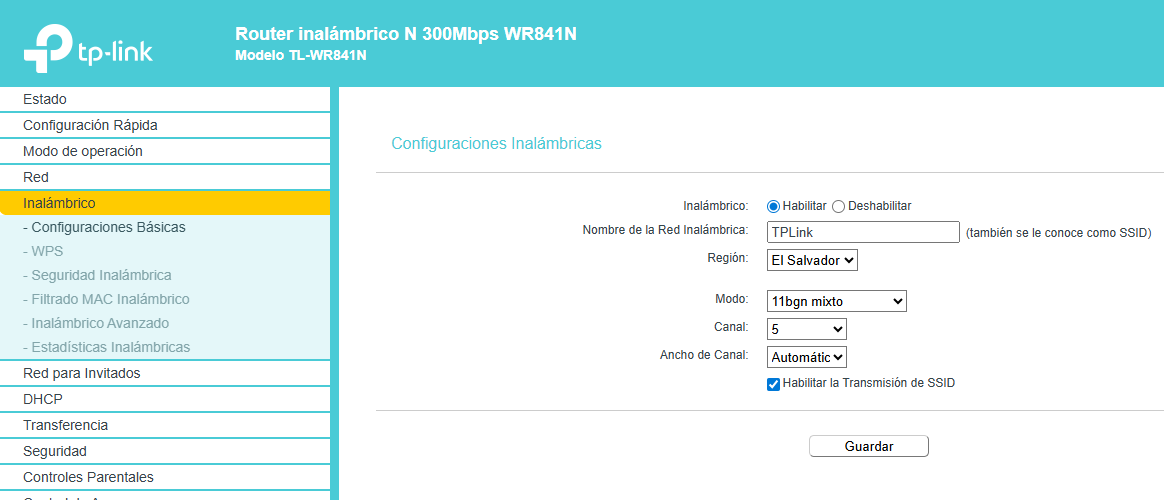
WR841N Wireless Basic Settings:
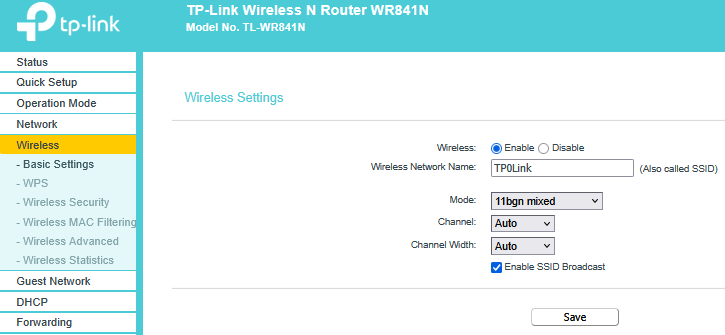
And outpust of the cmd command: ipconfig/all for the wireless adapter (when connected to your WR841N router):
Wireless LAN adapter Wi-Fi 6E:
Connection-specific DNS Suffix . :
Description . . . . . . . . . . . : Intel(R) Wi-Fi 6E AX210 160MHz
Physical Address. . . . . . . . . :
DHCP Enabled. . . . . . . . . . . : Yes
Autoconfiguration Enabled . . . . : Yes
Link-local IPv6 Address . . . . . : fe80::525:398c:af2f:1f9a%3(Preferred)
IPv4 Address. . . . . . . . . . . : 192.168.1.6(Preferred)
Subnet Mask . . . . . . . . . . . : 255.255.255.0
Lease Obtained. . . . . . . . . . : 09 март 2026 17:56:58
Lease Expires . . . . . . . . . . : 18 април 2162 05:36:20
Default Gateway . . . . . . . . . : 192.168.1.1
DHCP Server . . . . . . . . . . . : 192.168.1.1
DHCPv6 IAID . . . . . . . . . . . : 53010411
DHCPv6 Client DUID. . . . . . . . : 00-01-00-01-21-DD-DB-1E-FC-15-B4-E7-4D-18
DNS Servers . . . . . . . . . . . : 192.168.1.1
192.168.1.1
NetBIOS over Tcpip. . . . . . . . : Enabled
- Copy Link
- Report Inappropriate Content
Hi again,
Below prints requested.
But I accidentally discovered something. I have to connect to a VPN for work, and this happened.
File 1: With internet connected to VPN
I was connected to the cable modem's Wi-Fi (with an internet signal) and connected to the VPN, and everything was working normally. When I saw your email requesting "ipconfig /all while connected to the TP-Link", I switched to the TL-WR841N router's network, and I was surprised that at that moment, I was able to connect to the internet. And it worked only when I was connected to the work VPN and switched to TP-Link WiFi (With internet.txt). So, something unlocked the internet when I was connected to the VPN
File 2: Without internet and disconnected from the VPN
Then I disconnected from the VPN (while connected to the TP-Link's network) and immediately lost the internet signal.(Without internet.txt ).
WAN
DHCP
Wireless Basic Settings

- Copy Link
- Report Inappropriate Content
That's most probably because you have Internet access through your work VPN (your VPN client doesn't use split tunneling).
Now do the following:
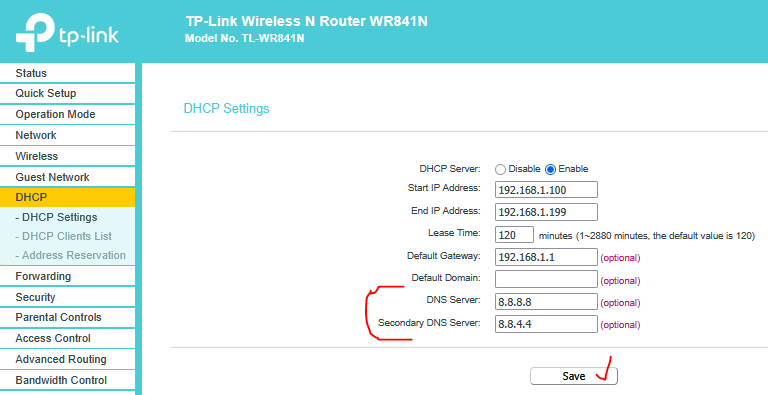
Reboot your WR840N, then connect your laptop to WR840 and test. If you still don't have Internet access do the following:
In CMD issue the commands ping google.com and ping 8.8.8.8 and post their output here.
- Copy Link
- Report Inappropriate Content
Hi again.
I made the changes in both side for DNS as you mentioned and still fails.
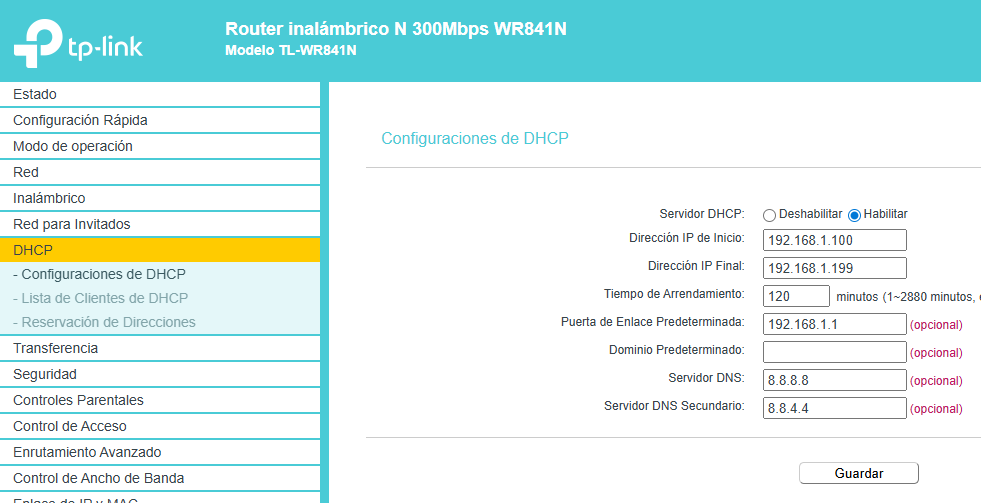
Below the print you requested.
C:\Users\user>ping google.com
Ping request could not find host google.com. Please check the name and try again.
C:\Users\user>ping 8.8.8.8
Pinging 8.8.8.8 with 32 bytes of data:
Reply from 8.8.8.8: bytes=32 time=75ms TTL=117
Reply from 8.8.8.8: bytes=32 time=72ms TTL=117
Reply from 8.8.8.8: bytes=32 time=69ms TTL=117
Reply from 8.8.8.8: bytes=32 time=70ms TTL=117
Ping statistics for 8.8.8.8:
Packets: Sent = 4, Received = 4, Lost = 0 (0% loss),
Approximate round trip times in milli-seconds:
Minimum = 69ms, Maximum = 75ms, Average = 71ms
- Copy Link
- Report Inappropriate Content
Information
Helpful: 0
Views: 1684
Replies: 27
Voters 0
No one has voted for it yet.