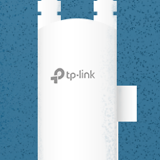
Support in the Tether app for the NE200 Outdoor

Good morning everyone,
I purchased and tried this fantastic NE200-Outdoor. After raising the issue of not being able to manage it remotely via the Tether app, and seeing how many people have reported the same problem, I would like this feature to be introduced in the future.
I use this router as my main router, with several APs downstream in a mountain house that is not always accessible in winter due to snow.
Therefore, it would be convenient to access it remotely via the Tether app, so I could check GB traffic usage, connected clients, run speed tests, and—most importantly—READ SMS messages, etc. All of these things currently require me to be physically there.
Considering the significant cost of this device, I would be very happy with the addition of Tether app support.
Thanks to the entire support team.
- Copy Link
- Subscribe
- Bookmark
- Report Inappropriate Content


Hi all,
I'd like to clarify the current status of remote management for the NE200-Outdoor V1.
After reconfirming with the relevant team, I found that my previous reply was incorrect. I sincerely apologize for the misunderstanding caused by the inaccurate information.
Currently, the NE200-Outdoor v1 does not support remote management through the Tether App. This capability is part of future planning, but we don't have information on when it will be available.
If remote management is important to you, please let us know:
1) How you are using the NE200-Outdoor and what specific remote management features you need.
2) Any other relevant info.
We will log the feature request and forward it to the relevant team to help evaluate future development priorities.
Thank you for your understanding and valuable feedback.
Best Regards
- Copy Link
- Report Inappropriate Content
@LoryBernooo
I am facing the same issue
- Copy Link
- Report Inappropriate Content
Yes I kindly ask as well - to add support for TP Link Cloud management for NE200-Outdoor
- Copy Link
- Report Inappropriate Content
- Copy Link
- Report Inappropriate Content

Ich schreibe Ihnen, um ein anhaltendes Verbindungsproblem zwischen der TP-Link Tether App und meinem NE200-Outdoor v1.0 Router zu melden und zu bestätigen.
Problembeschreibung:
Die Tether-App erkennt das NE200-Outdoor erfolgreich in der Liste „Meine Geräte“. Jedes Mal, wenn ich jedoch versuche, mich mit dem Gerät zu verbinden, um dessen Einstellungen zu verwalten (insbesondere um auf den Administrationsbereich zuzugreifen), zeigt die App die Fehlermeldung „Verbindung fehlgeschlagen“ an.
Es währe schön wenn sie die Tether App kompatibel machen würden.
- Copy Link
- Report Inappropriate Content
- Copy Link
- Report Inappropriate Content
- Copy Link
- Report Inappropriate Content
È un ottimo prodotto, mi aggiungo pure io a richiedere la possibilità di poterlo vedere sulla App Tether.
- Copy Link
- Report Inappropriate Content
- Copy Link
- Report Inappropriate Content

- Copy Link
- Report Inappropriate Content
Hi,
If you want to remotely manage the NE200-Outdoor V1.0 in the Tether App, please try the following steps:
1. Make sure the router's firmware and the Tether App are up to date.
2. Log in to the router's web UI: How to log in to the web management page of TP-Link 5G/4G Router
3. Go to Basic > TP-Link Cloud page to bind your router to a TP-Link account. Then, in the Tether App, you can try to remotely control the NE200-Outdoor.
4. To manage the NE200-Outdoor locally, please log in to the router's web UI.
Best Regards
- Copy Link
- Report Inappropriate Content
Information
Helpful: 10
Views: 2007
Replies: 21
Voters 10