
Home Network Community > DSL Modem Routers > my modem does accept the 0.16 firmware, how to move forward?
my modem does accept the 0.16 firmware, how to move forward?
my modem does accept the 0.16 firmware, how to move forward?
Posts: 2
Helpful: 0
Solutions: 0
Stories: 0
Registered: 2026-03-20

2026-03-20 02:50:48 - last edited 2026-04-20 03:16:43
Posts: 2
Helpful: 0
Solutions: 0
Stories: 0
Registered: 2026-03-20
my modem does accept the 0.16 firmware, how to move forward?
2026-03-20 02:50:48 - last edited 2026-04-20 03:16:43
Tags:
#Firmware Update
I downloaded the firmware from your TP-Link web site for Au, but when try to install it, I got Error 4503, the uploaded file was not accepted.
#1
Options
- Copy Link
- Subscribe
- Bookmark
- Report Inappropriate Content
Thread Manage
Module Manage
Announcement Manage
1 Accepted Solution

Posts: 8241
Helpful: 6755
Solutions: 1674
Stories: 7
Registered: 2013-10-12
Re:my modem does accept the 0.16 firmware, how to move forward?-Solution
2026-03-25 14:43:52 - last edited 2026-04-20 03:16:43
Try updating to VX230v(AU)_V1_240114 release first and upon successful update next use VX230v(AU)_V1_0.16.0 Build 250624.
Use this guide (Case 1) for a reference.
If this was helpful click on the arrow pointing upward to make it blue.
If this solves your issue, click the star to make it blue as a "Recommended Solution".
BTC:149wubkkfoLmNDjDbiTxx4ZU8mpcMA5CJt
Recommended Solution
1
We appreciate your feedback. Feel free to let us know more. Log in to submit feedback.
1
We appreciate your feedback. Feel free to let us know more. Log in to submit feedback.
#4
Options
- Copy Link
- Report Inappropriate Content
Thread Manage
Module Manage
Announcement Manage
3 Reply
Posts: 8241
Helpful: 6755
Solutions: 1674
Stories: 7
Registered: 2013-10-12
Re:my modem does accept the 0.16 firmware, how to move forward?
2026-03-21 00:20:26
You didn't mentioned what's the VX230v current FW region and FW version.
The FW region can be determined by the VX230v bottom sticker:
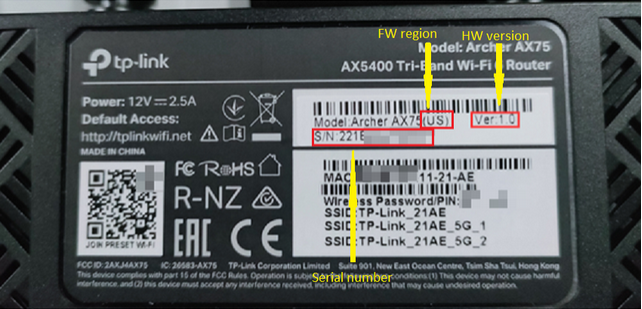
If this was helpful click on the arrow pointing upward to make it blue.
If this solves your issue, click the star to make it blue as a "Recommended Solution".
BTC:149wubkkfoLmNDjDbiTxx4ZU8mpcMA5CJt
1
We appreciate your feedback. Feel free to let us know more. Log in to submit feedback.
1
We appreciate your feedback. Feel free to let us know more. Log in to submit feedback.
#2
Options
- Copy Link
- Report Inappropriate Content
Thread Manage
Module Manage
Announcement Manage
Posts: 2
Helpful: 0
Solutions: 0
Stories: 0
Registered: 2026-03-20
Re:my modem does accept the 0.16 firmware, how to move forward?
2026-03-25 07:21:28
My modem is VX230v(AU) 1.0, current firmware version is 0.13.
0
We appreciate your feedback. Feel free to let us know more. Log in to submit feedback.
0
We appreciate your feedback. Feel free to let us know more. Log in to submit feedback.
#3
Options
- Copy Link
- Report Inappropriate Content
Thread Manage
Module Manage
Announcement Manage
Posts: 8241
Helpful: 6755
Solutions: 1674
Stories: 7
Registered: 2013-10-12
Re:my modem does accept the 0.16 firmware, how to move forward?-Solution
2026-03-25 14:43:52 - last edited 2026-04-20 03:16:43
Try updating to VX230v(AU)_V1_240114 release first and upon successful update next use VX230v(AU)_V1_0.16.0 Build 250624.
Use this guide (Case 1) for a reference.
If this was helpful click on the arrow pointing upward to make it blue.
If this solves your issue, click the star to make it blue as a "Recommended Solution".
BTC:149wubkkfoLmNDjDbiTxx4ZU8mpcMA5CJt
Recommended Solution
1
We appreciate your feedback. Feel free to let us know more. Log in to submit feedback.
1
We appreciate your feedback. Feel free to let us know more. Log in to submit feedback.
#4
Options
- Copy Link
- Report Inappropriate Content
Thread Manage
Module Manage
Announcement Manage
Posts: 2
Helpful: 0
Solutions: 0
Stories: 0
Registered: 2026-03-20
2026-03-20 02:50:48 - last edited 2026-04-20 03:16:43
Posts: 2
Helpful: 0
Solutions: 0
Stories: 0
Registered: 2026-03-20
Information
Helpful: 0
Views: 349
Replies: 3
Voters 0
No one has voted for it yet.
Tags
Report Inappropriate Content
Transfer Module
New message