Archer BE550 UNABLE TO ACCESS HTTPS SERVER

Archer BE550 UNABLE TO ACCESS HTTPS SERVER

Archer BE550 UNABLE TO ACCESS HTTPS SERVER
Yesterday
Model: Archer BE550  
Hardware Version:
Firmware Version:

I upgrade my router to Archer BE550, and now I am not able to use like the older one.

1. I used to connect two computers (running windows) on the same network.

2. From one computer I would do https://192.168.0.148/ and hit the default IIS page running on the other machine. I could also use the machine name.


Now with this new Archer BE550, I am no longer able to do so. The only changing paremeter in my setup is the router replacement.


Can someone tell me what I need to do/set on the Archer BE550 to get my setup working again?

  0      
  0      
#1
Options
1 Reply
Re:Archer BE550 UNABLE TO ACCESS HTTPS SERVER
Yesterday

  @MausNy 


Hi,


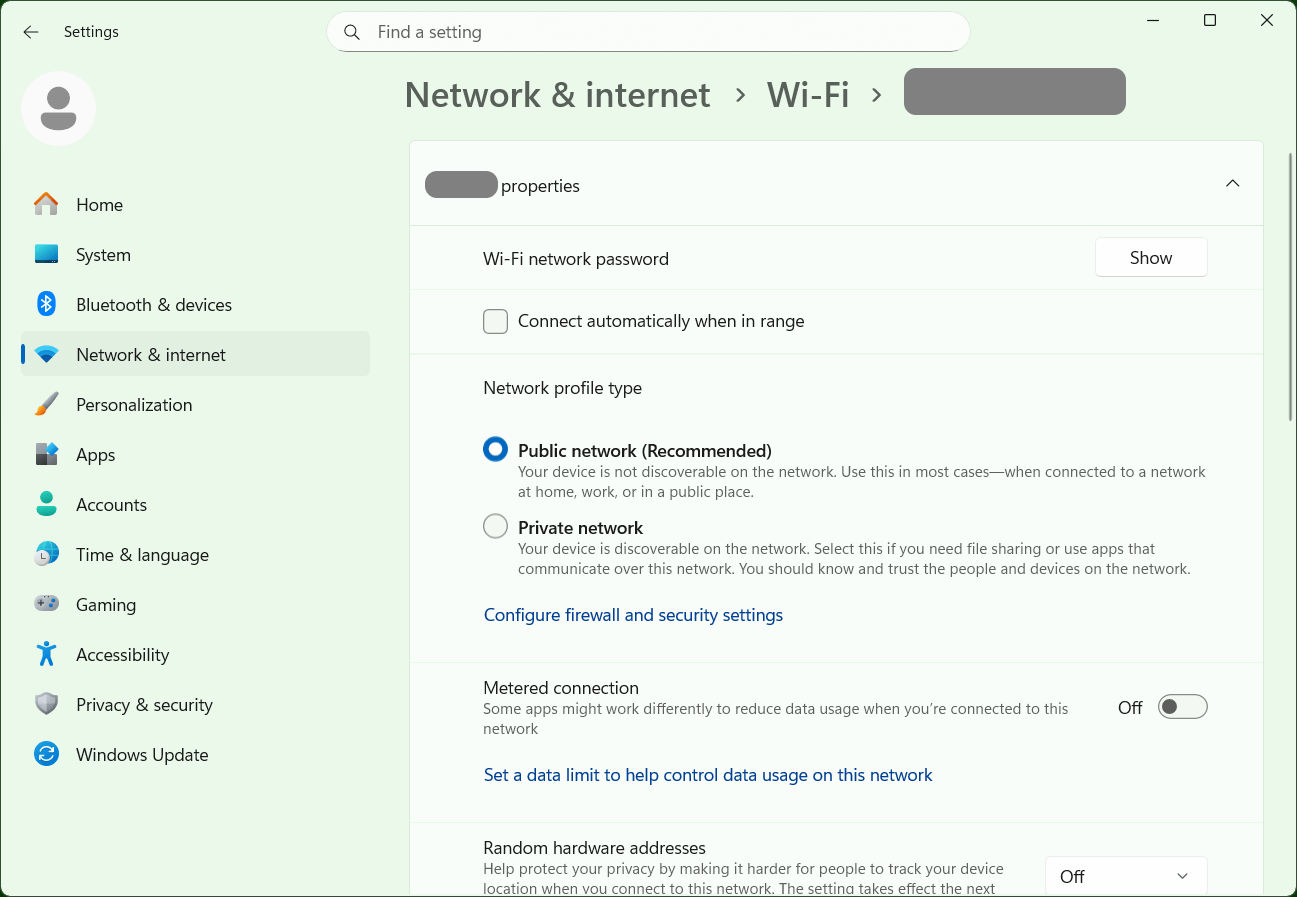
When newer versions of Windows connect to a new network (i.e. new router) they usually set the connection to "Public" by default (like shown in the picture). With this setting the firewall blocks basically everything. I suggest you check this on the computer that runs IIS and if this was the case switch the connection to "Private".


  1  
  1  
#2
Options