
RE700X Ethernet Backhaul not working with Archer C80

RE700X Ethernet Backhaul not working with Archer C80

RE700X Ethernet Backhaul not working with Archer C80
2026-03-26 17:43:47 - last edited 2 weeks ago
Model: RE700X   Archer C80  
Hardware Version: V1
Firmware Version: 1.3.15 Build 20251124 Rel. 43984

Hi everyone,

Could someone help me out with a networking issue?


In my living room, I have an Archer C80 (v1.0, Firmware 1.14.30 Build 250729) connected via Ethernet cable to my ISP’s router.


In two other rooms, I have wall-mounted Ethernet ports. One of these ports is connected to a switch that feeds several devices, all of which are working perfectly.

In those two rooms, I’ve installed two RE700X (v1.0, Firmware 1.3.15 Build 20251124) units. As far as I know, this firmware version supports Ethernet Backhaul. Both the Archer C80 and the RE700X units have EasyMesh enabled.


The Problem: When I connect the RE700X units via Ethernet cable to use Ethernet Backhaul, most of the times, the Wi-Fi from the RE700X units stops working properly.

A very few times, I have Wifi internet on mobile devices, but most of the times, don't.


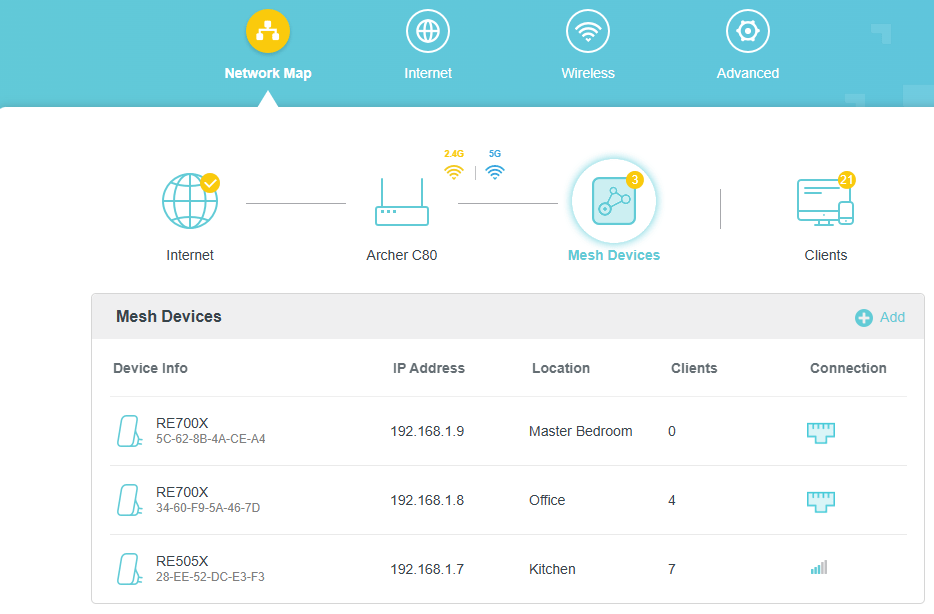
They both appear as "Mesh Devices" on the Archer C80 management page with no apparent configuration errors. Mobile devices can successfully connect to the RE700X Wi-Fi, but there is no internet access provided through them.


What am I missing here? Any help would be greatly appreciated!


Archer C80:


0
0
#1
1 Accepted Solution
Re:RE700X Ethernet Backhaul not working with Archer C80-Solution
2026-04-02 02:31:13 - last edited 2 weeks ago

Hello @RFP ,

Welcome to our community.


May I know if your network topology diagram is as follows:

ISP modem—C80 )))(((RE505X

  ├──RE700X

  └──RE700X

(Note: — stands for wired connection,)))((( stands for wireless connection )


Is there a switch between the C80 and RE700X? If yes, remove it for a comparative test.

What is the error message when the wireless clients are unable to connect to the RE700X?

Please temporarily remove the other two extenders and test the wireless connection for one RE700X.


Welcome to Community! Get the latest posts: △New Firmware for Archer GE550/GE650 V1 Introduces AI-QoS, EasyMesh IoT Expansion, and More! △New Firmware Releases for Archer BE805 V1/BE450 V1 to Support VPN Merge, New ECO Mode, and More! More posts, please see: △ Get the Ongoing Pre-release Firmware for Wi-Fi Routers Here— Subscribe for Updates! Urgent problems with your Wi-Fi Router, Range Extender, or DSL Modem? Please reach out via private Messages or @Joesph-TP in your new thread directly. Click Or ☆Recommended Solution if the post/answer helps.
Recommended Solution
0
0
#2
1 Reply
Re:RE700X Ethernet Backhaul not working with Archer C80-Solution
2026-04-02 02:31:13 - last edited 2 weeks ago

Hello @RFP ,

Welcome to our community.


May I know if your network topology diagram is as follows:

ISP modem—C80 )))(((RE505X

  ├──RE700X

  └──RE700X

(Note: — stands for wired connection,)))((( stands for wireless connection )


Is there a switch between the C80 and RE700X? If yes, remove it for a comparative test.

What is the error message when the wireless clients are unable to connect to the RE700X?

Please temporarily remove the other two extenders and test the wireless connection for one RE700X.


Welcome to Community! Get the latest posts: △New Firmware for Archer GE550/GE650 V1 Introduces AI-QoS, EasyMesh IoT Expansion, and More! △New Firmware Releases for Archer BE805 V1/BE450 V1 to Support VPN Merge, New ECO Mode, and More! More posts, please see: △ Get the Ongoing Pre-release Firmware for Wi-Fi Routers Here— Subscribe for Updates! Urgent problems with your Wi-Fi Router, Range Extender, or DSL Modem? Please reach out via private Messages or @Joesph-TP in your new thread directly. Click Or ☆Recommended Solution if the post/answer helps.
Recommended Solution
0
0
#2
