
BE9300 firmware version 1.2.3 breaks all sorts of stuff

Ive been wrestling with my TrueNAS server for days and days trying to figure out whats wrong. I get periodic lag while connecting, apps being slow, things like Home Assistant sensors being flakey, etc etc. And I finally remembered I updated the router firmware around the same time this started happening, so I connected my PC to a switch the server is on, bypassing the router, and suddenly everything started working perfectly. And its not just LAN traffic. I am having problems with app updates from the internet as well.
I found a thread saying 1.2.2 was broken, and that 1.2.3 breaks things. I had the opposite experience. Everything was fine UNTIL 1.2.3. Oh and also, the tether app no longer connects to the router?
- Copy Link
- Subscribe
- Bookmark
- Report Inappropriate Content
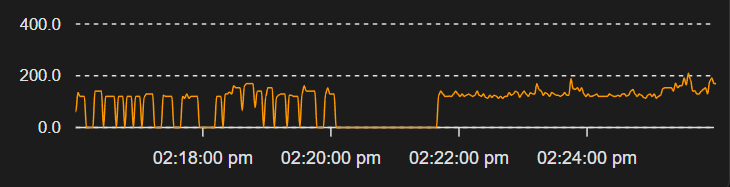
Example of the issue in Home Assistant, where the sensor was glitchy over the LAN, and the drop out is me flashing firmware 1.2.1, then it resuming proper operation. It looked exactly the same when bypassing the router earlier.
- Copy Link
- Report Inappropriate Content


Hello @evildoer ,
Thanks for contacting our community.
May I know if your network topology diagram is as follows:
Internet
|
Modem [Bridge mode]
|
Router [Handles NAT, DHCP, etc.]
|
|--- Server
|--- Clients
What is the network connection type? Is it PPPoE+VLAN ID, or Dynamic IP?
You mentioned that you’ve rolled back the firmware to 1.2.1, and Home Assistant is now working properly. Are other devices, such as the TrueNAS server, working properly now as well?
- Copy Link
- Report Inappropriate Content
Same config as you described.
Internet > Modem(Bridge) > Router ( NAT, DHCP, etc) > Servers and clients
Connection type is Dynamic IP mode.
And yes, 100% of the problems I was having cleared up when rolling back to 1.2.1
Oh and I mentioned a problem with the tether app. That was just my fault. My phone had tailscale running, so ignore that part.
- Copy Link
- Report Inappropriate Content
When one of the first problems I noticed right after installing 1.2.3 was that I couldnt update an app on TrueNAS, and I worked with an AI to track down the problem, and this might point to what the problem might be.
truenas_admin@truenas[~]$ for i in {1..10}; do dig +short ghcr.io; done
140.82.113.33
;; communications error to 1.1.1.1#53: timed out
;; communications error to 1.1.1.1#53: timed out
140.82.113.34
;; communications error to 1.1.1.1#53: timed out
140.82.112.33
;; communications error to 1.1.1.1#53: timed out
;; communications error to 1.1.1.1#53: timed out
;; communications error to 1.1.1.1#53: timed out
140.82.113.33
140.82.113.33
140.82.113.33
140.82.112.33
;; communications error to 1.1.1.1#53: timed out
140.82.114.33
140.82.113.33
140.82.112.34
This was not a problem with ghcr.io, and it also had a problem when forcing to 8.8.8.8 as well. And the problem was continuous the entire time with v1.2.3. As soon as I updated to 1.2.1 I am now getting zero of these errors.
Also the TrueNAS server is the only device on my network where I was using the custom 1.1.1.1 and 8.8.8.8 dns servers. The rest were using the ISPs DHCP assigned DNS servers. And as far as I know, it was only this server that was having these problems. And any device connecting to that server THROUGH the router had issues with it. If you were connected to the server outside of the router, like on a separate switch I have, I did not have any issues.
- Copy Link
- Report Inappropriate Content
Information
Helpful: 0
Views: 114
Replies: 4
Voters 0
No one has voted for it yet.