
Deployment Difficulties - guidance needed

Hi Guys
Been Omada user for many years so familier with the usual VLN/LAN/AP/SWITCH setup.... however had a play with a Gateway for the first time - having used a variety of UTM devices with Omada previously. The alure of Omada to add Gateway/WAN visibility was worth exploring.
My primary issue is that (remember - only swapping out UTM to Gateway prividing DHCP services) - if a wifi guest using a SSID on a specific VLAN requests DHCP - it gets an address for another subnet (which is on another VLAN).
Any ideas what would cause this behaviour?
I have been around the loop server times to check and double check the Gateway itself and the switch ports its connected to (same ports as previously used UTM).
Second question - in the image below - why would the gateway switch connections show RED as in not active?
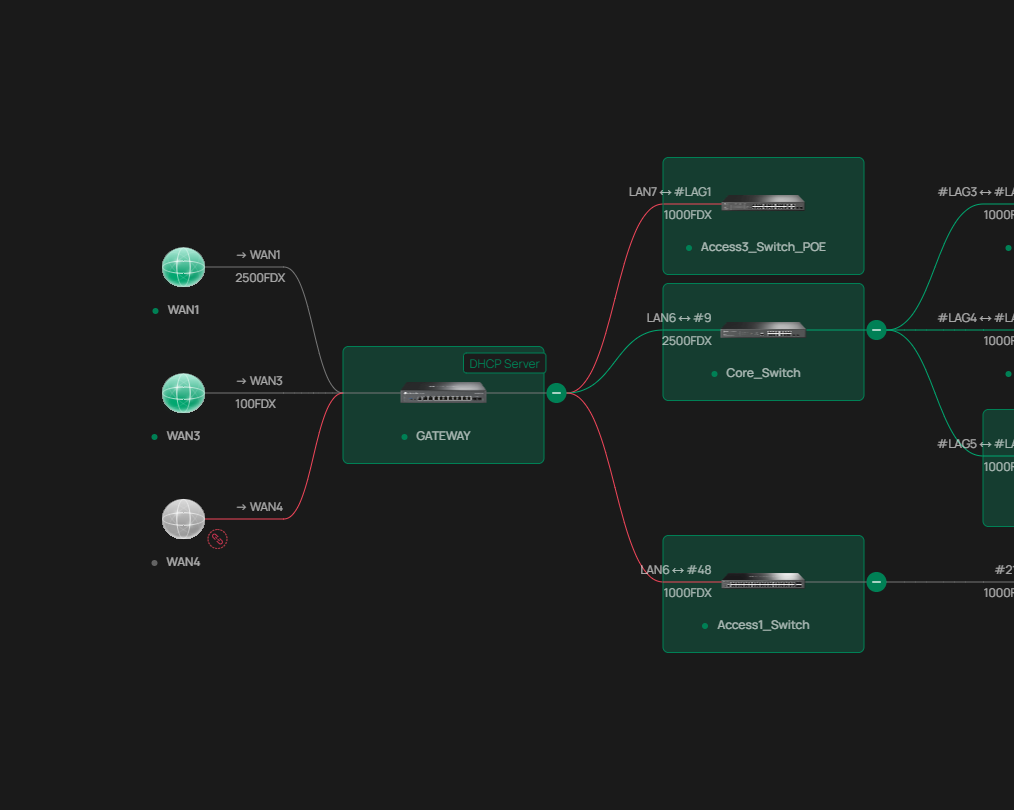
My last question - is there, other than the actual TP-Link manual, and decent references in terms of websites, Videos or other guides so I can read up and check what I have missed? Most google searches have resulted in basic Gateway setups (My gateway is using 10 ports and 9 VLANS).
Many thanks


