Better Support for TP-Link BE230 for Watching IPTV Multicast

Better Support for TP-Link BE230 for Watching IPTV Multicast

Better Support for TP-Link BE230 for Watching IPTV Multicast
Saturday - last edited Saturday
Tags: #IPTV
Model: Archer BE230  
Hardware Version: V1
Firmware Version: Archer BE230(EU)_V1_1.2.5 Build 20260108

Hello,

My name is Quoc Bao and I am from Vietnam. I am currently using the TP-Link BE230 router with my ISP (FPT), and I would appreciate some assistance.

  1. Regarding QoS:
    At present, this router only supports manual entry of upload and download bandwidth values. I would like to know whether TP-Link plans to introduce a dynamic QoS feature, so users would not need to input these parameters manually. My home internet bandwidth fluctuates constantly and does not have a fixed value. Although my contract specifies 300 Mbps for both upload and download, actual speeds can reach 500, 700, or even 900 Mbps.
  2. Also regarding QoS:
    I would like to ask whether the TP-Link BE230 offers any solution to assign the highest priority to UDP traffic. My ISP (FPT) uses IPTV based on Multicast UDP. However, enabling IGMP Snooping alone is not sufficient—whenever I download large files, my TV begins to stutter and freeze.
    The router provided by my ISP includes a QoS mechanism that prioritises UDP traffic over TCP regardless of the total bandwidth, and also assigns the highest priority to the STB device. Does the TP-Link BE230 provide a similar feature or configuration?

Thank you for your support.

0
0
#1
2 Reply
Re:Better Support for TP-Link BE230 for Watching IPTV Multicast
Yesterday

Hello @tqucbo ,

Regarding the two features you mentioned, there is currently no definitive information on whether they will be implemented.
The first point: Have you tried simply increasing the upstream and downstream bandwidth values ​​within the QoS settings?
As for the second point, while there is currently no "highest priority" setting available, you can designate specific devices as having priority. Have you tried this?


For specific feature requests, you can also submit your feedback here: Feature Request (Routers) If other users share your needs, they are also welcome to participate in the voting process.

Welcome to Community! Get the latest posts: △New Firmware for Archer GE550/GE650 V1 Introduces AI-QoS, EasyMesh IoT Expansion, and More! △New Firmware Releases for Archer BE805 V1/BE450 V1 to Support VPN Merge, New ECO Mode, and More! More posts, please see: △ Get the Ongoing Pre-release Firmware for Wi-Fi Routers Here— Subscribe for Updates! Urgent problems with your Wi-Fi Router, Range Extender, or DSL Modem? Please reach out via private Messages or @Joesph-TP in your new thread directly. Click Or ☆Recommended Solution if the post/answer helps.
0
0
#2
Re:Better Support for TP-Link BE230 for Watching IPTV Multicast
Yesterday

@Joseph-TP

Thank you for your response.


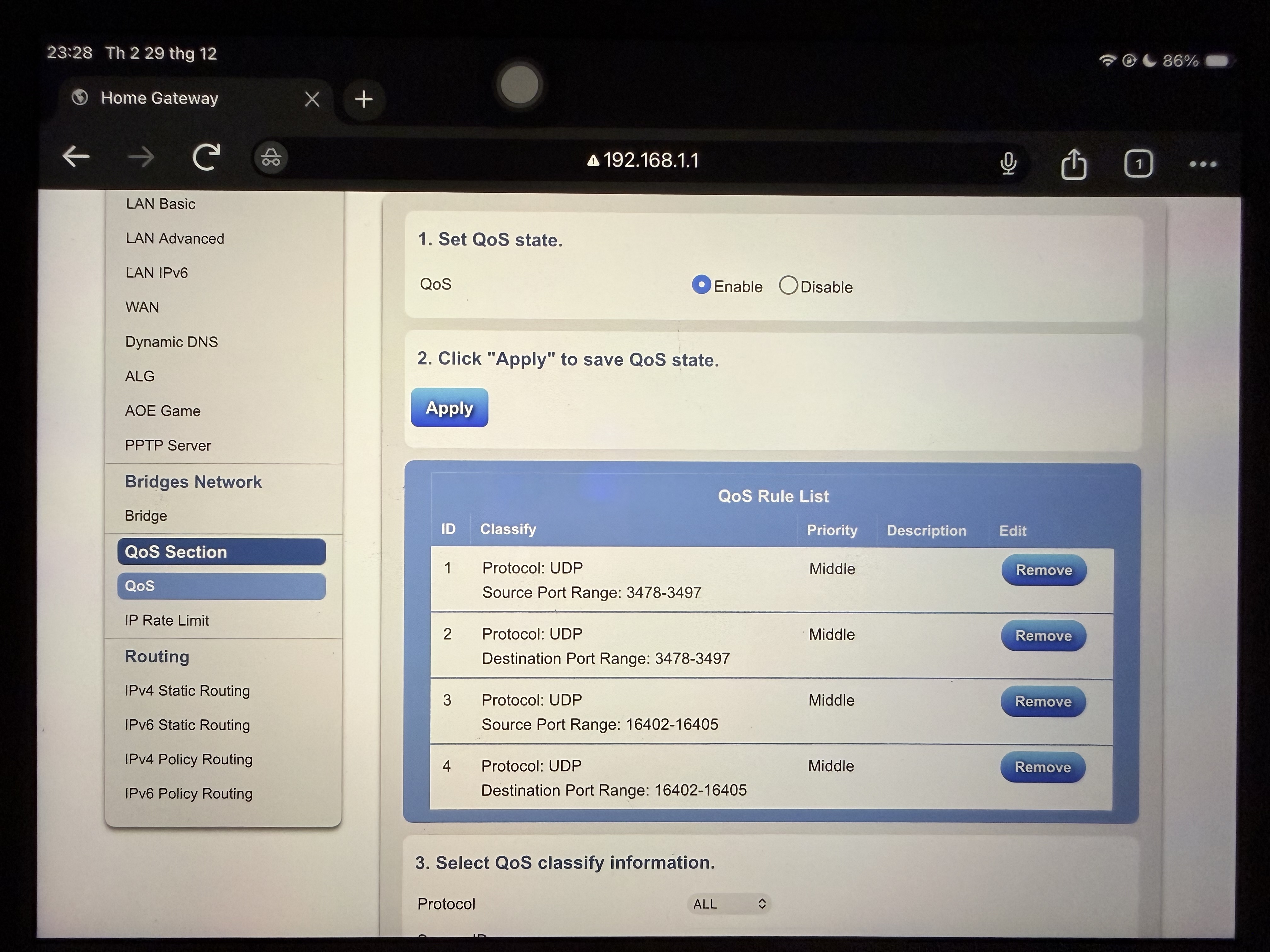
The image above shows the QoS settings on the default device supplied by my ISP. In that configuration, the priority level for UDP traffic on specific ports is set to Medium. The purpose is to ensure that even when heavy file downloads are using nearly all available bandwidth, IPTV Multicast IGMP traffic over UDP can still run smoothly and remain stable.


At present, this kind of protocol- and port-specific QoS functionality does not appear to be available on TP-Link products in general, not only on the BE230.


I have already tried setting the IPTV set-top-box to the highest priority level, but in practice this had no noticeable effect. It does not resolve the issue, because TP-Link’s QoS system fundamentally prioritises devices mainly through TCP traffic rather than effectively managing UDP-based IPTV traffic.

0
0
#3