Port forwarding with deco XE75 pro

Port forwarding with deco XE75 pro

Port forwarding with deco XE75 pro
Saturday
Model: Deco XE75 Pro  
Hardware Version: V3
Firmware Version: 1.3.1 buld 20251023 rel 477884

i am having trouble port forwarding anything  through Deco  i have followed all the guides and  still cant get it to work for me , 


i have previously had port forwarding working  with previous routers  like asus  with no issue,  i have been tring to run a server for games such as  palword and  enshrouded  which have both previously worked


i have checked for open ports and they can never be found no matter what ports oi try to open 


Server Machine
windows 11


Networking Gear & Setup Details
TP link Deco mesh


Who is your internet service provider?
tpg, I have spoken to them and there is nothing at their end that should be stopping the open port


Please list the make and model of your modem and router?
Deco XP75 Pro - master and 2 satellites. 


Do you have any additional network hardware, like additional routers or managed switches?
WAN goes straight from the incoming fibre box to the Deco master


Does your network have any VPNs, proxy servers, or enterprise-grade security?
No


I have followed all the steps   in the articles i could find for trouble shooting and still come up with no solution

Step 1: Make sure the server is accessible from the internal network
yes


Step 2: Check the port forwarding settings in the router.

service type: custom
service name: Enshrouded
internal ip: 192.168.68.54
internal port: 15636
external port: 15636
protocol: TCP & UDP

I have tried other ports for Minecraft arc palworld all closed
I have tried smpt http pop3 ports all closed
i have tried opening ports on different computers on the network , still all closed


Step 3: Check the firewall setting.
off


Step 4: Pay attention to the WAN IP address in the status page
router has a public ip


Step 5: Check the IP setting on the client.
I have  reserved the ip in the deco app for this machine 


0
0
#1
6 Reply
Re:Port forwarding with deco XE75 pro
Sunday

  @Memnus 


There is a brand new beta patch out for your deco XE75 pro I would try the new beta first to see if it fixes the issue.


You can read more about the beta here


If that doesn't fix the issue try the suggestions listed below.


How to Set Up Port Forwarding on Your Deco XE75 Pro:

Port Forwarding allows you to make specific devices or services on your home network accessible from the internet by forwarding external requests to designated internal devices or ports. This is commonly used for gaming, remote desktop, web servers, and other applications that require remote access.

To configure Port Forwarding on your Deco (which must be in Router mode):
1. Open the Deco app
2. Navigate to MORE > Advanced > NAT Forwarding > Port Forwarding
3. Follow the configuration instructions detailed in this FAQ: https://www.tp-link.com/support/faq/1797/

Important Notes:
• Port Forwarding is only available in Router mode, not in Access Point mode
• The Deco app will automatically create an address reservation for the selected device to ensure it always receives the same IP address via DHCP (this prevents port forwarding from failing if the device's IP changes)

If Port Forwarding Still Isn't Working:

Here are some troubleshooting steps:
1. Make sure the server/device is accessible from within your internal network first
2. Verify you are using the public WAN IP address of the Deco to access the server • if your WAN IP is not a public one, port forwarding will not work
3. Check the firewall settings on your server/device to confirm it allows traffic from the external Internet

If you've tried these steps and the issue persist please let us know. 

Need help with the Deco app, setup, Ethernet backhaul, network switch or rolling back firmware? Router or AP mode? https://community.tp-link.com/us/home/forum/topic/699816?page=1
0
0
#2
Re:Port forwarding with deco XE75 pro
Sunday

  @HelpFixDecoApp 


thanks for the automated response , 


i have updated the firmware as suggested , this has not resolved the issue ,


i have gone through and tried opening a port again  following the instructions , but its still closed.


the operation mode if wiifii router

the ip address is reserved  for the device


the  device is accessible  in the local network


deco is using a public ip


firewall have been turned off


still cant figure out where the block is happening


0
0
#3
Re:Port forwarding with deco XE75 pro
Sunday - last edited Sunday

  @Memnus 


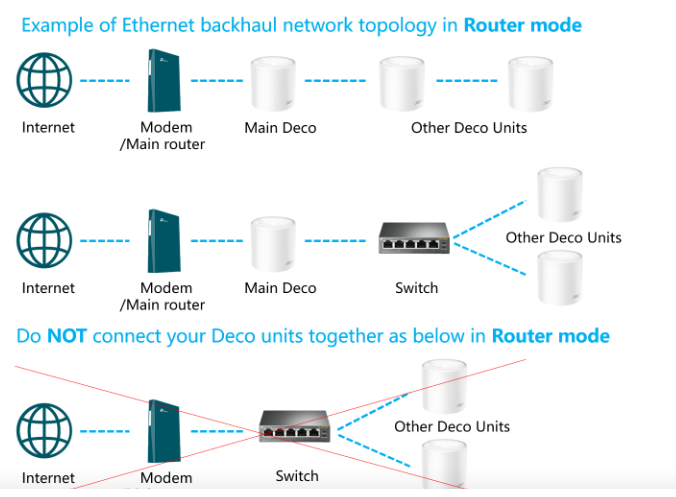
We shall see if we can get to the bottom of it if not I will have you send your logs in and have them reviewed by one of the senior engineers. What example from below best describes your network topology? 


Need help with the Deco app, setup, Ethernet backhaul, network switch or rolling back firmware? Router or AP mode? https://community.tp-link.com/us/home/forum/topic/699816?page=1
0
0
#4
Re:Port forwarding with deco XE75 pro
Yesterday

  @HelpFixDecoApp 


i believe the top one best describes the topology of my system , 


but its not accurate as such 


it goes from the incoming cable  to NBN box ,  then the main deco  in router mode from there, it is wired connection directly to the pc im running the server on and to a switch that hace 3 other pc  and a printer . there are 2 other deco units  forming the mesh connected witlessly  to the main deco unit


my ISP it TPG , in Australia.


i have not had any port forwarding issue with them in the past and i have already called them to ask if there would be anything on their end that would be blocking port forwarding , i was told there was not.


what logs do i need to collect and from where?

0
0
#5
Re:Port forwarding with deco XE75 pro
Yesterday

@Memnus 


Taken from google - TPG in Australia uses CGNAT (Carrier-Grade NAT) for most residential NBN and home wireless broadband services to manage IPv4 scarcity. While dynamic public IPs were previously common, TPG now typically assigns private IPs, restricting port forwarding, gaming (NAT type issues), and remote access.


According to this post - https://community.tp-link.com/us/home/forum/topic/861006?replyId=1680290https://community.tp-link.com/us/home/forum/topic/861006?replyId=1680290


"That said, Carrier‑Grade NAT is widely used by ISPs and usually doesn't impact standard browsing or speed tests. However, CGNAT can affect certain use cases. These can commonly include things like port forwarding, inbound connections, some VPN configurations, online gaming NAT types, and remote access in some scenarios.That said, Carrier‑Grade NAT is widely used by ISPs and usually doesn't impact standard browsing or speed tests. However, CGNAT can affect certain use cases. These can commonly include things like port forwarding, inbound connections, some VPN configurations, online gaming NAT types, and remote access in some scenarios."


From the same post - the recommended step to resolve this behavior is to contact your ISP to ask whether a public IPv4 or IPv6 connection is available.


You are still welcome to submit your logs by using the link below. 


How to submit Deco APP log


Once they have been submitted you should get an email with a TKID number please reply to this post with your TKID number.


Thanks 

Need help with the Deco app, setup, Ethernet backhaul, network switch or rolling back firmware? Router or AP mode? https://community.tp-link.com/us/home/forum/topic/699816?page=1
0
0
#6
Re:Port forwarding with deco XE75 pro
17 hours ago

  @Memnus 

One way to tell for sure if you are behind CGNAT from your ISP is to go into the Deco app: 

1. click on "More"

2. Click "Internet Settings"


Take a screenshot with your phone or just tell us what it says for "IP Address"


Basically if its in the Internet IP is in the range between

100.64.0.0 and 100.127.255.255 then you are behind CGNAT


If thats the case then you need to do what has been advised and request them to remove CGNAT from your account. Or you may be able to purchase a static IP.


If all else fails you could get a VPN with portforwarding included from someone like purevpn

-- Disclaimer: I am not a TP-Link Employee, just a user (like you), installer and networking professional
0
0
#7