
T3U runs a terrible speeds and does not connect via SuperSpeed, only HighSpeed

T3U runs a terrible speeds and does not connect via SuperSpeed, only HighSpeed

T3U runs a terrible speeds and does not connect via SuperSpeed, only HighSpeed
a week ago
Model: Archer T3U Plus  
Hardware Version:
Firmware Version:

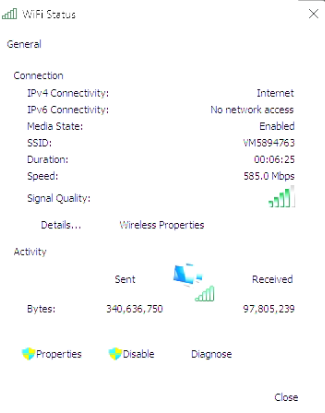
I recently purchased a T3U network adapter for my windows 11 computer, and when checking the speeds with my phone, it runs at around 400-500mbps, but with the T3U plugged into my computer, it only gives at maximum around 70mbps. I also viewed the port information with USB Tree VIewer, and despite the port being 3.0, and testing it in 4 ports in my computer (all 3.0+), it never returned to work at SuperSpeed, it only worked at HighSpeed. I have tried installing different versions of drivers, the realtek chipset driver does not work on windows 11, other devices work at 3.0, and I have no idea what the issue is. I have tried everything obvious so dont tell me to make sure all other ports are disabled, only the adapter is enabled, it is on 5GHz, and here is a screenshot of the wifi link screen. Please get back to me soon.

0
0
#1
1 Reply
Re:T3U runs a terrible speeds and does not connect via SuperSpeed, only HighSpeed
Tuesday

Hello @alfie_dearden ,

Welcome to our community.


Here are some additional steps based on your situation:

1. Download speed is typically 30–50% of the link speed shown for wireless adapters. You can check your adapter's current link speed using this guide to see if your speed is within the expected range: How to check the associated/link speed on a wireless client
2. Since you're already on 5 GHz, make sure your router's 5 GHz channel settings are optimized — recommended channels are 36/40/44/48 with 80/160 MHz width.
3. Install the latest driver from the TP-Link download center: https://www.tp-link.com/support/download/ — for Windows 11, download the Windows 10 x64 driver if no dedicated Windows 11 driver is listed.


Best Regards.

Welcome to Our Community! Get the latest posts: △New Firmware for Archer GE550/GE650 V1 Introduces AI-QoS, EasyMesh IoT Expansion, and More! △New Firmware Releases for Archer BE805 V1/BE450 V1 to Support VPN Merge, New ECO Mode, and More! More posts, please see: △ Get the Ongoing Pre-release Firmware for Wi-Fi Routers Here— Subscribe for Updates! Urgent problems with your Wi-Fi Router, Range Extender, or DSL Modem? Please reach out via private Messages or @Joesph-TP in your new thread directly. Click Or ☆Recommended Solution if the post/answer helps.
0
0
#2