
SG3452P Repeatedly Disconnecting from Omada Cloud Controller
SG3452P Repeatedly Disconnecting from Omada Cloud Controller

Hi all,
We are experiencing a recurring issue across 10 sites where the SG3452P repeatedly goes into a heartbeat missing loop and disconnects from the Omada Cloud-Based Controller throughout the day and night, then reconnects automatically after 10 to 13 minutes. This cycle repeats indefinitely with no manual intervention.
Setup at each affected site:
- Switch: SG3452P V3.30, firmware 3.30.0 Build 20230818 Rel.73626
- Controller: Omada Cloud-Based Controller (CBC)
- Gateway: FortiGate FG40F
- APs: EAP613
Symptoms:
- Switch cycles between Heartbeat Missed, Disconnected, and Reconnected repeatedly all day
- Recovery time is consistently 10 to 13 minutes across every event
- APs at the same sites remain connected to the Cloud Controller throughout every event
- All client devices remain online and network traffic is unaffected during every event
- Switch responds to ping from the FortiGate during every disconnect event
What we have ruled out:
- Network path issue: switch is pingable throughout every event and APs stay connected on the same path
- ISP instability: confirmed via FortiGate, no WAN drops during events
- Firmware as a blanket issue: other sites running the same firmware and hardware have zero occurrences
Screenshot:
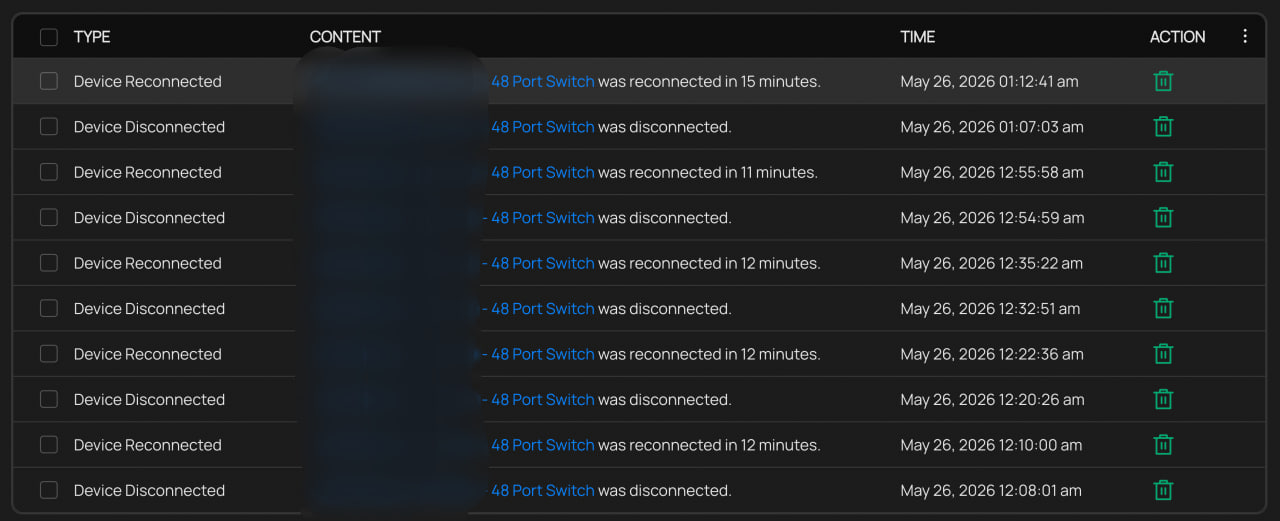
What we have found: As shown in the screenshot above, log analysis from one affected site over 7 days recorded 379 disconnect events averaging 54 per day. The consistent 10 to 13 minute recovery time across all events points to an internal management process crashing and restarting rather than a network-level issue.
The only consistent difference between affected and stable sites is wired client activity volume. Affected sites generate 2,000 to 5,500 wired client connection and disconnection events per day. Stable sites with the same switch, firmware, and topology generate approximately 40 to 44 per day. Affected sites are high-traffic retail environments with frequent device turnover throughout the day.
We also note that firmware versions 3.30.4 through 3.30.14 include fixes for abnormal spanning tree convergence under high client counts and adoption stability improvements. Our affected switches have not received any of these updates as they remain on the August 2023 build.
We are planning to test a firmware upgrade on one site and monitor results. Has anyone experienced something similar or found a resolution? Any input from TP-Link engineers would be appreciated.
- Copy Link
- Subscribe
- Bookmark
- Report Inappropriate Content


Hi @oewncj
- Have you seen similar cases from other clients where the heartbeat missing loop occurs specifically on high-traffic sites while low-traffic sites on the same firmware remain stable?>>>yes, this happened.
I understand your concern, but I truly do not have more details available on my end. Network equipment indeed requires maintenance, and using firmware that is three years old is not recommended. Instead of dwelling on exactly which version fixed this issue, we generally advise using the latest firmware
The root cause of this issue is related to the relatively small MTU of some links on the public network. The latest firmware has resolved this problem.
Strictly following the upgrade steps I previously outlined will most likely not cause any issues.
https://community.tp-link.com/en/business/forum/topic/865062?replyId=1697508
However, as I mentioned before, there are many unknowns during the upgrade process, plus you are managing it via the cloud controller, so I cannot guarantee a 100% success rate. Therefore, I recommend upgrading in batches during off-peak hours to minimize any potential impact.
- Copy Link
- Report Inappropriate Content
Information
Helpful: 0
Views: 460
Replies: 11
Voters 0
No one has voted for it yet.