Techical assistance please

Techical assistance please

Techical assistance please
a week ago - last edited a week ago
Model: Archer AXE5400  
Hardware Version: V1
Firmware Version: latest.


I have starlink in bypassmode, and so far this router tp link  has been solid.


I did try to use ipv6 set up in bypassmode (ipv6 bridge) and my Xbox would not connect to certain games anymore, not sure why?


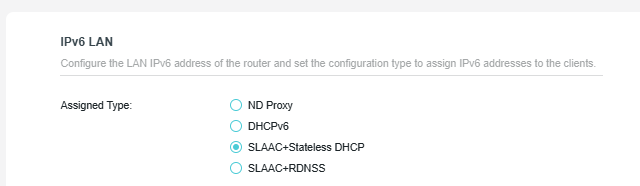
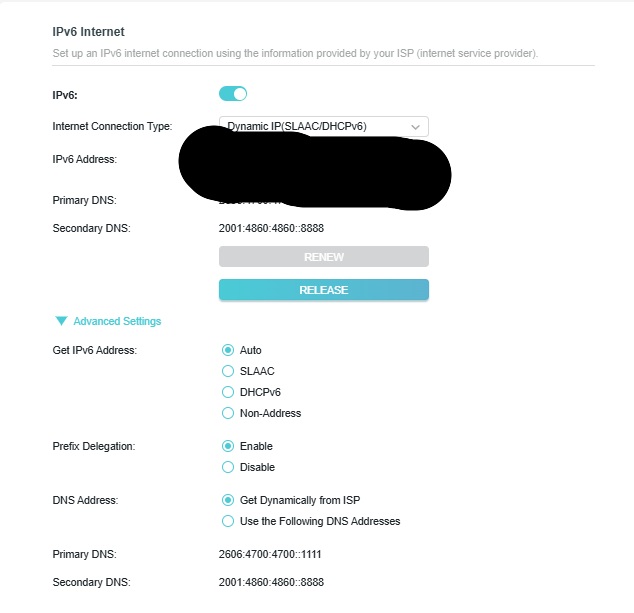
Leaving ipv6 set up on auto seems fine and works well with most  games apart from the game  (battlefield). I would like to make sure my ipv6 is set up correctly?


So far ipv6 works on xbox and pc, apart from android where I don't get ipv6 connection for some reason on my android phone.


As one game doesn't work very well and I have to keep port forwarding an ipv6 port (3074) so the game works without disconnection because each time starlink reboots my ipv6  address changes so have to redo the portforward, if ipv6 is enabled shouldn't it sort that for me so i don't have to keep portforwarding?


Could someone technical assist me setting tp link router up to work properly with ipv6 please?


below are my ipv6 config
 

3e30a98dcee0420f9ed483879c6ca857


0a1f0639707148d1a4f93ce2c7290b19


  0      
0
#1
Options
5 Reply
Re:Techical assistance please
a week ago

  @Links1 


Go through this thread and check if these suggestions can help in your case.

If you still have issues configuring IPv6 try the suggestions in this thread.

If nothing helps so far, contact your local support for further assistance.

If this was helpful click on the arrow pointing upward to make it blue. If this solves your issue, click the star to make it blue as a "Recommended Solution". BTC:149wubkkfoLmNDjDbiTxx4ZU8mpcMA5CJt
  0  
0
#2
Options
Re:Techical assistance please
Wednesday - last edited Wednesday

  @Links1 Thanks for the details,I’m also facing similar IPv6 behavior on Starlink with TP Link AXE5400 in bypass mode.When IPv6 is set to bridge/auto,some games like Battlefield still act unstable on my side too. It looks like DHCPv6/Prefix Delegation might not be sticking properly after Starlink reboot.Can someone from support please guide the correct IPv6 setup,apkrain?

  1  
1
#3
Options
Re:Techical assistance please
Thursday - last edited Thursday

  @terziyski  @Kevin_Z 

No unfortunately that post didn't help me.


  0  
0
#4
Options
Re:Techical assistance please
Thursday

  @johnruiko48 


Seems like they need to put out a new firmware to fix the issue!

  0  
0
#5
Options
Re:Techical assistance please
Yesterday

  @Links1 


Look at your router bottom sticker. There should be written the FW region, HW version and the router mode - details.

Post them here as well as your current FW release version.

If this was helpful click on the arrow pointing upward to make it blue. If this solves your issue, click the star to make it blue as a "Recommended Solution". BTC:149wubkkfoLmNDjDbiTxx4ZU8mpcMA5CJt
  0  
0
#6
Options