
nano cheap quality adapters broken " second one"

nano cheap quality adapters broken " second one"

nano cheap quality adapters broken " second one"
a week ago
Tags: #Network Connectivity #tp-link wifi adapter
Model: Archer T2U Nano  
Hardware Version: V1
Firmware Version:

Hello ,

this just an abset customer ,

I'm a fan of tp link products but seems like no more ,

in the past 4 months I boght tp link adapter with small gigabit swtich ,

the switch is slow and it's connected to the router directly..but somehow doesn't feel like a gigabit ,

anyway .. this is not the main issue here .. 


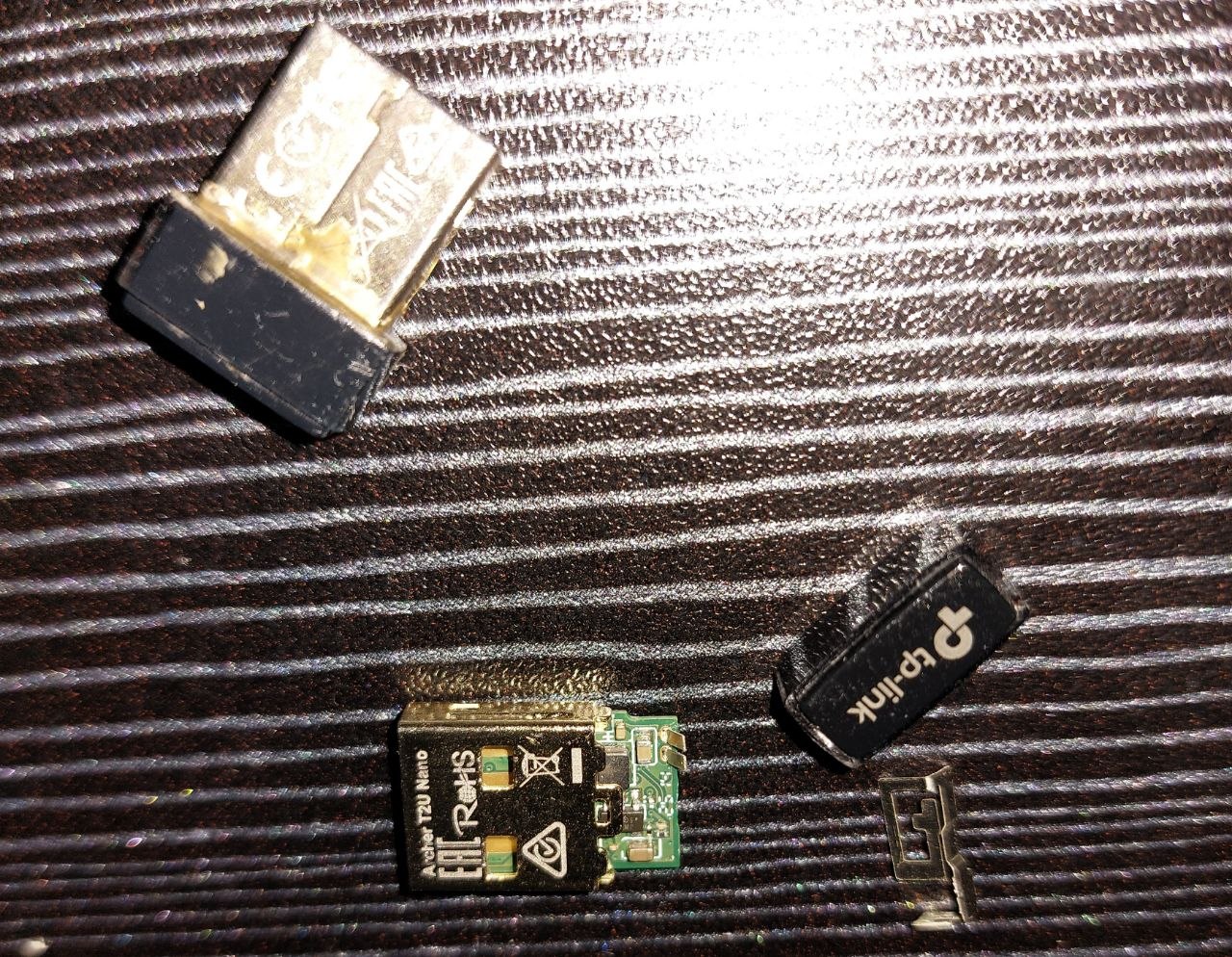
it's the nano wilress adapter T2U Nano , before I had the 2.4 version , and I took the 2.4/5g version , both had the plastic back cover taken off when pulling the adapter out of the USB port !!!!

.. the quality is not that great ..

the moment I pulled out today it broke and didn't work again " gives "uknown device" now 

 I managed to save the 2.4 by some mixed glue .. but not the new one I boght 4 months ago

 I'm gentle person , I work in IT , I know what force needed for a smal USB adapters , .. yet these are just junk .. so I'm here to say it ( don't buy these) ,

buy real branded products you can trust not to fail in needed moments insted of buying multiple cheap ones . 


  0      
0
#1
Options
1 Reply
Re:nano cheap quality adapters broken " second one"
Tuesday

Hello @esmail88 ,

Welcome to our community.


I'm sorry to hear about your experience, and I completely understand your frustration. 


Regarding the "unknown device" error, even though the issue appears to be related to physical damage, it's worth trying a few basic steps to see if the adapter can still be recognized:
1. Go to Device Manager > Action > Scan for hardware changes and check if the adapter appears under Network Adapters, Other Devices, or Universal Serial Bus Controllers.
2. Try plugging the adapter into a different USB port on your PC.
3. Go to Device Manager > Universal Serial Bus Controllers, double-click each USB Root Hub, go to Properties > Power Management, and uncheck "Allow the computer to turn off this device to save power". Save and restart after modifying each one.
4. If possible, test the adapter on a different computer to determine whether the issue is with the adapter or the PC.

That said, given that the adapter suffered physical damage and is only 4 months old, this may be a warranty matter. Please contact Local Technical Support for further assistance.

Welcome to Our Community! Get the latest posts: △New Firmware for Archer GE550/GE650 V1 Introduces AI-QoS, EasyMesh IoT Expansion, and More! △New Firmware Releases for Archer BE805 V1/BE450 V1 to Support VPN Merge, New ECO Mode, and More! More posts, please see: △ Get the Ongoing Pre-release Firmware for Wi-Fi Routers Here— Subscribe for Updates! Urgent problems with your Wi-Fi Router, Range Extender, or DSL Modem? Please reach out via private Messages or @Joesph-TP in your new thread directly. Click Or ☆Recommended Solution if the post/answer helps.
  0  
0
#2
Options
