
Blocked clients do not show up, unable to access wifi
Blocked clients do not show up, unable to access wifi

I have 2 clients (Windows Laptop and Nintendo Switch) that I blocked a few days ago. Now I want to unblock them, but I am not able to see them in the blocked list. The clients are not able to access wifi.
I have cleared out any profile groups i had, any existing lists etc. I "forgot" the clients in an attempt to clear them out and maybe have them rediscovered. Now when they try to connect, i can see it in the logs, but when i click on the mac address, it says client does not exist. How can I fix this? I'm not able to change the mac addresses on the clients either.
[Failed]D0-55-09-98-AE-39 failed to connect to Upstairs (New) - Wifi7 with SSID "JKH1428" on channel 149 because the user was blocked by MAC block/MAC Filter/Lock To AP.(2 times in the last minute)
Neither of these was locked to an AP, it has to be because at one point they were blocked, which i assume is by mac address.
- Copy Link
- Subscribe
- Bookmark
- Report Inappropriate Content
Hi Vincent,
I blocked them via the block button.
I blocked them probably 4-5 days ago. What am I looking for in the logs? When I click on the blocked mac address in the logs, it says the client does not exist.
- Copy Link
- Report Inappropriate Content

I'm also facing similar issue on using lock client device to specific AP.
Once I've locked the device to AP, some how the device just went offline, and I couldn't find it in the online or offline (it's empty) client page, hence cannot undo the settings.
The only way is to forget the AP from the locked AP, then the settings will be reverted, then re-adopt back the AP.
There must be bug on the controller that is not showing offline clients that have specific settings set such as blocked or lock to AP.
I'm using Omada Essential cloud.
- Copy Link
- Report Inappropriate Content


Hi @jhud922
Thanks for the reply.
Not click the MAC address, but the MAC block/MAC filter I pointed out in the picture.
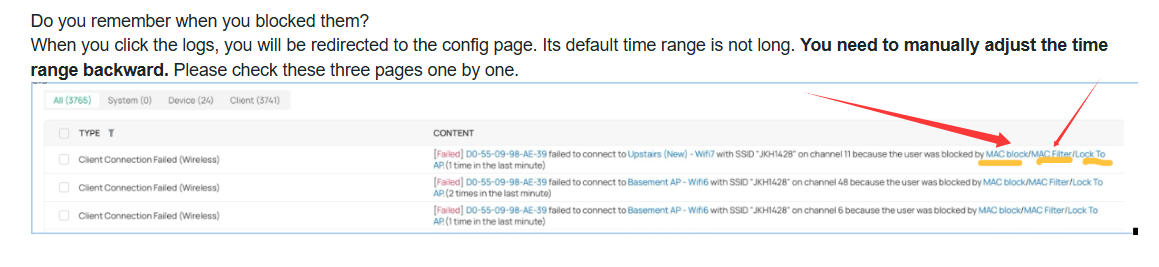
If you can't find it, please share a whole screenshot of the redirect page after clicking on it. Thanks.
jhud922 wrote
Hi Vincent,
I blocked them via the block button.
I blocked them probably 4-5 days ago. What am I looking for in the logs? When I click on the blocked mac address in the logs, it says the client does not exist.
- Copy Link
- Report Inappropriate Content
Hi @pokhui
Thanks for the feedback. Lock to AP is different from OP.
The Lock To AP feature currently has room for improvement in this regard. Internally, we are considering optimizing its working mechanism to avoid such situations. Please pay attention to the future firmware updates. Thanks.
pokhui wrote
I'm also facing similar issue on using lock client device to specific AP.
Once I've locked the device to AP, some how the device just went offline, and I couldn't find it in the online or offline (it's empty) client page, hence cannot undo the settings.
The only way is to forget the AP from the locked AP, then the settings will be reverted, then re-adopt back the AP.
There must be bug on the controller that is not showing offline clients that have specific settings set such as blocked or lock to AP.
I'm using Omada Essential cloud.
- Copy Link
- Report Inappropriate Content
- Copy Link
- Report Inappropriate Content
Hi @jhud922
Sorry for the late reply.
We would like to test it locally. Before that, please give us the following info:
1. A screenshot of the Device page so we would know the model number and firmware version of the EAP devices you are using;
2. The type and version of the two blocked clients.
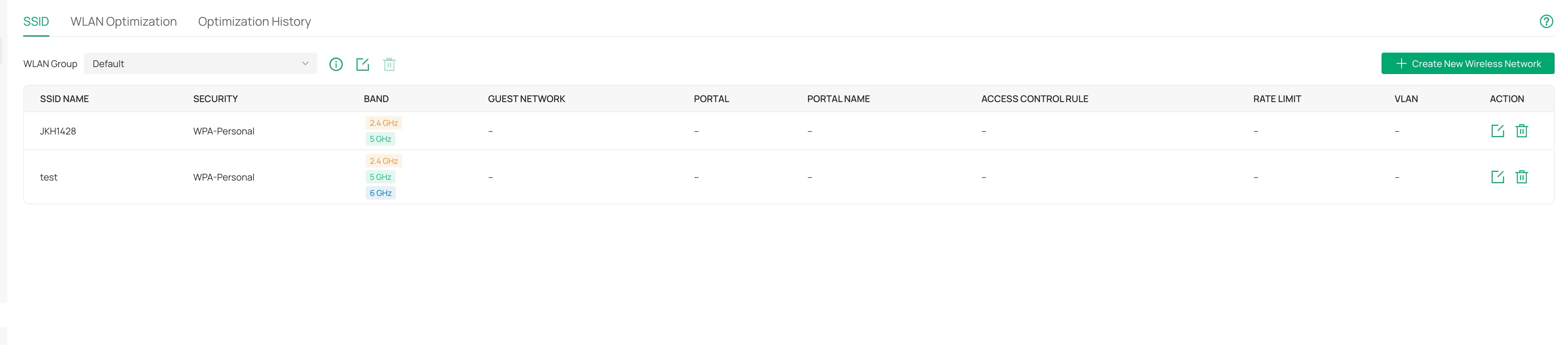
3. Some screenshots showing the SSID config.
jhud922 wrote
- Copy Link
- Report Inappropriate Content
Information
Helpful: 1
Views: 498
Replies: 16
Voters 1