Archer Ax6000 blocking random sites after firmware update to 1.4.3

Archer Ax6000 blocking random sites after firmware update to 1.4.3

Archer Ax6000 blocking random sites after firmware update to 1.4.3
Tuesday
Model: Archer AX6000  
Hardware Version: V2
Firmware Version: 1.4.3 Build 20250725 rel.18118(4555)

About two days ago I entered my router configuration page (no idea for what reason) and I saw there was a firmware update available.I pressed the button, it updated successfully to the 1.4.3 Build 20250725 rel.18118(4555) version and everything seemed to work correctly. Then I saw that I cannot access certain websites. I started testing and tried the following:

  • Checked on different browsers on my PC, including incognito mode.
  • Checked on different browsers on my Phone, including incognito mode.
  • Disabled QoS and Antivirus features, firewall features, Ipv6 (on recommendation of chatGPT)
  • Contacted my ISP to diagnose, since my phone's data opens the websites correctly (as my phone is on a different provider)
  • Tried Factory reset via the web interface - however this did nothing to downgrade the firmware version 
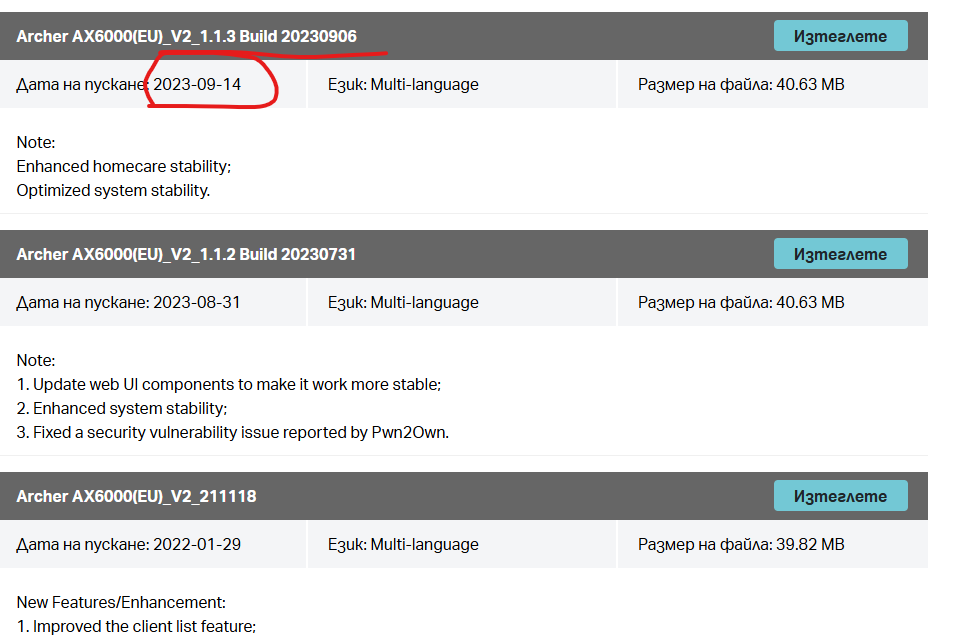
  • Tried manually downgrading the firmware - I saw that I have to select my country (Bulgaria) and the latest firmware version is actually different and much lower 1.1.3 from 14 Sep 2023
    • I am not really sure why it automatically updated the router to a version that is not for the correct region, however these are the facts.
    • My attempt to downgrade was unsuccessful, as of course, we as users are locked out of our own devices by TP-Link's policies unable to freely downgrade... cringe much? The error simply states - Update Failed.


Nothing so far worked so I tried connecting directly to my IPS provider's router after talking to their support and everything worked well.

Another thing that worked well is switching the Archer Ax6000 to Acess Point mode, which basically treats it as a switch with antennas.


Now since I cannot see why the router is blocking these sites, BUT I am completely sure that some of its features are doing it, can you please help me revert to the previous version so I can use my device? I need this fixed really soon for several reasons

1. One of those sites is one that I am actually working on for a client (wordpress site)

2. Another of those sites is the biggest medical laboratory and I need to check my blood test results, and I do not want to do workarounds for vital info

3. It is inconvinient, super frustrating and random.


Lastly - the lack of any logs indicating why something is blocked is super frustrating. Supposedly there is a system log, however it only states when featurres are turned on and off, and I am not really sure if that is correct since the filtering continues. 


Funnily enough pirate sites still work... even the romantic ones, so good job to your teams for the security features. 

Please get back to me here or via email - I can provide access to the device either via shared screen or teamviewer.

  0      
0
#1
Options
10 Reply
Re:Archer Ax6000 blocking random sites after firmware update to 1.4.3
Wednesday

Hello @lionheartfan ,

Welcome to our community.


It appears that after updating your AX6000 to firmware version 1.4.3, you are unable to access certain websites; furthermore, when attempting to downgrade to the correct firmware version for your region, you encounter an "Update Failed" error.


Regarding the firmware downgrade:

I noticed that the regional version used in your area is the EU version, so the firmware from the global official website is also compatible with your router: https://www.tp-link.com/en/support/download/archer-ax6000/#Firmware

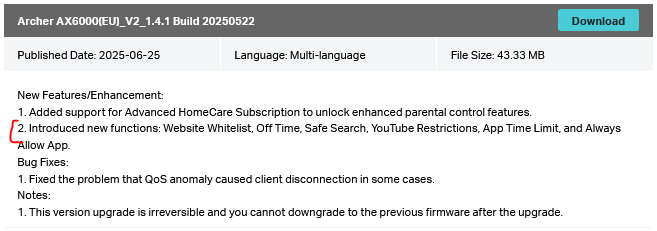
You can try manually downloading version 1.4.1: Archer AX6000(EU)_V2_1.4.1 Build 20250522

Additionally, the fact that you detected and installed firmware version 1.4.3 via the online update feature indicates that this firmware is indeed compatible with your router.


Regarding the website access:

1. Change the DNS server on the router: Open the Tether app, go to MORE > Internet Connection, and change the DNS server to 1.1.1.1 or 8.8.8.8. After updating, reconnect your devices to the router network to ensure the new DNS settings take effect. Alternatively, you can do this via the web interface under Advanced > Network > Internet > Advanced Settings.
2. Check Parental Control settings: Make sure no content filtering or website blocking rules are active under Parental Controls, as these can sometimes block specific websites unexpectedly.


Welcome to Our Community! Get the latest posts: △New Firmware for Archer GE550/GE650 V1 Introduces AI-QoS, EasyMesh IoT Expansion, and More! △New Firmware Releases for Archer BE805 V1/BE450 V1 to Support VPN Merge, New ECO Mode, and More! More posts, please see: △ Get the Ongoing Pre-release Firmware for Wi-Fi Routers Here— Subscribe for Updates! Urgent problems with your Wi-Fi Router, Range Extender, or DSL Modem? Please reach out via private Messages or @Joesph-TP in your new thread directly. Click Or ☆Recommended Solution if the post/answer helps.
  0  
0
#2
Options
Re:Archer Ax6000 blocking random sites after firmware update to 1.4.3
Wednesday

  @Joseph-TP 


Hello,


Thank you for getting back to me so quickly. I forgot to write in my original post that I have already tried changing the DNS settings to the one you mentioned. They didn't work.

I also checked Parental Controls and the list is empty.


Additionally I tried downgrading to the version you mentioned 1.4.1 and the downgrade was successfull. However there is no change to the website access. 


I have made some effort and checked that most of these sites, if not all, are running on wordpress. I can list them here for reference if it is needed.


Is there someone who can get on a call with me and see what is happening? Additionally is there a way to see what sites are blocked and filtered by the router, as I wasn't able to see them myself?

  0  
0
#3
Options
Re:Archer Ax6000 blocking random sites after firmware update to 1.4.3
Wednesday

Hello @lionheartfan ,

Thanks for your reply.


Here is the most critical step—one I forgot to mention last time: Did you bypass the Archer AX6000 and connect your PC directly to the ISP modem to test if the same issue occurs?

If not, we would like to escalate your case to the support engineers, and they will follow up on it. If you are willing to conduct further analysis, please check your inbox and respond.  

Welcome to Our Community! Get the latest posts: △New Firmware for Archer GE550/GE650 V1 Introduces AI-QoS, EasyMesh IoT Expansion, and More! △New Firmware Releases for Archer BE805 V1/BE450 V1 to Support VPN Merge, New ECO Mode, and More! More posts, please see: △ Get the Ongoing Pre-release Firmware for Wi-Fi Routers Here— Subscribe for Updates! Urgent problems with your Wi-Fi Router, Range Extender, or DSL Modem? Please reach out via private Messages or @Joesph-TP in your new thread directly. Click Or ☆Recommended Solution if the post/answer helps.
  0  
0
#4
Options
Re:Archer Ax6000 blocking random sites after firmware update to 1.4.3
Wednesday

  @Joseph-TP 


Hi, Yes I tried connecting directly to the router of my ISP. All sites are accessible. I also tried switching the Archer Ax6000 to Access Point operation mode - and the websites open too.


Here are the websites:

https://boardgames.bg - ERR_CONNECTION_TIMED_OUT

https://bodimed com - ERR_CONNECTION_TIMED_OUT

https://divinehealing.space - ERR_CONNECTION_TIMED_OUT

https://time2play.bg/ - Cloudflare error 520

https://sportsacademy.bg - ERR_CONNECTION_TIMED_OUT


  1  
1
#5
Options
Re:Archer Ax6000 blocking random sites after firmware update to 1.4.3
Thursday

  @lionheartfan 


In FW release v1.4.1 Build 20250522, the following features have been introduced:

"Introduced new functions: Website Whitelist, Off Time, Safe Search, YouTube Restrictions, App Time Limit, and Always Allow App."

Is there any chance you're using one of these new features and it's misconfigured ?

I would try a router hardware reset by pressing the reset button for about 10 seconds and then re-configure from scratch.

If this was helpful click on the arrow pointing upward to make it blue. If this solves your issue, click the star to make it blue as a "Recommended Solution". BTC:149wubkkfoLmNDjDbiTxx4ZU8mpcMA5CJt
  0  
0
#6
Options
Re:Archer Ax6000 blocking random sites after firmware update to 1.4.3
Thursday

  @terziyski 


I do not see any of these settings? Where are they exactly? Is that a setting in Parental Controls. I am using the web interface through my PC browser.


  0  
0
#7
Options
Re:Archer Ax6000 blocking random sites after firmware update to 1.4.3
Thursday - last edited Thursday

  @lionheartfan 


Since I don't own an AX6000, I don't know where they are, but they are somewhere (probably in HomeCare) :


The essential action here is to reset the router and re-configure from scratch (make a configuration backup before that, so you can easily restore it, if needed).

If this was helpful click on the arrow pointing upward to make it blue. If this solves your issue, click the star to make it blue as a "Recommended Solution". BTC:149wubkkfoLmNDjDbiTxx4ZU8mpcMA5CJt
  0  
0
#8
Options
Re:Archer Ax6000 blocking random sites after firmware update to 1.4.3
Thursday

  @terziyski 


Sorry, I can't find them anywhere. Not sure where they added them. Maybe parental controls, but since there are none, I haven't seen any. I tried Factory reset from the web interface. Didn't try the physical one. Is it any different? Is it going to do anything different than the one from the web interface?

  0  
0
#9
Options
Re:Archer Ax6000 blocking random sites after firmware update to 1.4.3
Thursday

  @lionheartfan 


Well, in theory it should be the same. But in practice, since I don't know, that's why you might try that as a final resort.

If that doesn't work for you either, you can easily restore from the configuration backup file.

HomeCare is accessible through the Tether app and that's probably the reason you can find these features.

If this was helpful click on the arrow pointing upward to make it blue. If this solves your issue, click the star to make it blue as a "Recommended Solution". BTC:149wubkkfoLmNDjDbiTxx4ZU8mpcMA5CJt
  0  
0
#10
Options
Re:Archer Ax6000 blocking random sites after firmware update to 1.4.3
Thursday

  @terziyski 


I will give the hardware factory reset a try later.


About the homecare feature - I couldn't find any such settings neither in the mobile tether app, nor through the web interface on 192.168.0.1. Sorry, if someone from TP-link can point me to where they are, I can check further.

  0  
0
#11
Options