
Animations on Teether app behaving strange

Animations on Teether app behaving strange

Animations on Teether app behaving strange
Sunday - last edited Yesterday
Model: Archer GE550  
Hardware Version: V1
Firmware Version: 1.1.2

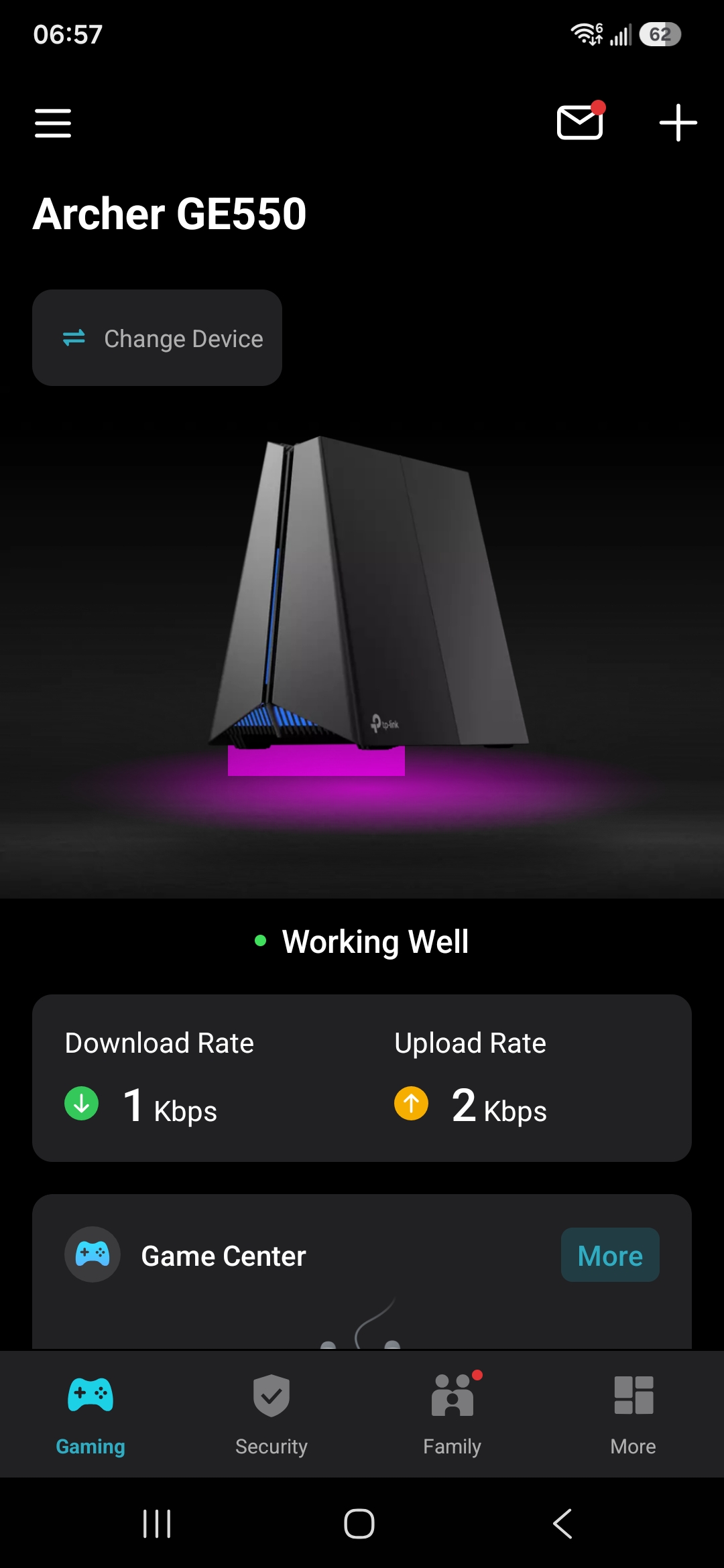
I'm showing odd animations for the LED panel at the login main page. Use to be only the actual LED animations for the router pic displayed not an odd colour bar below.

Any ideas on how to fix this? I have tried a stop/start of the app, restarted phone, still strange behavior. Screenshot
  0      
0
#1
Options
1 Reply
Re:Animations on Teether app behaving strange
Yesterday

Hello @macdongr68 ,

Welcome to our community.


It is recommended that you can try updating the firmware to 1.3.0 Build 20260331 rel.26942

Please refer to How to Update Firmware on TP-Link Wi-Fi Routers


Best Regards.

Welcome to Our Community! Get the latest posts: △New Firmware for Archer GE550/GE650 V1 Introduces AI-QoS, EasyMesh IoT Expansion, and More! △New Firmware Releases for Archer BE805 V1/BE450 V1 to Support VPN Merge, New ECO Mode, and More! More posts, please see: △ Get the Ongoing Pre-release Firmware for Wi-Fi Routers Here— Subscribe for Updates! Urgent problems with your Wi-Fi Router, Range Extender, or DSL Modem? Please reach out via private Messages or @Joesph-TP in your new thread directly. Click Or ☆Recommended Solution if the post/answer helps.
  0  
0
#2
Options
