
Extremally slow upload speed for devices connected to LAN ports

Hi Support community.
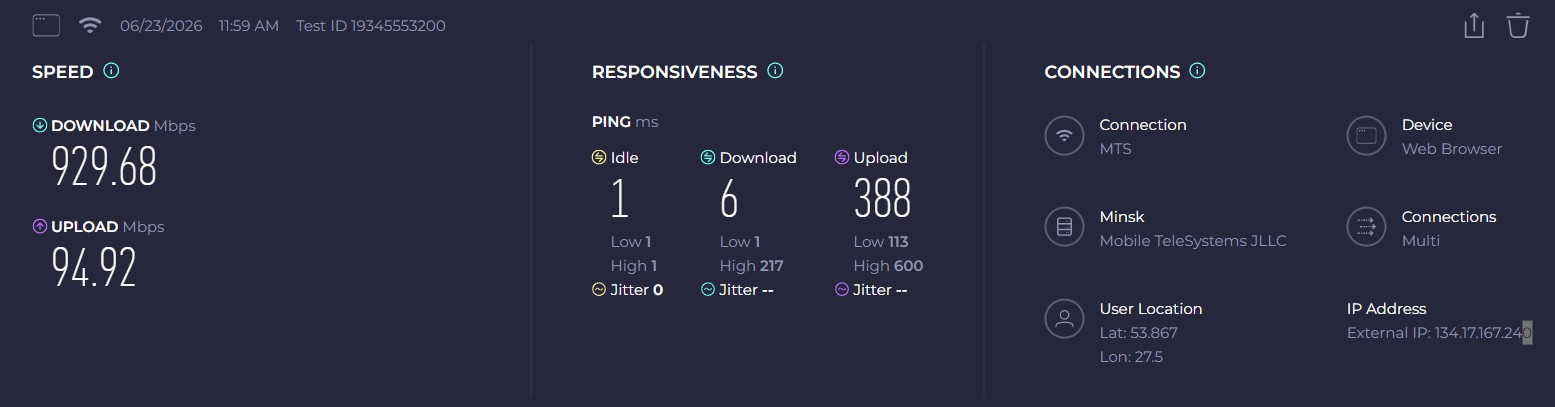
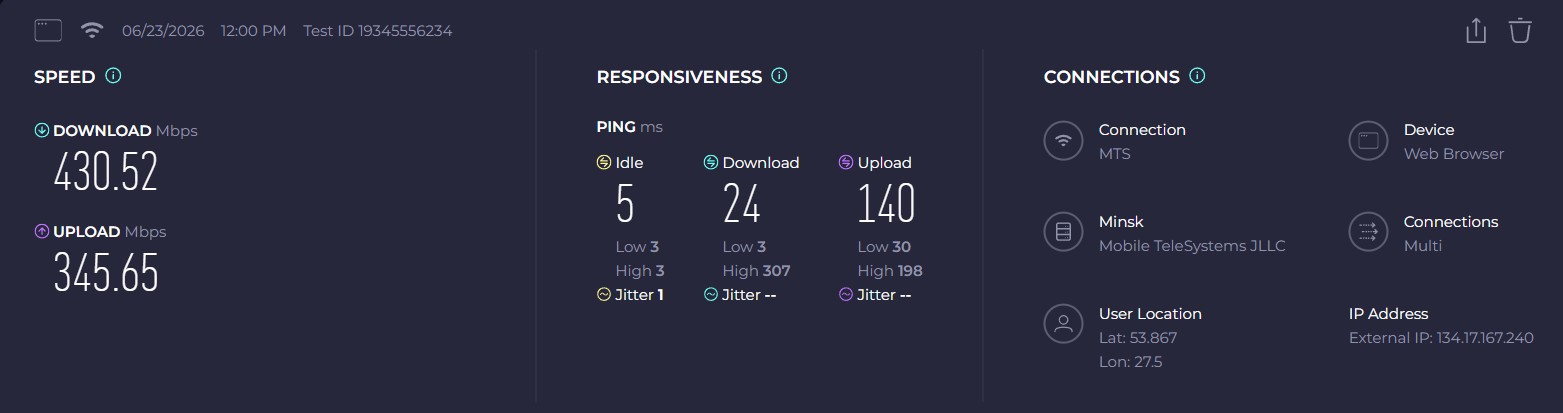
Could you please advise what is wrong with my device, the upload speed for all clients, connected to LAN ports, is extremally slow and is limited to 100Mbps only. This limitation is also applied when transfering data within local network (from device to device). QoS is disabled, no limits are set on router at all. Could you please advise how to fix this?
Tested from Laptop connected to LAN
Tested from Laptop connected over WiFi
- Copy Link
- Subscribe
- Bookmark
- Report Inappropriate Content

- Copy Link
- Report Inappropriate Content
@terziyski I installed beta version, that did not help, however made the situation even worse. Any suggestions? Thank you!
- Copy Link
- Report Inappropriate Content
To get help, put your comments in the thread in question with a detailed explanation of what went worse.
- Copy Link
- Report Inappropriate Content


Hello @Serg_Sony ,
Thanks for contacting our community.
Have you noticed when this anomaly occurs? Have you recently modified any router settings—such as a firmware update or adding a new device to the network?
Is your network topology diagram is as follows?
ISP modem—BE550)))((( client devices
(Note: — stands for wired connection,)))((( stands for wireless connection )
Is there a switch between the BE550 and laptop? If yes, please remove it temporarily for comparison test.
I noticed you've updated to version 1.3.2 Beta, but the speed has dropped even further. Is this the wired connection speed on your laptop?
- Copy Link
- Report Inappropriate Content
-> Have you noticed when this anomaly occurs? Have you recently modified any router settings—such as a firmware update or adding a new device to the network?
Anomaly occured after firmware upgrade to the version 1.3.1. No changes were made.
-> Topology is simple:
ISP wired < - > Internet port on BE5500 <-> Wired connection (LAN ports)
-> Is there a switch between the BE550 and laptop?
No, laptop and PC are directly connected to BE550. BE550 is showing interface speed as 1000/1000Mpbs

-> I noticed you've updated to version 1.3.2 Beta, but the speed has dropped even further. Is this the wired connection speed on your laptop?
Yes, I installed the beta version, and yes, that is the current speed of the wired connection on my laptop
- Copy Link
- Report Inappropriate Content
Information
Helpful: 0
Views: 120
Replies: 5
Voters 0
No one has voted for it yet.