
I can not change 5GHz channel on RE200

I have Archer C64 and Re200 ... (mesh mode)
If I change 5GHz channel on Archer C64 (36/40/44/48) - it was changed, and i see on wi-fi analyzer device
But! I can see that channel on RE200 all time is 36! I see it on analyzer and on web interface Re200 ... 36.
1. Why channel is not chaned automatically identically?
2. Why І can't сhange the channel manually on RE200 between 36-48 ?
- Copy Link
- Subscribe
- Bookmark
- Report Inappropriate Content

- Centralized Control Protocol: EasyMesh is designed to create a single, seamless network topology. Individual adjustments on satellite nodes are disabled by design to prevent network fragmentation.
- Dynamic Backhaul Coordination: The RE200 uses its 5GHz band to maintain a wireless backhaul link with the main router. If you change the channel on the extender independently, it will break its connection to the router entirely.
- Log into your Main Router's Web Management Gateway (e.g., TP-Link Router Portal).
- Navigate to Advanced > Wireless Settings.
- Locate the 5GHz Wireless Band settings.
- Change the channel selection from "Auto" to your preferred specific channel (36, 40, 44, or 48).
- Save the configuration and let the router apply changes.
- Copy Link
- Report Inappropriate Content
- Copy Link
- Report Inappropriate Content
Well, my assumption is that on the Wi-Fi Analyzer you saw the so-called Locked Backhaul Connection: The satellite uses a dedicated channel to talk to the main router. If you change it independently, it will break the connection and lose the network.
- Copy Link
- Report Inappropriate Content
@terziyski on RE200 all time is 36 chanel, and in settings label , and in analyzer ...
And it`s so bad because my neighbors overload this channel ((
- Copy Link
- Report Inappropriate Content

Treyko wrote
"If I change 5GHz chanel on Archer C64 (36/40/44/48) - it was changed, and i see on wi-fi analyzer device But! I can see that chanel on RE200 all time is 36! I see it on analyzer and on web interface Re200 ... 36. 1. Why chanel is not chaned automatically identically? " ©
Hi,
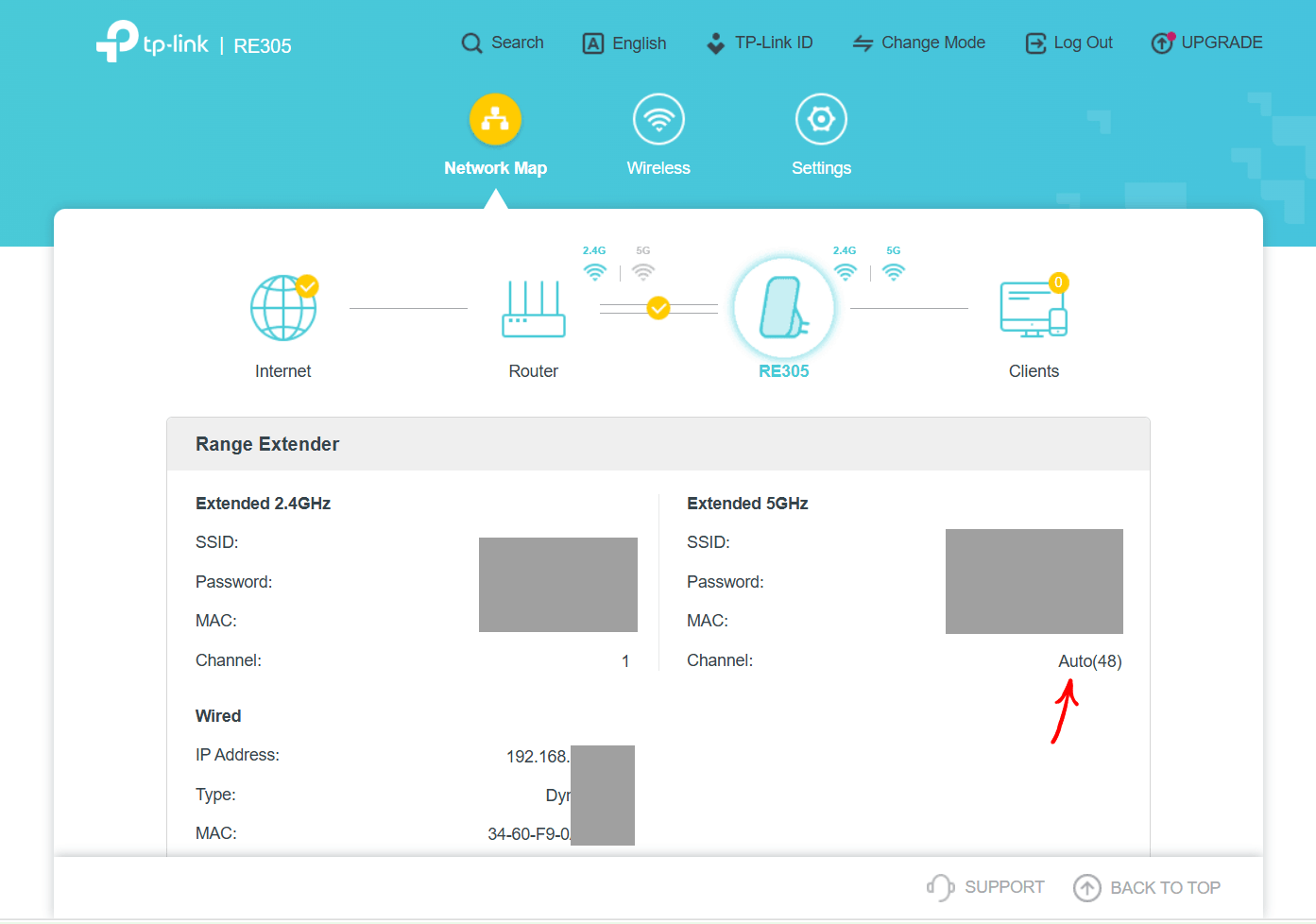
For some reason that we don't know TP-Link decided it should be that way. You can't change this behavior. It is the same on other RE devices that use the same hardware platform, like my RE305 V4.
The web GUI of the RE in EasyMesh mode shows that its 5 GHz band is set to "Auto"matic channel selection, of which it indeed makes use. My RE305 seems to prefer channel 48.
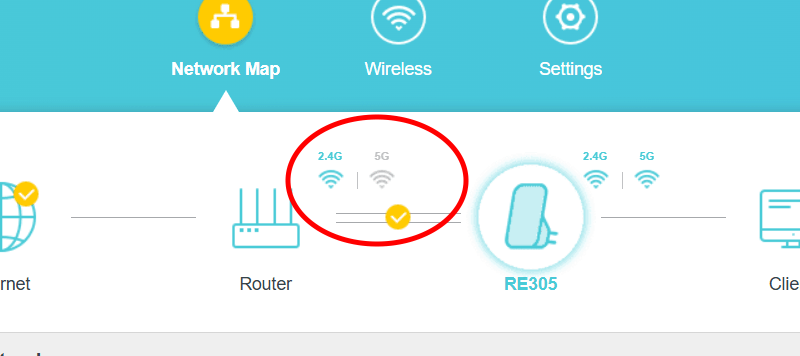
The problem with that is, if the 5 GHz channel that is automatically chosen by the RE is different from the 5 GHz channel of the main EasyMesh router, it breaks the wireless 5 GHz EasyMesh backhaul, so the wireless EasyMesh backhaul will be done via the slow 2.4 GHz band.
- Copy Link
- Report Inappropriate Content
@woozle
not true..
my speed on 2.4 Ghz ~ 20-28 Mbit\s ..
my speed on 5 Ghz ~ 60-80 Mbit\s ..
But why 36 channel on all time? Its mystery
- Copy Link
- Report Inappropriate Content
Treyko wrote
@woozle
not true..
my speed on 2.4 Ghz ~ 20-28 Mbit\s ..
my speed on 5 Ghz ~ 60-80 Mbit\s ..But why 36 channel on all time? Its mystery
What do you mean by "not true"?
If your router is on channel 40 or 44 or 48 and the RE200 on channel 36, does the icon for the 5 GHz backhaul show in grey color (= not connected) or in blue/cyan color (= connected)?
- Copy Link
- Report Inappropriate Content
@woozle very long distance
- Copy Link
- Report Inappropriate Content
Information
Helpful: 0
Views: 101
Replies: 8
Voters 0
No one has voted for it yet.