
2.5 Gigabit PCIe Network Adapter
 This thread has been locked for further replies. You can start a new thread to share your ideas or ask questions.
Hallo zusammen
vielleicht kann mir jemand wo Euch hier weiterhelfen.
Habe mein Mainboard Z87-K von Asus mit der TX 201 aufgerüstet und den neusten Treiber installiert (10.74.1126.2024) und den PC direkt an den 10 GB Port von meinem Zyxel AX7501-B1 angeschlossen und das alles an einem Glasfaseranschluss von 10 GB.
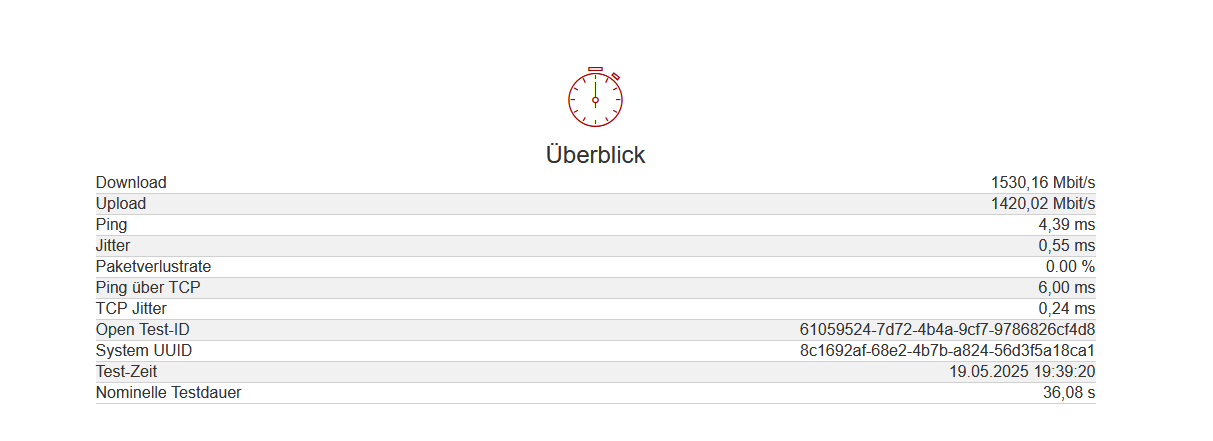
Leider egal was ich mache, komme ich nicht mal über 2 GB.
Hat jemand eine Antwort für mit?
Danke für Eure Hilfe
- Copy Link
- Subscribe
- Bookmark
- Report Inappropriate Content


Hi@Lucca_68,
Thank you for contacting our community.
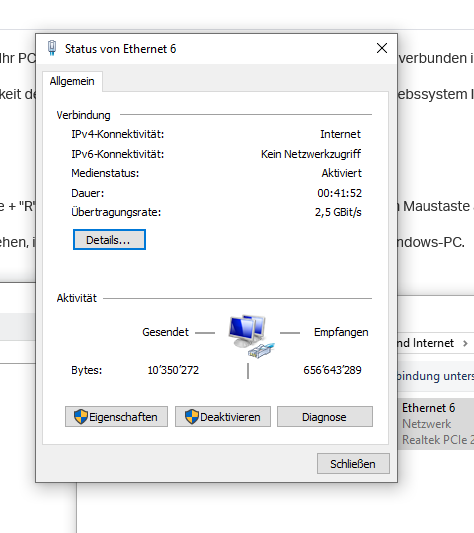
If you're suffering the slow speed issue with the wired adapter, please check the link speed you can get by referring to this link: How to check the associated/link speed on a wired client. Please send here the screenshot with test results.
1. If the link speed is normal, please uninstall the adapter, and reinstall again with the latest driver version.
2. If the link speed is abnormal:
a. Change to another cable (Cat6 or above).
b. Change to plug in a different LAN port on your router.
c. Make sure the router has the same specification, you can test with other devices.
- Copy Link
- Report Inappropriate Content
Hello
I'm using a CAT 7 LAN cable and the PC is connected directly to the 10GB port, and the driver is the latest available on the website.
- Copy Link
- Report Inappropriate Content
Good evening

Thank you for your reply. This isn't about the Wi-Fi signal, but rather the fact that I'm connected to the router via a network adapter and LAN cable, and I can't even get 2GB of the 10GB with this card.
- Copy Link
- Report Inappropriate Content
Hi @Lucca_68,
Thank you for your reply.
The actual speed is affected by hardware bottlenecks and configuration issues. First, the built-in network card specification of the ASUS Z87-K motherboard should be 1Gbps. It is recommended that you disable the network card first to eliminate the interference problem of the built-in network card.
In addition, is there a switch between the PC and the Zyxel AX7501-B1? The settings of the switch may also affect the transmission speed.
Tools such as Speedtest are affected by server load, network congestion and latency. It is recommended that you try a few other speedtest servers, other servers might reach better speeds.
Best Regards~
- Copy Link
- Report Inappropriate Content
Information
Helpful: 0
Views: 430
Replies: 4
Voters 0
No one has voted for it yet.