
Solution Web Interface Menus of Archer AX80/AX53/AX72 Pro Become Invisible After Upgrading Router Firmware


Update on Sep 12th, 2025:
The official version for Archer AX80(EU) V1, Archer AX53(EU) V1, Archer AX72 Pro(EU) V1, and Archer AX72(EU) V1 has been released publicly. Users can check for updates via the router's web interface or through the Tether App to install the latest version manually.
If you cannot find the latest version, please download the firmware from the official website and upgrade it manually:
Archer AX80(EU)_V1_1.3.2 Build 20250812
Archer AX53(EU)_V1_1.5.2 Build 20250812 (This version is not available for downloading on the website, and users need to check for the updates via the router's web interface or through the Tether App to install the latest version)
Archer AX72 Pro(EU)_V1_1.4.3 Build 20250814
Archer AX72(EU)_V1_1.4.3 Build 20250814
We will manually lock this post to better focus on discussions regarding the new firmware. We also encourage all users to upgrade to the latest firmware for testing and to provide feedback.
--------------------------------------------------------------------------------
This Article Applies to:
Archer AX80(EU) V1 1.3.1 Build 20250718 pre-release version
Archer AX53(EU) V1 1.5.1 Build 20250721 official version
Archer AX72 Pro(EU) 1.0 1.4.1 Build 20250724 official version
Archer AX72(EU) 1.0 1.4.1 Build 20250724 official version
Phenomenon Description:
We've received feedback from users indicating that after updating the router's firmware to the version mentioned above, the web interface page will not display correctly and most menus become invisible when logged into the page. When this happens, all devices connected to the router continue to connect to the internet without issue.
Workaround/Solution:
We understand that this situation can be frustrating. Please be assured that we have prioritized this concern, and our team is actively investigating to identify and resolve the underlying cause as quickly as possible.
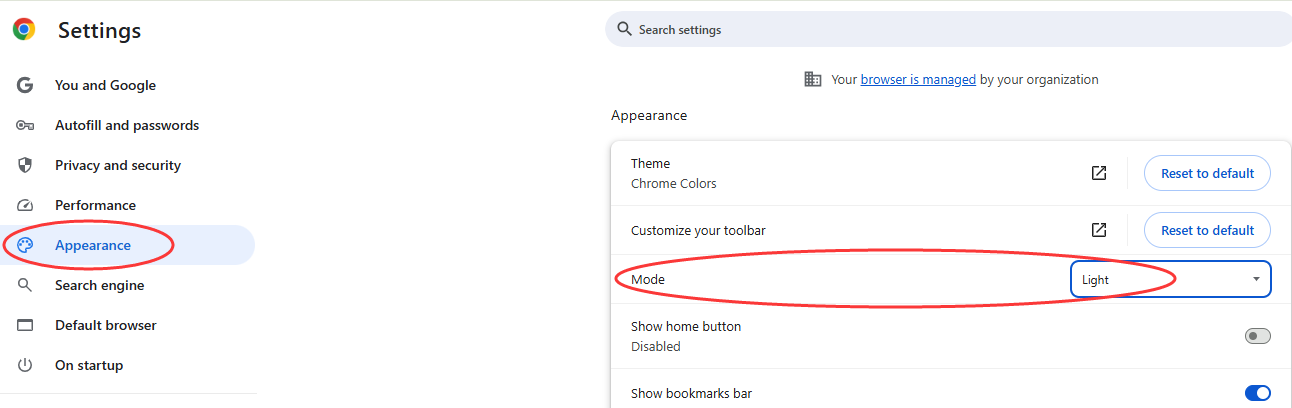
As a workaround, please try changing the Mode of your web browser to Light Mode to see if the web interface page of the router displays correctly as expected.
For Google Chrome, navigate to the three-dot option and click on Settings > Appearance > Mode, choose Light:
For Firefox, you can find the Mode settings as below:
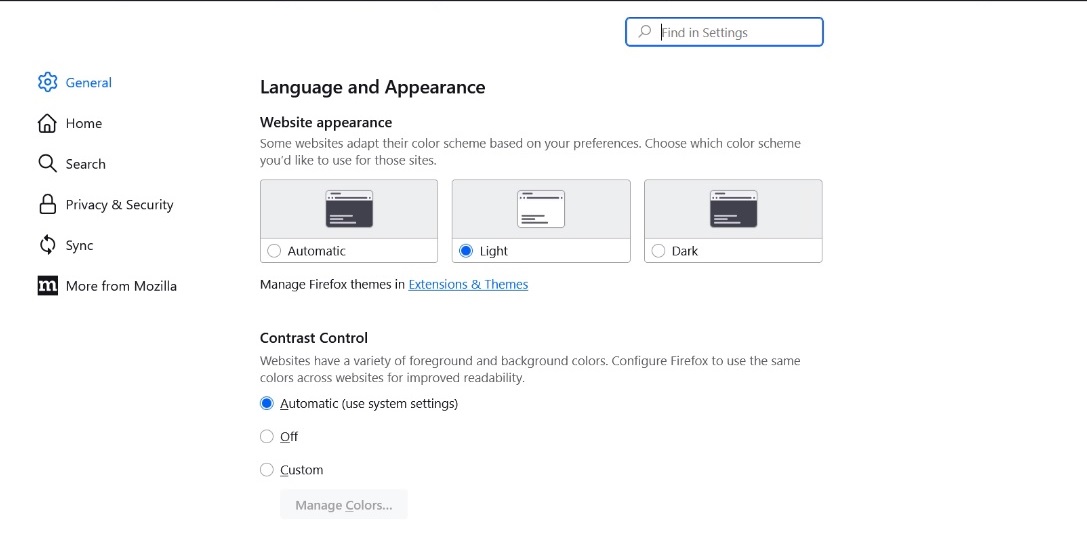
You should find similar settings for your browser to change the mode. If you're not sure how to modify these settings, please Google online or feel free to let me know.
Thank you very much for your feedback and cooperation!
Update Log:
Aug 13th, 2025:
Release of this article.
- Copy Link
- Subscribe
- Bookmark
- Report Inappropriate Content

@Kevin_Z Уроды вы продаете роутеры с кучей ошибок и обновления ах53 v1 обещаного так и не пришло. Это последний роутер вашей отвратительной организации. Вас надо запретить во всех цивилизованных странах и пусть все забудут о мусоре от бракованой организации tplink.
Пора всем отказаться от ваших роутеров и пользоватся рабочими. Надеюсь за ваш иу6сор вас затягают по судам
- Copy Link
- Report Inappropriate Content

I too am on the same boat waiting for the AX80 US firmware. OneMesh appearing instead of EasyMesh on the tether app is quite annoying since it's been over a year without a fix, not to mention 5Ghz channel and channel width from main router not populating to the satellite router via wired ethernet backhaul whereas wireless backhaul populates perfectly fine.
AX80 US (Main)
AX73 US (Satellite)
- Copy Link
- Report Inappropriate Content
I was stuck with the “getting kicked out after a few seconds” bug when trying to access the admin panel of my Archer AX53 (EU v1). I was on firmware 1.4.4 and the OTA upgrade to 1.5.1 always failed.
I manually downloaded and installed firmware 1.5.4 Build 20250926, and it immediately fixed the logout issue. https://www.tp-link.com/en/support/download/archer-ax53/v1/#Firmware
-
Settings were not wiped
-
Manual upload via web UI worked fine, I was kick out of the admin screen the first time trying at the upload firmware state, but second time was quicker and it worked fine (I used Brave browser with LAN cable)
-
File name:
ax53v1-up-ax53v1-only-ver1-5-4-P1[20250926-rel87654]-2048_sign
Hope this helps others with the same issue. Make sure to back up your settings first just in case.
- Copy Link
- Report Inappropriate Content

@Kevin_Z That definitely sounds like a firmware-related UI bug. I'd try clearing the browser cache, testing the interface in an incognito window or a different browser, and if that doesn't help, checking whether TP-Link has released a newer firmware or a rollback option. Hopefully they fix it soon. By the way, I recently looked at the Hawaiian Bros Island Grill Tucson menu—those island-style chicken plates and sides look like a great reward after spending hours troubleshooting networking issues!
- Copy Link
- Report Inappropriate Content
Information
Helpful: 11
Views: 11104
Replies: 44
Voters 2
