
Wrong Omada Connection

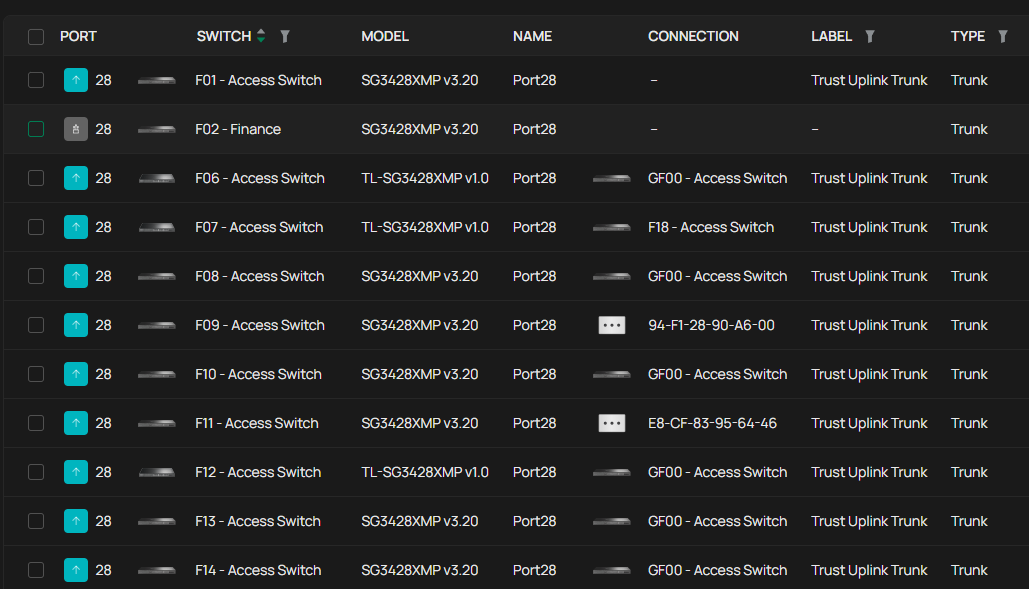
hello,want to ask why did my uplink fiber goes to my other access switch or random switch?is it display bug?will it affect my network?
there should be 1 more core switch thats all access switches connected to but i didnt adopt it into the controller because it will messed up the setup.i did try adopt the core switch first then setting in the controller but cant do the setting i want. so the solution i just run the core switch on standalone mode.the core switch model is SX6632YF.
- Copy Link
- Subscribe
- Bookmark
- Report Inappropriate Content


I haven’t thought of any limitations for now. You can refer to the two FAQs below to configure the L3 function.
How to setup Switch as DHCP server on Omada Controller
How to configure VLAN Interfaces and Static Routes on Omada Switches
The screenshots are from controller 5.14, but the steps are similar.
- Copy Link
- Report Inappropriate Content
Thanks for posting here.
Did you enable the LLDP for the core switch?
i did try adopt the core switch first then setting in the controller but cant do the setting i want.
>>>May I know which configuration do you refer to?
- Copy Link
- Report Inappropriate Content
@Vincent-TP
For your info,the core switch is not adopted into the omada oc300 controller due to limitation on the L3 static route problem.
if i enable LLDP in the core switch does the network can detect the core switch even though its not adopted in the oc300?
for now im running the core without adopting into oc300.but if i adopt it into the oc300,does the setting goes away and i need to setting it all over again?
im in hotel infrastructure network thats running 24/7.
- Copy Link
- Report Inappropriate Content

- Copy Link
- Report Inappropriate Content
Hi @GRL ,
I recently purchased a TP-Link SX6632YF to replace an aging Juniper core switch. Our environment already uses TP-Link Omada for all access switches, managed by an OC300.
The vendor responsible for the supply and installation claims that they cannot adopt the SX6632YF into the OC300 because of "problems with Layer 3 settings." They seem to be struggling with the configuration and have had to call TP-Link support multiple times.
I am trying to determine if this is a genuine hardware/software limitation or a configuration error on their part.
My questions are:
-
Are there known limitations when adopting the SX6632YF into an OC300, specifically regarding Layer 3 configurations?
-
Has anyone successfully managed this specific core switch model via an OC300 in a Layer 3 environment?
Any advice would be appreciated so I can resolve this quickly. Thanks!
- Copy Link
- Report Inappropriate Content
I haven’t thought of any limitations for now. You can refer to the two FAQs below to configure the L3 function.
How to setup Switch as DHCP server on Omada Controller
How to configure VLAN Interfaces and Static Routes on Omada Switches
The screenshots are from controller 5.14, but the steps are similar.
- Copy Link
- Report Inappropriate Content
Information
Helpful: 0
Views: 484
Replies: 5
Voters 0
No one has voted for it yet.