
DNS Proxy Issue
DNS Proxy Issue

Hi,
I won't say this isn't me, but 
I am setting the Gateway DNS Proxy, to re-route all requests to my (internal) DNS server. If I point to my server using DNS Override, it works great (I only have 1 network, selecting that one). But ... if I try to use DNSSEC or DoT, it doesn't seem to - but I can confirm (using dig), that DNS requests to that same server do work with DNSSEC or DoT. Is this a known bug?
Thanks!
- Copy Link
- Subscribe
- Bookmark
- Report Inappropriate Content

Hi @arrmo
Could you please let us know what type of controller you are using?
We recommend submitting a support ticket via email for efficient assistance.
Please include the following information in the email:
1. This Forum ID 856282;
2. your community nickname;
3. The type of controller you are using;
4. The config file of the controller.
- Copy Link
- Report Inappropriate Content

All these options simply send port 53 DNS requests somewhere else.
DNS Override just forwards the original port 53 request to another server which can be inside or outside your network
The other 'Proxy' options (DNSSEC, DoT and DoH) repackage the unencrypted Port 53 DNS request into the selected secure format and then forward it to your chosen proxy, then receives the encrypted response, unpacks it and sends the unencrypted response back to the originating device on port 53.
So, NONE of these options will forward, redirect or proxy DNSSEC, DoT or DoH requests (because you can't without impersonating the SSL cert of each provider)
- Copy Link
- Report Inappropriate Content
Hi @arrmo
Thanks for posting here.
To better understand the situation, please let us know the following info:
1. A screenshot of the Device page of the controller, showing the firmware version of the SDN devices;
2. What kind of controller are you using? What's the firmware version?
3. The screenshots of the involved config pages;
4. Some screenshots, or other info indicating how the server didn't work when using DNSSEC or DoT
- Copy Link
- Report Inappropriate Content
@Vincent-TP Of course, NP at all! Here is the info, please let me know what else you need,
1) The devices,
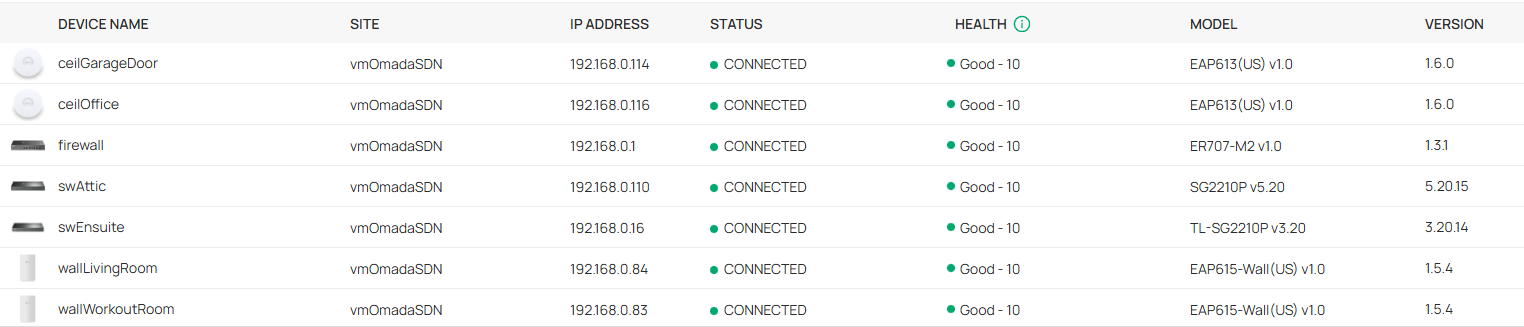
2) OC220 v1.0. And firmware (BTW, it's odd that this info shows up twice on the same UI page ... perhaps fix this?)
Current Version: 1.3.10 Build 20260117 Rel.83568 (Release Candidate)
3) Gateway DNS
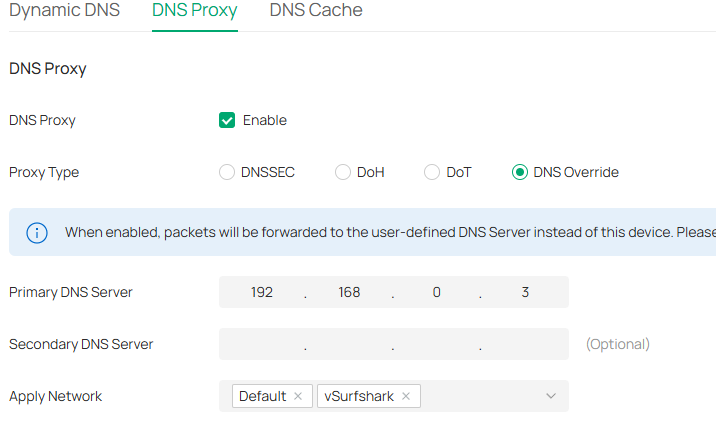
4) This is found using nslookup or dig, for internal DNS entries. If I use DNS Override, these work, so I know the query is going to the internal DNS server. Not so for DoT or DNSSEC. And if I nslookup or dig directly to that internal server (DNSSEC, DoT or regular DNS), it works. So I can tell the query is only getting there with DNS Override set on the Gateway.
Make sense? Thanks!
- Copy Link
- Report Inappropriate Content
Hi @arrmo
Thanks for the reply.
Because the DNS server and the router are on the same network segment, DNS queries may not be routed through the router. Please try setting the server to a different network segment.
- Copy Link
- Report Inappropriate Content
@Vincent-TP That's not really possible - I only have one subnet on my LAN ;). Why would this be limited? DNS Override does work, why the difference?
Thanks!
- Copy Link
- Report Inappropriate Content
Hi @arrmo
Could you please let us know what type of controller you are using?
We recommend submitting a support ticket via email for efficient assistance.
Please include the following information in the email:
1. This Forum ID 856282;
2. your community nickname;
3. The type of controller you are using;
4. The config file of the controller.
- Copy Link
- Report Inappropriate Content
@Vincent-TP OK ,will do. The controller is ER707-M2. Sorry, my bad! That's the firewall LOL. Controller is OC220.
- Copy Link
- Report Inappropriate Content
@arrmo FYI, I submitted an email request, never any response :(
- Copy Link
- Report Inappropriate Content
- Copy Link
- Report Inappropriate Content
- Copy Link
- Report Inappropriate Content
@arrmo Like I said, you cannot redirect (override) any DNS requests that use TLS, i.e. DNSSEC, DoT or DoH
- Copy Link
- Report Inappropriate Content
Information
Helpful: 0
Views: 944
Replies: 13
Voters 0
No one has voted for it yet.