
Devices showing as disconnected in OC400

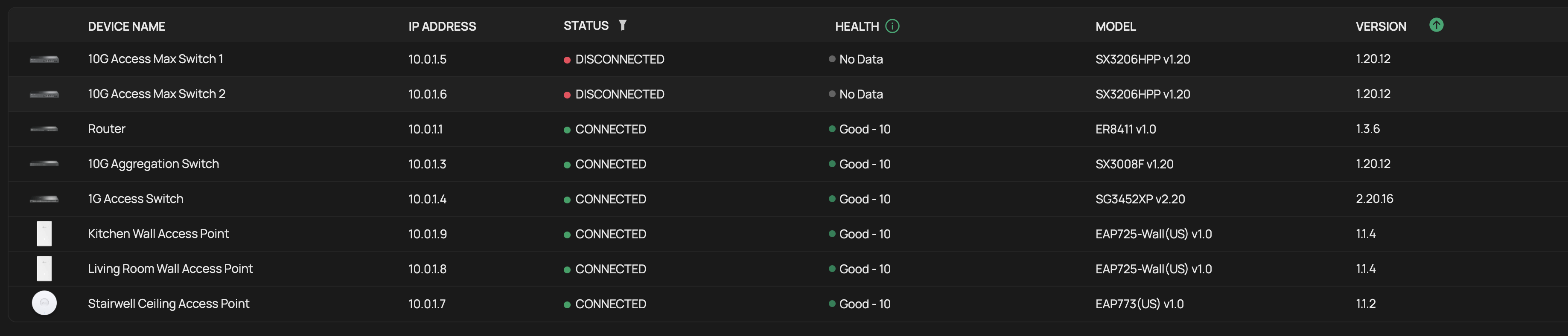
Devices are randomly going to disconnected status. The switches never recover by themselves, I had one of the access points recover without intervention. Network is otherwise healthy, traffic is flowing. The only way to bring them back is to reboot the actual devices. Rebooting the gateway or the OC400 make no difference. I even had the gateway show disconnected the other day and had to remotely power cycle through my UPS to have it show up again (keep in mind it was working fine even though it showed as disconnected).
- Copy Link
- Subscribe
- Bookmark
- Report Inappropriate Content


Thanks for the reply.
We recommend submitting a support ticket via email for efficient assistance.
Please include the following information in the email:
1. This Forum ID 856810;
2. your community nickname;
3. The topology of the network
4. The config file of the controller.
- Copy Link
- Report Inappropriate Content
Thanks for posting here.

The above is an explanation of the “disconnected” status.
Since the device’s network was not affected during the disconnect, the issue likely lies in communication between the device and the OC400 (purely internal).
You may troubleshoot from the OC400 end, for example, replace the OC400's network cable, relocate the OC400, etc.
- Copy Link
- Report Inappropriate Content
@Vincent-TP since this doesn't affect all devices at the same time I doubt it is a connection/network cable issue.... and if I can log into the OC400 to see the devices status, I don't see how it could be a network cable issue
- Copy Link
- Report Inappropriate Content
Thanks for the reply.
We recommend submitting a support ticket via email for efficient assistance.
Please include the following information in the email:
1. This Forum ID 856810;
2. your community nickname;
3. The topology of the network
4. The config file of the controller.
- Copy Link
- Report Inappropriate Content

Did you ever find out what was causing this? I have an OC300 and experienced something similar. Here is the thread.
- Copy Link
- Report Inappropriate Content

I've been having the same problem recently but with a Software Linux Controller.
The switches continue to work without any problems and everything else works fine.
The switches are simply displayed as “disconnected.”
- Copy Link
- Report Inappropriate Content

I have confirmed this behaviour if Google NTP is set as the time server in Controller (Global > Controller Settings)
Try changing this to any other NTP server or "Auto" then doing a reboot of everything
- Copy Link
- Report Inappropriate Content
@GRL Did not have a custom NTP server, was already Auto./
- Copy Link
- Report Inappropriate Content
@GRL I use pool.ntp.org and ptbtime1.ptb-.-de
Do you have any other suggestions?- Copy Link
- Report Inappropriate Content
Information
Helpful: 0
Views: 542
Replies: 8
Voters 0
No one has voted for it yet.