Major workflow impact after latest update – Global Port Profiles no longer available?

Major workflow impact after latest update – Global Port Profiles no longer available?

Major workflow impact after latest update – Global Port Profiles no longer available?
Yesterday

Hello everyone,


we are using Omada in a professional MSP context to manage customer environments with 20+ switches per site.


Our main use case – and honestly one of the biggest reasons we chose Omada – was the ability to:

  • Define networks globally

  • Create and manage port profiles centrally

  • Apply those profiles across multiple switches in a scalable way

  •  

After the latest update, this workflow appears to be fundamentally changed.

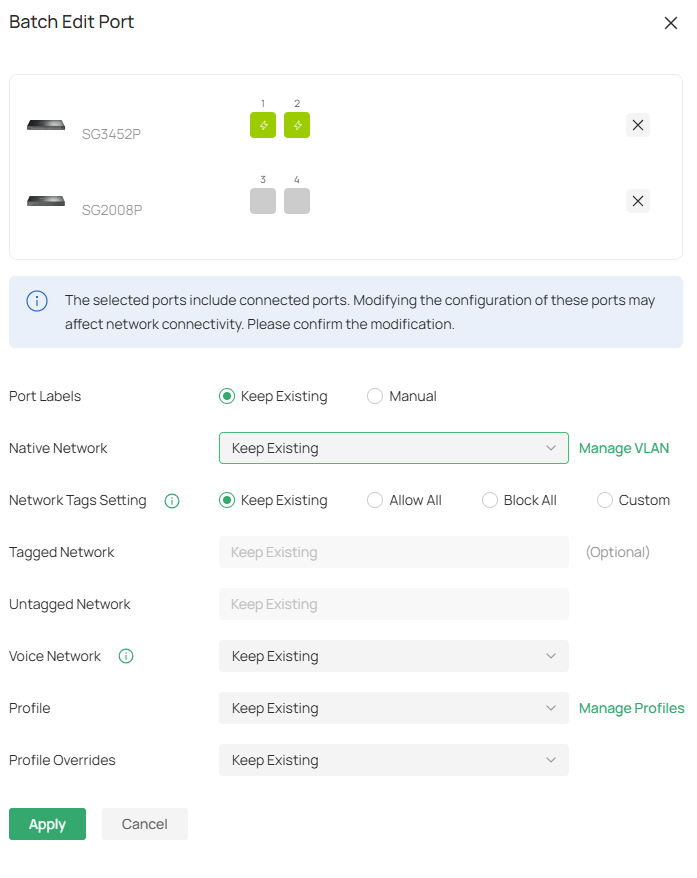
As far as we can see, port profiles now need to be assigned per port individually. We are being referred to multi-edit (batch editing), but this is not a replacement for global profile management across multiple switches.

For us, this removes the core efficiency advantage of the platform. What previously took minutes can now take hours in larger environments.


So I would like to ask the community:

  1. Is this change officially confirmed as intended behavior?

  2. Is there any roadmap information about restoring global port profile management?

  3. Are we overlooking an alternative method (e.g., switch groups, template logic, inheritance models)?

  4. How are other MSPs handling this change in larger deployments?


We have deployed Omada in one of our largest customer environments specifically because of this centralized management capability. Losing this functionality significantly impacts our operational efficiency.

If anyone has official statements, changelog references, or best-practice workarounds, I would highly appreciate it.

Thank you.

  0      
  0      
#1
Options
2 Reply
Re:Major workflow impact after latest update – Global Port Profiles no longer available?
14 hours ago

  @MW_FIS The Batch Edit feature will allow you to accomplish your use case, as shown below:


However, I do understand the frustration of adjusting your workflow to such a significant degree. What I can suggest is creating a new post with your suggestion in our Requests and Suggestions module, as that module is referenced directly by development when it comes to new feature requests (or returning feature requests to previous versions). 

Thank you for your suggestions; rest assured they are very much appreciated when it comes to improving the Omada platform. 

  0  
  0  
#2
Options
Re:Major workflow impact after latest update – Global Port Profiles no longer available?
3 hours ago - last edited 3 hours ago

  @MW_FIS 


A workaround to enable faster management of ports is to use the new "Port Labels" feature


Create port labels with meaningful names, and apply them to switch ports (you can also do this in batches)  - yes the first time you do this in a large deployment will take some time but...


Then, in the new global port list screen, you can filter by port labels, then select all and edit them in one go.  So you can create multiple labels for your specific vlan native/tagged requirements, then use that as the filter to edit in batches.

  0  
  0  
#3
Options