
Deco XE75 - satellite regularly goes offline and main router ad-hoc won't reload

I have 2 XE75's running on the latest firmware.
When they're working, they work well. However, around every 2 weeks the secondary unit will go offline - more often at night, so I come down in the morning to a red light. A restart of the device resolves it.
However, my primary issue is that, ad-hoc, when the primary router is rebooted it gets stuck on a solid yellow light and won't load. It occurred today after I accidentely hit a power switch and turned it off, it refused to load. Took me 4 attempts and 30 minutes before it decided to load. A couple of months ago I had to fully reset both devices when it just wouldn't go past that light at all.
I need devices that are reliable and, well, they just aren't, particularly if I can't rely on the main unit working after something as simple as a power cut.
Anybody have any ideas about any of these issues?
- Copy Link
- Subscribe
- Bookmark
- Report Inappropriate Content

There is beta firmware currently in testing that may fix your issue. But we will need to know your hardware version first to make sure the beta firmware will work on your XE75 pro.
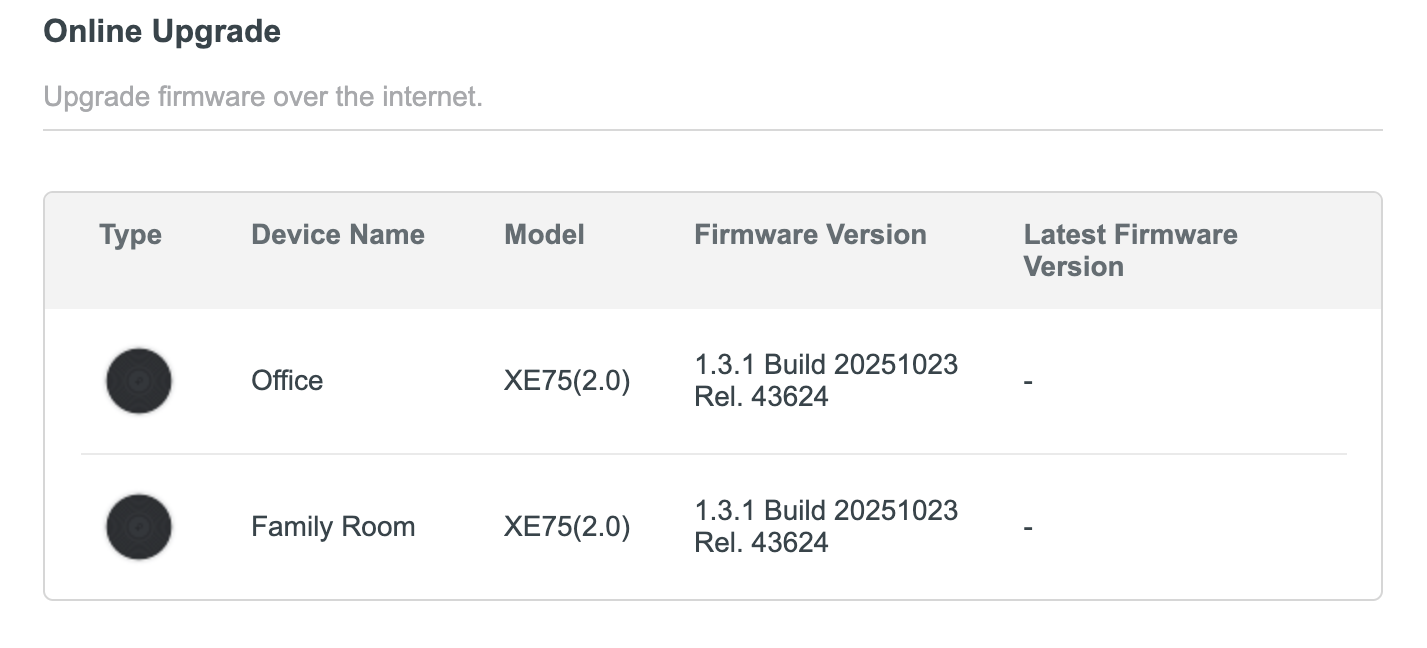
Can you please confirm your firmware and hardware version by using the directions below.
1. Go to http://tplinkdeco.net/ and sign in - use the same password you use to log into the deco app
2. Once your logged in click on Advanced
3, Click on System from the menu on the left
4, Now click on Firmware Upgrade
Take a screenshot of the information on this page and reply back to this post with it
Thanks.
- Copy Link
- Report Inappropriate Content
- Copy Link
- Report Inappropriate Content
Both of your units will run the beta patch if you would like to try it you can read more about it using the link posted below.
https://community.tp-link.com/en/home/forum/topic/856648?moduleId=39
- Copy Link
- Report Inappropriate Content
Thanks, but I don't see anything there related to the issues that I reported which is around stability - either the primary router not loading after power loss (staying on yellow light) or the secondary device going offline every few weeks and needing a reboot.
- Copy Link
- Report Inappropriate Content
See if any of the following help.
Issue 1: Secondary Unit Going Offline (Red Light)
When your satellite Deco shows a red light and goes offline, here are some steps to help prevent this recurring issue:
1. Check if the satellite unit is within proper Wi-Fi range of the main Deco • being too far can cause intermittent disconnections.
2. Open the Deco app, go to MORE > ECO Mode (if available), and make sure ECO Mode is turned off, as this can sometimes cause connectivity issues.
3. If there are any Ethernet cables connected to the satellite unit, try temporarily removing them to see if this resolves the issue.
4. Since this happens regularly, monitor the LED on your main Deco when the satellite goes offline to ensure the main unit is functioning properly.
Issue 2: Primary Deco Stuck on Solid Yellow Light
A solid yellow light indicates the Deco is booting up. If it remains solid yellow indefinitely or takes multiple attempts to boot, this suggests a more serious issue:
1. Try a different power adapter or power outlet for the main Deco unit • this is especially important given your power-related issues.
2. Disconnect any Ethernet cables and client devices from the Deco during boot to see if something connected is causing the boot failure.
3. If the issue persists and the unit frequently fails to boot, you may need to attempt a firmware recovery by following the instructions here: https://www.tp-link.com/support/faq/2958/
Given the recurring nature of both issues, especially the boot failure problem which suggests potential hardware instability, if the above steps don't resolve the issues, please reply back to this post.
- Copy Link
- Report Inappropriate Content
Thank you.
Issue 1: Secondary Unit Going Offline (Red Light)
1. Check if the satellite unit is within proper Wi-Fi range of the main Deco
It's not. It has a strong signal strength
2. Open the Deco app, go to MORE > ECO Mode (if available), and make sure ECO Mode is turned off, as this can sometimes cause connectivity issues.
I don't have that option in my app.
3. If there are any Ethernet cables connected to the satellite unit, try temporarily removing them to see if this resolves the issue.
There are no Ethernet cables connected to it.
4. Since this happens regularly, monitor the LED on your main Deco when the satellite goes offline to ensure the main unit is functioning properly.
Yeah, it normally happens overnight so I have no idea when this occurs. I wish the app would be able to log this kind of information - maybe even let me know when one of the units has gone down.
Issue 2: Primary Deco Stuck on Solid Yellow Light
A solid yellow light indicates the Deco is booting up. If it remains solid yellow indefinitely or takes multiple attempts to boot, this suggests a more serious issue:
1. Try a different power adapter or power outlet for the main Deco unit
But I don't have any power related issue - it went off yesterday when I accidently turned off the outlet. But it should just boot back up but I'm finding it often doesn't after any kind of (legitimate) power failure.
What does it indicate when stuck on yellow other than "a more serious issue". The power supply, btw, is the original that came with it.
2. Disconnect any Ethernet cables and client devices from the Deco during boot to see if something connected is causing the boot failure.
I'll try that next time.
3. If the issue persists and the unit frequently fails to boot, you may need to attempt a firmware recovery by following the instructions here: https://www.tp-link.com/support/faq/2958/
What do I do if I don't have a Windows device - all mine are MacOS.
- Copy Link
- Report Inappropriate Content
Switching out the power adapter for another is is one of the recommend steps when a deco fails to set up - You can see more about it here it's basically an issue where the power adapter isn't supplying enough power to the deco.
If the above suggestions do not solve your concern please contact TP-Link support. before trying the firmware recovery. A firmware recovery is the last ditch effort if nothing else works.
Yes, you can perform firmware recovery on macOS. Firmware recovery is needed if your Deco shows a solid yellow light after powering on. There are two methods available:
1. The HTTP uboot method (the most common approach) • This is browser-based and works on macOS through any web browser like Safari, Chrome, or Firefox.
2. The TFTP method • This uses standard networking protocols that are compatible with macOS.
To perform the firmware recovery:
• First, prepare the latest official firmware for your Deco model
• Follow the detailed step-by-step instructions at these links:
• https://www.tp-link.com/support/faq/2958/
• https://community.tp-link.com/us/home/kb/detail/490/
These guides will walk you through entering firmware recovery mode and upgrading the firmware. Both methods should work seamlessly on your Mac.
- Copy Link
- Report Inappropriate Content
HelpFixDecoApp wrote
Switching out the power adapter for another is is one of the recommend steps when a deco fails to set up - You can see more about it here it's basically an issue where the power adapter isn't supplying enough power to the deco.
This makes sense except, after a while, it does then boot up. Is the suggestion that the power supply issue is intermittent?
Where's the best place to get a genuine replacement power supply?
- Copy Link
- Report Inappropriate Content
The problem is it may or may not be the power adapter it's just on the list of suggestions to try but it has fixed issues for people in the past. I recommend reaching out to TP-Link support they should be able to determine if that's the issue and if it is where you can purchase a new one if its not still under warranty.
- Copy Link
- Report Inappropriate Content
Information
Helpful: 0
Views: 118
Replies: 9
Voters 0
No one has voted for it yet.