Troubleshooting Troubleshooting HTTPS Port Not Accessible Error and Causing Omada Firmware Upgrade Failure


The topic was originally posted by Clive_A in Troubleshooting HTTPS Port Not Accessible Error and Causing Omada Firmware Upgrade Failure
This Article Applies to:
Omada devices.
Issue Description:
Failed to upgrade the Omada devices.
Error message: [Failed]Failed to upgrade ER605 ROUTER to firmware version 2.X.X online. Please check your network configuration and make sure the device can access the Controller's HTTPS management port.
Troubleshooting:
1. Export the Device Info and log to locate the reason.
In this log, you can see the process of the upgrade.
(The original information was removed or replaced for privacy.)
05-08-2025 22:27:16.924 INFO [comm-pool-15] [] c.t.s.o.m.d.d.m.u.c.f(): Start rolling upgrade devices /abcdefg = in OmadacId(EXAMPLE_OMADAC_ID) SiteId(EXAMPLE_SITE_ID)
05-08-2025 22:27:16.928 INFO [comm-pool-15] [] c.t.s.o.m.d.d.m.u.c.f(): Start download and batch upgrade devices OmadacId(EXAMPLE_OMADAC_ID) /abcdefg.
05-08-2025 22:27:16.930 INFO [comm-pool-15] [] c.t.s.o.m.d.d.m.u.c.f(): firmware info FirmwareBasicInfo(md5=80f99fff2e7c6667ebad2a4f3b45de9f, url=null, version=ER605_un_2.3.0_20250410-rel38015_common_v2_up_2025-04-10_10.36.02.bin, online=false) for BatchUpgradeRequestDTO(omadacId=OmadacId(EXAMPLE_OMADAC_ID), site=SiteId(EXAMPLE_SITE_ID), deviceTypeEnum=gateway, macs=[EXAMPLE_MAC_ADDRESS], compoundModel=ER605 v2.0, version=2.2.6, oemId=v2#oFzblYGwsX2example., role=, operator=, single=false, operatorIp=, resource=0, targetVersion=ER605_un_2.3.0_20250410-rel38015_common_v2_up_2025-04-10_10.36.02.bin) when checkFirmWareAndUpgrade
05-08-2025 22:27:16.984 INFO [comm-pool-15] [] c.t.s.o.m.d.a.u.UpgradeDeviceApplicationService(): start device upgrade in OmadacId(EXAMPLE_OMADAC_ID) SiteId(EXAMPLE_SITE_ID), upgradeId[EXAMPLE_UPGRADE_ID], devices [DeviceMac(EXAMPLE_DEVICE_ID)]
05-08-2025 22:27:17.077 INFO [upgrade-send-req-group-0] [] c.t.s.o.m.d.d.m.u.c.c(): OmadacId(EXAMPLE_OMADAC_ID) upgradeId[EXAMPLE_UPGRADE_ID] DeviceMac(EXAMPLE_DEVICE_ID) upgrade status change from[UPGRADE_READY] to [REQUEST_SEND_START]
05-08-2025 22:37:22.006 INFO [comm-pool-2] [] c.t.s.o.m.d.d.m.u.t.DeviceUpgradeStaticTask(): v2 device macEXAMPLE_MAC_ADDRESS of omadacIdEXAMPLE_OMADAC_ID upgradeIdEXAMPLE_UPGRADE_ID finished upgrade process in STAGE_DOWNVAL_TIMEOUT
Omada upgrade would take 10 minutes to determine if the upgrade is successful or not.
If it cannot download the firmware from the controller, it will generate a log with a reason.
When you are trying to self-debug this, you can pay attention to this and learn about the reason.
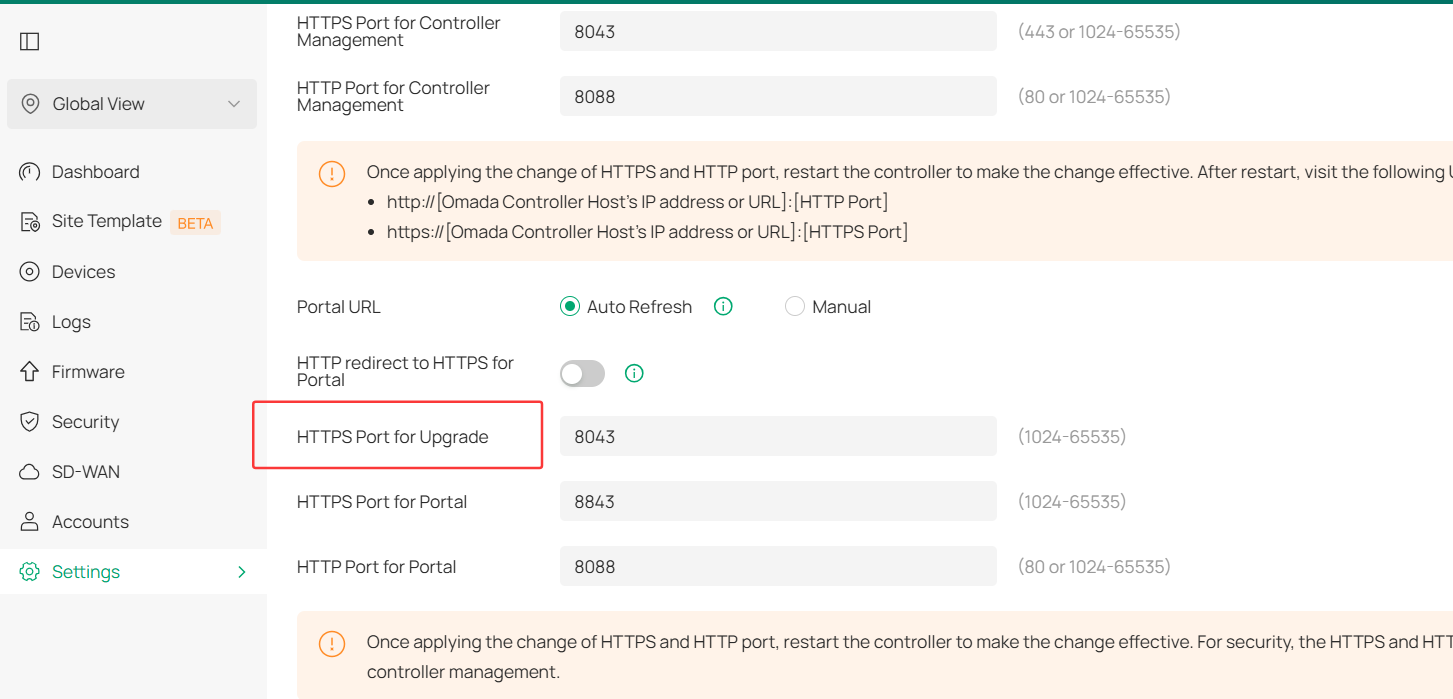
2. Check your ports if the firmware upgrade port is accessible.
Commonly, the error you would receive is that the HTTPS port is not available.
Which ports do Omada SDN Controller and Omada Discovery Utility use? (above Controller 5.0.15)
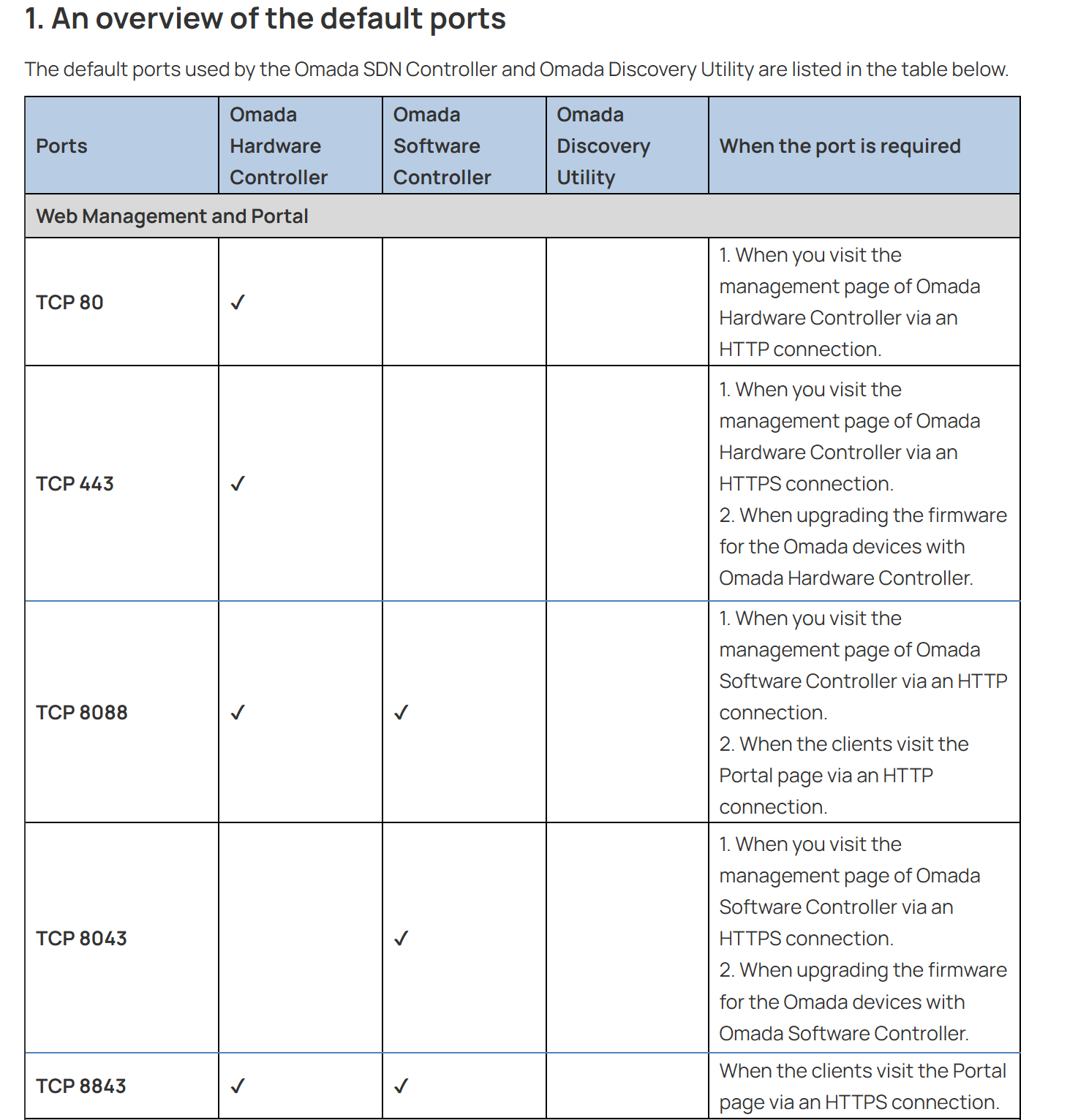
HTTPS is required to be accessible from the devices you are trying to upgrade. If your device that is trying to be upgraded cannot access the HTTPS port on the controller, this will cause the firmware to be downloaded from the controller to fail.
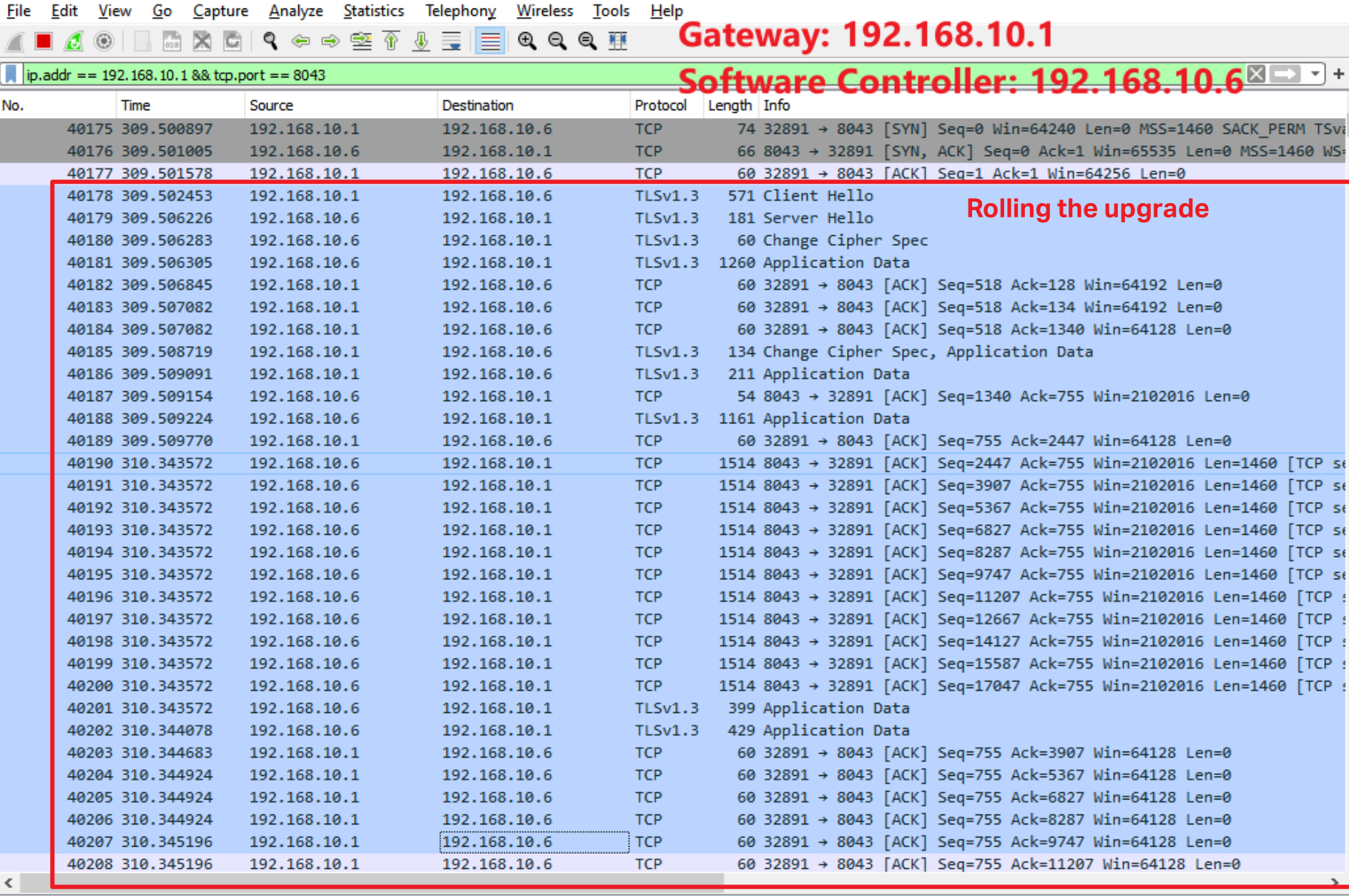
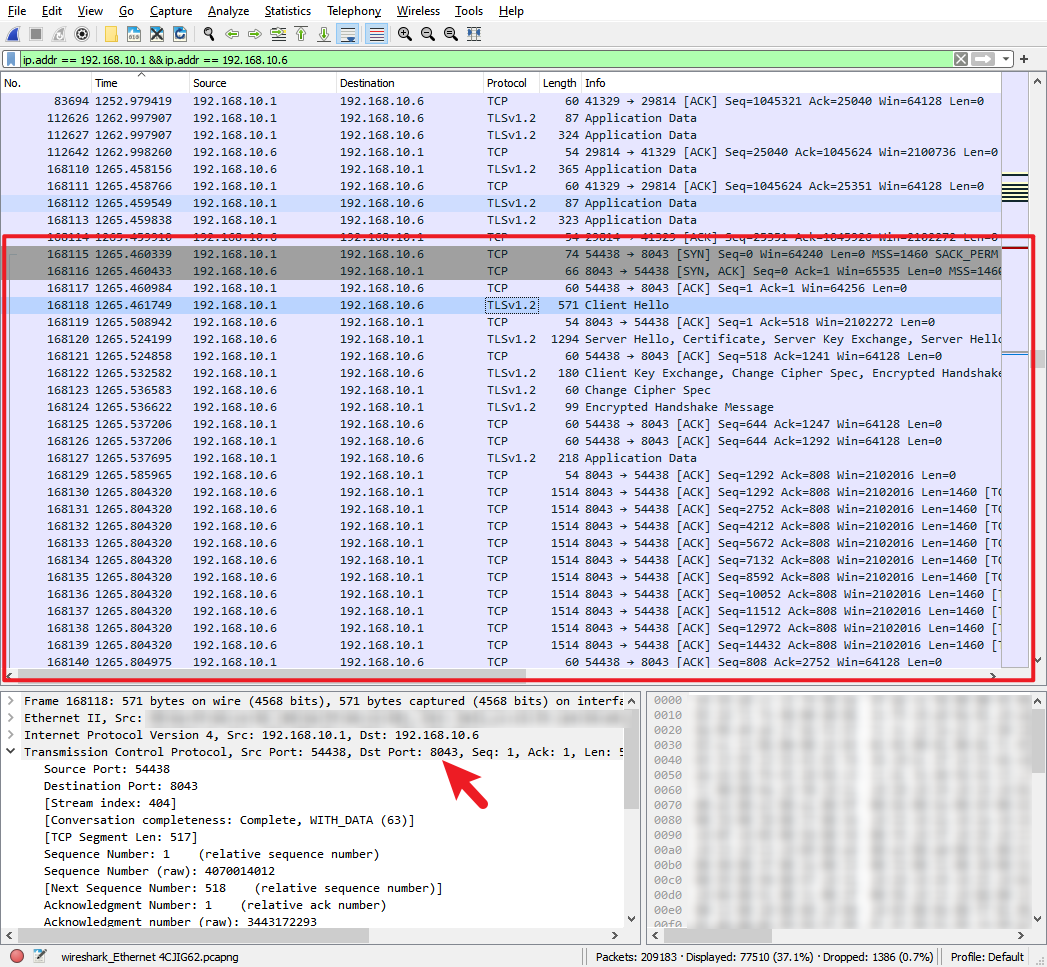
Once you hit the Upgrade in the controller page, manual or online upgrade, the firmware will be sent from the controller to the router.
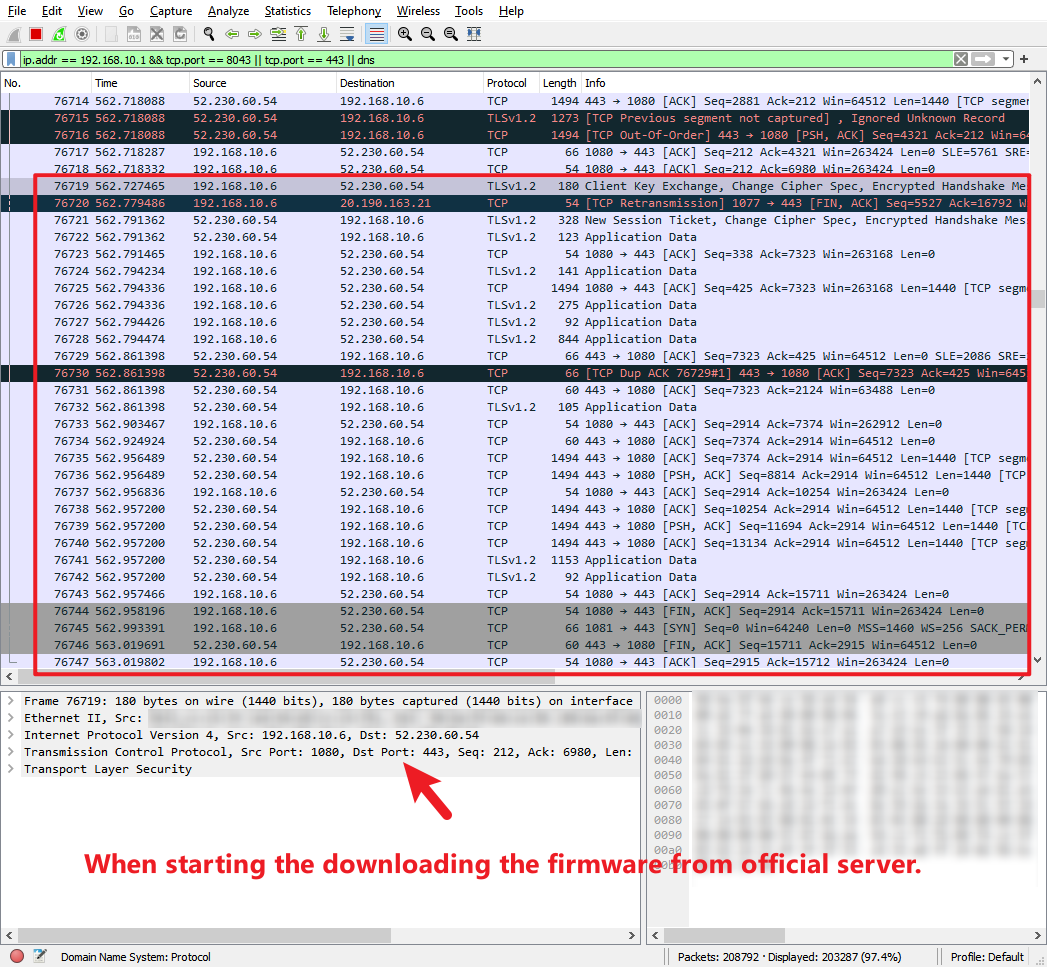
If you are doing an online upgrade, the local controller HTTPS should still be accessible.
The controller sends the command and permits it to download to the controller.
Then the router will get the file from the controller. See the process below:
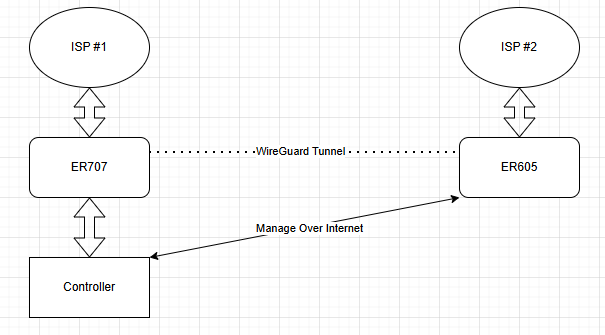
3. Check your diagram and how you adopt and manage the devices.
If your network is like this or you use this guide to manage, please note that your adopted devices are thinking your controller IP is a public IP address.
In this case, the port forwarding is inevitable. When you port forward your controller's HTTPS page to the public Internet, you should always use a strong password for management.
Update Log:
May 14th, 2025:
Release of the article.
Recommended Threads:
Which ports do Omada SDN Controller and Omada Discovery Utility use? (above Controller 5.0.15)
Old - Failed to update Omada devices by Omada Controller Online
Feedback:
- If this was helpful, welcome to give us Kudos by clicking the upward triangle below.
- If there is anything unclear in this solution post, please feel free to comment below.
- If you encounter such an issue, please follow the troubleshooting steps above to check your settings. Besides, ensure your Omada Controller and Gateway are running with the latest firmware.
- If the issue still exists after you try the suggestion above, please feel free to comment below or contact our support team with a detailed description of your issue and the steps you have tried.
Thank you in advance for your valuable feedback!
------------------------------------------------------------------------------------------------
Have other off-topic issues to report?
Welcome to > Start a New Thread < and elaborate on the issue for assistance.