
Slow upload speeds with ER707-M2
Slow upload speeds with ER707-M2

Hi!
I am struggling with an issue that I see that others have, too. In sum, my download speeds are fine but my upload speeds are nearly half of what they should be. I know that the issue is not with the ISP. I have confirmed this by directly connecting to the ONT, where I get symmetric download/upload speeds (around 950mbs). I have also confirmed this with a Verizon technician.
Below I outline my setup and some troubleshooting I have already undertaken.
Setup:
Fios ONT -> ER707 -> Computer
The ONT is connected to the 2.5G WAN 1 port. The Computer is connected to the 2.5G LAN 2 port.
In this setup, I get approximately 900mbs download and 300 upload speeds.
I have tried the following steps:
-
Checked cabling. All are Cat. 6. All verified working.
-
Enabled/ Disabled Flow Control
-
Explicitly set the negotiation modes
-
Verified that IPS/IDS is not enabled
-
Cycled power
When I connect my ONT to WAN 3, which is 1G, and my computer to 2.5G LAN 2, everything seems to work! I get symmetric upload and download speeds (at or near 1g). What is going on?
Why does 2.5G WAN 1 port seem to limit my upload speeds?
- Copy Link
- Subscribe
- Bookmark
- Report Inappropriate Content

ER707-M2 v1.20
1.3.1 Build 20251009 Rel.67687
Nov 2025 I moved from Cable to Fibre.
I bought my ER707 a week earlier than i got the fibre, ugraded from the ER607 around end of October.
When connecting the T-Mobile fibre directly to the ER707's 2.5 gig port my download maxs around 300, upload seems normal around 910 ish.
Ive since moved it to a 1 gig port and get consistent 910/910 ish.
When I had the cable 1 gig plugged into the 2.5 port it worked accordingly. So seems a 2.5 to 1 gig issue.
I can't imagine this is a T-Mobile issue either. Been searching around found this.
Switch is the tplink TL-SG1016PE 3.20
Think I have same issue with my ER707.
Any advice or if this helps for a new firmware.
- Copy Link
- Report Inappropriate Content

I have since upgraded to the Verizon 2.5G ONT and all is well. There seems to be an issue with the ER707 2.5G WAN port negotiating with 1G ONTs.
- Copy Link
- Report Inappropriate Content

I have the same problem with my ER707 M2, connected to a verizon NOKIA (G-211) 1 Gbe ONT. Once I sent LAN3 to WAN, upload speeds dramatically improved, not quite synchronous but much better.
Thanks!
- Copy Link
- Report Inappropriate Content

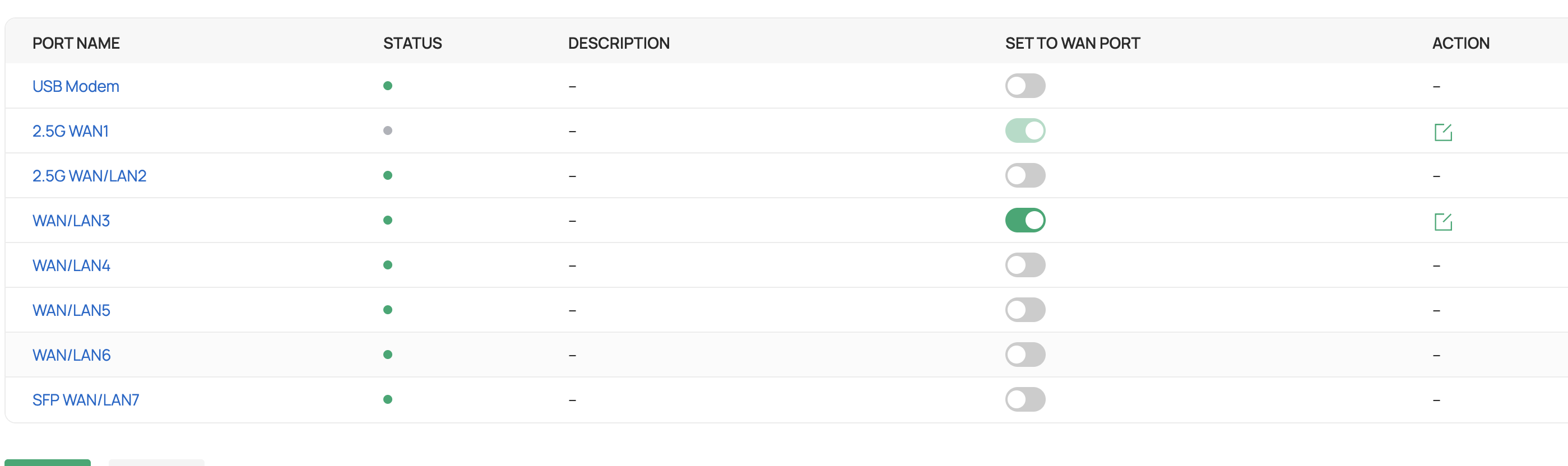
I ran into this issue as well. Doing some research it seems to occur with a lot of devices that have 2.5Gb Wans. I also switched to Lan3. It looks like there is no way to disable WAN1 as a Wan correct? And I can't repurpose Wan1 into a lan correct?
- Copy Link
- Report Inappropriate Content

@mackworth I can't find a way to turn off WAN on Port 1. Seems fixed as a WAN. I looked in Network Config -> Internet as saw this:
- Copy Link
- Report Inappropriate Content
Akaman wrote
@mackworth I can't find a way to turn off WAN on Port 1. Seems fixed as a WAN. I looked in Network Config -> Internet as saw this:
You dont set the Wan port through Network Config -> Internet. Go to Devices, select the router and then "manage ports" in the square on the panel that pops out on the right.
- Copy Link
- Report Inappropriate Content
Correct Port 1 is marked a "WAN" All others are WAN/LAN and so selectable.
BTW, When I switched from WAN1 using Port 3 as my WAN Port, my upload (Fios 300/300) improved from 10% to 50% of the download, but not better. However ticking the "flow control" improved to about 70-80% of download speed. Cant make up make up my mind whether flow control on the 2.5GBS LAN2 to 2.5GB switch also helped, but might have improved things ~10%
- Copy Link
- Report Inappropriate Content
Information
Helpful: 0
Views: 2975
Replies: 17
Voters 0
No one has voted for it yet.